Infrastructure as Code Tools: Revolutionizing DevOps
Infrastructure as Code tools DevOps is a revolutionary approach to managing and deploying IT infrastructure. Instead of manually configuring servers and networks, IaC tools allow you to define and manage infrastructure as code, enabling automation, consistency, and efficiency. This shift towards code-driven infrastructure has become a cornerstone of modern DevOps practices, offering a streamlined and reproducible way to build, deploy, and manage complex environments.
IaC tools empower DevOps teams to define infrastructure components like servers, networks, databases, and applications in configuration files, which are then automatically provisioned and managed. This approach eliminates the manual errors and inconsistencies associated with traditional methods, leading to faster deployments, improved reliability, and reduced operational overhead.
By treating infrastructure as code, organizations can leverage the power of version control, collaboration, and automation, driving innovation and agility across their IT operations.
Introduction to Infrastructure as Code (IaC)
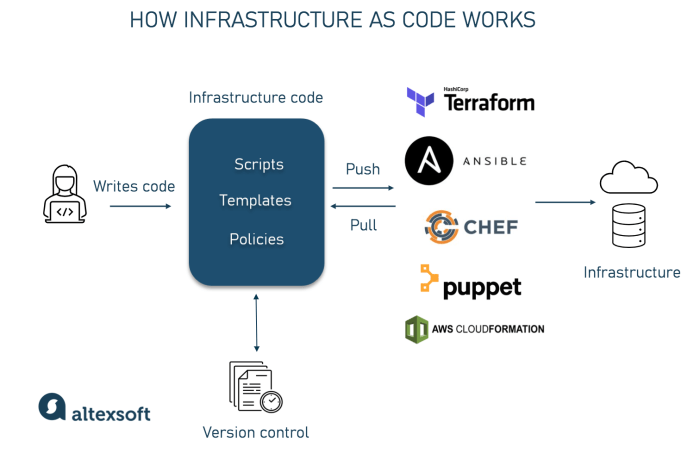
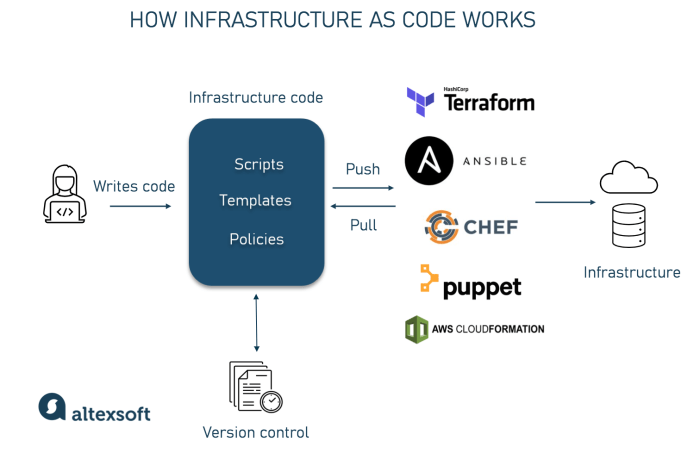
Infrastructure as Code (IaC) is a revolutionary approach to managing and provisioning IT infrastructure. It leverages code to define and automate the creation, configuration, and management of infrastructure resources. This approach eliminates manual processes, ensures consistency, and accelerates deployment cycles.
Core Concepts of IaC
IaC employs code to define and manage infrastructure resources, enabling automation and consistency. The key concepts are:
- Declarative Definition:IaC tools use declarative language to describe the desired state of the infrastructure. The tools then automatically configure and manage resources to match this desired state.
- Version Control:IaC code is stored in version control systems like Git, enabling tracking changes, collaboration, and rollbacks.
- Automation:IaC tools automate the creation, configuration, and management of infrastructure, reducing manual errors and increasing efficiency.
- Idempotency:IaC configurations are idempotent, meaning they can be applied multiple times without causing unintended changes.
Examples of IaC Tools
Several popular IaC tools are available, each with its strengths and use cases.
- Terraform:A widely adopted tool that supports multiple cloud providers and on-premises infrastructure. Terraform uses a declarative language called HashiCorp Configuration Language (HCL).
- Ansible:An agentless automation tool that uses YAML files to define infrastructure configurations. Ansible is known for its simplicity and ease of use.
- Chef:A configuration management tool that uses Ruby-based code to define infrastructure configurations. Chef excels in managing complex and distributed systems.
- Puppet:A configuration management tool that uses a domain-specific language (DSL) to define infrastructure configurations. Puppet is known for its strong security features and robust reporting capabilities.
Benefits of Using IaC in DevOps
IaC brings numerous benefits to DevOps workflows, including:
- Consistency and Repeatability:IaC ensures consistent infrastructure configurations across different environments, eliminating manual errors and inconsistencies.
- Increased Speed and Efficiency:Automating infrastructure provisioning and management accelerates deployment cycles and reduces manual effort.
- Improved Collaboration:Version control systems enable collaboration among team members, allowing for seamless sharing and tracking of infrastructure changes.
- Reduced Risk and Errors:IaC eliminates manual errors and reduces the risk of misconfigurations by automating infrastructure management.
- Enhanced Scalability:IaC makes it easier to scale infrastructure up or down based on demand, ensuring efficient resource utilization.
- Faster Disaster Recovery:IaC enables rapid recovery from infrastructure failures by automating the provisioning of new resources.
Popular IaC Tools in DevOps
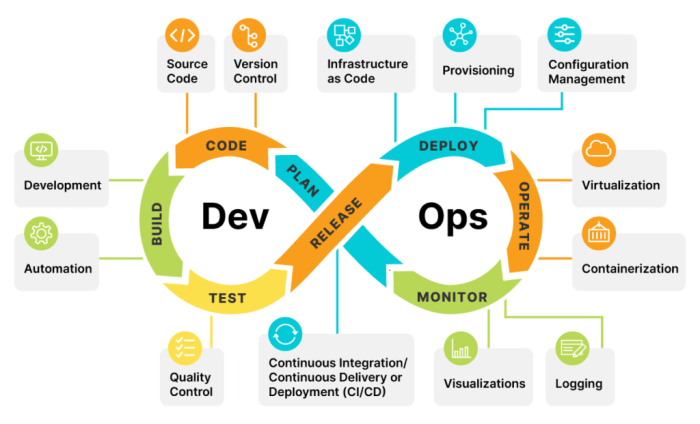
Infrastructure as Code (IaC) has revolutionized the way we manage and deploy infrastructure. By defining infrastructure in code, we can automate the provisioning, configuration, and management of resources, leading to faster deployments, reduced errors, and improved consistency. This approach has become a cornerstone of DevOps practices, and several popular IaC tools are available to cater to different needs and preferences.
Popular IaC Tools and their Features
Here is a table comparing and contrasting the features of some of the most popular IaC tools:
| Tool Name | Strengths | Weaknesses | Use Cases |
|---|---|---|---|
| Terraform |
|
|
|
| Ansible |
|
|
|
| CloudFormation |
|
|
|
| Puppet |
|
|
|
IaC for Different Cloud Platforms: Infrastructure As Code Tools Devops
Infrastructure as Code (IaC) has become an indispensable practice in modern DevOps, enabling automated provisioning, configuration, and management of infrastructure resources across various cloud platforms. This approach offers numerous advantages, including consistency, repeatability, and reduced risk of human error. Let’s delve into the specific IaC tools and techniques employed for managing infrastructure on prominent cloud providers like AWS, Azure, and GCP.
AWS IaC
AWS offers a comprehensive suite of tools and services for managing infrastructure using IaC. The most popular IaC tools for AWS are:
AWS CloudFormation
AWS CloudFormation is a service that allows you to model and provision your AWS resources using a declarative language called YAML or JSON. You define the desired state of your infrastructure in a template, and CloudFormation handles the creation, update, and deletion of resources accordingly.
AWS Serverless Application Model (SAM)
SAM is an extension of CloudFormation that simplifies the deployment of serverless applications on AWS. It provides a more concise and user-friendly syntax for defining serverless resources, such as Lambda functions, API Gateway endpoints, and DynamoDB tables.
Terraform
Terraform is an open-source IaC tool that supports multiple cloud providers, including AWS. It uses a declarative configuration language called HCL (HashiCorp Configuration Language) to define infrastructure resources. Terraform excels in its ability to manage resources across different cloud platforms and its comprehensive provider ecosystem.
AWS CDK
The AWS CDK (Cloud Development Kit) is a framework that allows you to define infrastructure as code using familiar programming languages like Python, Java, TypeScript, C#, and Go. It provides a higher-level abstraction over AWS resources, simplifying complex infrastructure deployments.Here are some examples of IaC code for deploying resources on AWS:
Deploying an EC2 Instance with CloudFormation
Infrastructure as code tools are revolutionizing DevOps by automating infrastructure management, but it’s important to stay ahead of the curve. Take a look at apple intelligence 5 ai powered things you should do immediately for inspiration on how AI is transforming the tech landscape.
Integrating these concepts into your IaC workflows can lead to greater efficiency, scalability, and innovation.
“`yamlResources: MyEC2Instance: Type: ‘AWS::EC2::Instance’ Properties: ImageId: ami-08c4074257337188a InstanceType: t2.micro KeyName: MyKeyPair“`
Deploying a Serverless API with SAM
“`yamlAWSTemplateFormatVersion: ‘2010-09-09’Transform: AWS::Serverless-2016-10-31Resources: MyAPI: Type: AWS::Serverless::Function Properties: Handler: index.handler Runtime: nodejs14.x CodeUri: ./src MemorySize: 128 Timeout: 10“`
Azure IaC
Azure provides a robust set of IaC tools and services for managing infrastructure on its platform. The primary IaC tools for Azure are:
Azure Resource Manager (ARM) Templates
ARM templates are declarative JSON files that define the desired state of Azure resources. They allow you to automate the deployment, configuration, and management of your Azure infrastructure.
Infrastructure as code tools are essential for DevOps, enabling us to automate and manage our infrastructure efficiently. But it’s interesting to see how Apple’s recent decision to ditch web apps on iPhones, blaming the Digital Markets Act, as reported here , might influence the future of app development and how we approach infrastructure management.
This shift could potentially lead to more complex deployment strategies, making the use of infrastructure as code tools even more critical.
Azure Bicep
Bicep is a domain-specific language (DSL) that simplifies the creation and management of ARM templates. It provides a more concise and readable syntax, making it easier to write and maintain IaC code for Azure resources.
Terraform
Terraform, being a multi-cloud IaC tool, also supports Azure resources. It utilizes its Azure provider to define and manage Azure infrastructure using the HCL language.
Azure CLI
The Azure CLI is a command-line interface that provides a comprehensive set of commands for managing Azure resources. It can be used to automate infrastructure deployments and perform various management tasks.Here are some examples of IaC code for deploying resources on Azure:
Deploying a Virtual Machine with ARM Template
“`json “$schema”: “https://schema.management.azure.com/schemas/2019-04-01/deploymentTemplate.json#”, “contentVersion”: “1.0.0.0”, “resources”: [ “type”: “Microsoft.Compute/virtualMachines”, “apiVersion”: “2021-03-01”, “name”: “myVM”, “location”: “eastus”, “properties”: “storageProfile”: “imageReference”: “publisher”: “Canonical”, “offer”: “UbuntuServer”, “sku”: “18.04-LTS”, “version”: “Latest” , “hardwareProfile”: “vmSize”: “Standard_A2_v2” , “osProfile”: “adminUsername”: “azureuser”, “adminPassword”: “P@sswOrd1” ]“`
Deploying a Web App with Bicep
“`bicepparam location string = ‘westus2’param appServicePlanName string = ‘myAppServicePlan’resource appServicePlan ‘appServicePlan’ existing = true name: appServicePlanName location: location kind: ‘linux’ sku: tier: ‘Free’ size: ‘S1’ resource webApp ‘webApp’ existing = true name: ‘myWebApp’ location: location kind: ‘app,linux’ properties: serverFarmId: appServicePlan.id siteConfig: linuxFxVersion: ‘node|16’ “`
GCP IaC
Google Cloud Platform (GCP) offers a range of IaC tools and services for managing infrastructure resources. Some of the prominent IaC tools for GCP include:
Google Cloud Deployment Manager
Deployment Manager is a service that allows you to define and deploy GCP resources using declarative YAML or JSON templates. It provides a robust framework for managing complex infrastructure deployments on GCP.
Terraform
Terraform, being a multi-cloud IaC tool, also supports GCP resources. It utilizes its GCP provider to define and manage GCP infrastructure using the HCL language.
Google Cloud SDK
The Google Cloud SDK is a command-line interface that provides a comprehensive set of tools for managing GCP resources. It can be used to automate infrastructure deployments, perform management tasks, and interact with various GCP services.
Google Cloud Shell
Google Cloud Shell is a web-based command-line environment that provides access to the Google Cloud SDK and other tools for managing GCP resources. It offers a convenient and integrated environment for working with GCP infrastructure.Here are some examples of IaC code for deploying resources on GCP:
Deploying a Compute Engine Instance with Deployment Manager
“`yamlresources:
name
my-instance type: compute.v1.instance properties: name: my-instance zone: us-central1-a machineType: ‘n1-standard-1’ disks:
boot
true autoDelete: true diskSizeGb: 100 diskType: pd-standard sourceImage: debian-cloud/debian-9 networkInterfaces:
network
default subnetwork: projects/gcp-project-id/regions/us-central1/subnetworks/default subnetworkProject: gcp-project-id networkConfiguration: name: default network: projects/gcp-project-id/global/networks/default subnetwork: projects/gcp-project-id/regions/us-central1/subnetworks/default subnetworkProject: gcp-project-id“`
Deploying a Cloud Storage Bucket with Terraform
“`terraformresource “google_storage_bucket” “default” name = “my-bucket” location = “US” force_destroy = true“`
Integrating IaC with DevOps Pipelines
The seamless integration of Infrastructure as Code (IaC) tools into continuous integration/continuous delivery (CI/CD) pipelines is paramount for achieving true DevOps efficiency. By incorporating IaC into your CI/CD workflows, you automate infrastructure provisioning and configuration, leading to faster deployments, reduced errors, and improved consistency.
Integrating IaC Tools into CI/CD Pipelines
This section will explore the process of integrating IaC tools into CI/CD pipelines.
- Define Infrastructure as Code:Begin by defining your infrastructure in code using a chosen IaC tool like Terraform, Ansible, or CloudFormation. This involves creating configuration files that specify the resources, configurations, and dependencies of your infrastructure.
- Integrate IaC Tool with CI/CD Pipeline:Integrate your chosen IaC tool with your CI/CD pipeline. This typically involves configuring your CI/CD platform to execute the IaC scripts as part of your build or deployment process. Common CI/CD platforms like Jenkins, GitLab CI/CD, and Azure DevOps provide integrations with various IaC tools.
- Trigger Infrastructure Provisioning:Configure your CI/CD pipeline to trigger infrastructure provisioning as part of your build or deployment process. For example, when a new code commit is pushed to your repository, the CI/CD pipeline can automatically execute the IaC scripts to provision or update the necessary infrastructure.
- Infrastructure Configuration and Deployment:The IaC tool will use the defined configuration files to provision and configure the infrastructure resources. This includes creating virtual machines, configuring networks, setting up databases, and deploying applications.
- Testing and Validation:Integrate automated testing and validation steps into your CI/CD pipeline to ensure the provisioned infrastructure meets your requirements. This could involve running unit tests, integration tests, and infrastructure-as-code tests.
- Deployment and Rollbacks:The CI/CD pipeline will then deploy your application to the provisioned infrastructure. If any issues arise, the pipeline can roll back to a previous working state, ensuring minimal downtime and reducing the risk of deployment failures.
Examples of IaC Tool Integration in DevOps Workflows
This section will explore examples of how IaC tools can be used to automate infrastructure provisioning and configuration within a DevOps workflow.
- Automating Infrastructure Provisioning for a Web Application:Imagine deploying a web application. Using Terraform, you can define the infrastructure resources, including virtual machines, load balancers, and databases, in configuration files. When a new code commit is pushed to your repository, the CI/CD pipeline will execute the Terraform scripts to provision the necessary infrastructure on your cloud provider.
Infrastructure as code tools are essential for DevOps, allowing you to manage your infrastructure in a consistent and repeatable way. But what about the tools you use for your day-to-day work? If you’re looking for a powerful and affordable office suite, you might want to check out the officesuite personal plan lifetime subscription.
With a lifetime subscription, you can focus on your DevOps projects without worrying about recurring costs, ensuring your team has the tools they need to be productive.
Once the infrastructure is ready, the application code is deployed to the provisioned virtual machines. This automated process ensures consistency, reduces manual errors, and accelerates deployment time.
- Configuring a Database Cluster with Ansible:Ansible can be used to configure a database cluster. You can create Ansible playbooks to automate tasks like installing database software, configuring database settings, and setting up users and permissions. These playbooks can be integrated into your CI/CD pipeline to ensure consistent database configuration across different environments.
- Provisioning and Configuring a Kubernetes Cluster with CloudFormation:CloudFormation can be used to provision and configure a Kubernetes cluster on AWS. By defining the cluster resources, including nodes, control plane components, and network configurations, in a CloudFormation template, you can automate the cluster setup. This template can be integrated into your CI/CD pipeline to create and manage Kubernetes clusters as part of your deployment process.
Best Practices for IaC in DevOps
Infrastructure as Code (IaC) is a fundamental pillar of modern DevOps practices, enabling the automation of infrastructure provisioning, configuration, and management. Implementing IaC effectively requires adhering to best practices that ensure code quality, maintainability, and security. This guide delves into crucial best practices for writing and managing IaC code, offering a comprehensive approach to implementing IaC in a DevOps environment.
Version Control for IaC
Version control is essential for managing changes to IaC code. It enables tracking changes, collaborating with team members, and rolling back to previous versions if necessary.
- Use a version control system like Git for managing IaC code.
- Store all IaC code in a central repository.
- Create branches for different features or bug fixes.
- Implement a clear branching strategy.
- Use pull requests to review changes before merging them into the main branch.
Testing IaC Code, Infrastructure as code tools devops
Testing IaC code is crucial to ensure that infrastructure changes are deployed correctly and without unintended consequences.
- Implement unit tests to validate individual components of IaC code.
- Conduct integration tests to verify the interactions between different components.
- Perform acceptance tests to ensure that the infrastructure meets business requirements.
- Use tools like Terraform’s “terraform plan” command to preview changes before applying them.
- Utilize infrastructure-as-code testing frameworks for comprehensive testing.
Security Considerations for IaC
Security is paramount in IaC, as misconfigurations can lead to vulnerabilities.
- Implement least privilege principles for access to infrastructure resources.
- Use strong passwords and secrets management tools.
- Scan IaC code for security vulnerabilities using tools like Snyk.
- Apply security best practices like input validation and output encoding.
- Regularly review and update IaC code for security patches.
Modularization and Reusability
Modularization and reusability are key to maintaining and scaling IaC code.
- Break down IaC code into smaller, reusable modules.
- Use variables to parameterize modules and make them flexible.
- Create libraries of reusable modules for common infrastructure components.
- Leverage IaC tools’ capabilities for modularization and reusability.
Documentation and Best Practices
Clear documentation and adherence to best practices are crucial for managing and maintaining IaC code.
- Document IaC code with clear explanations and comments.
- Use consistent naming conventions for resources and variables.
- Adhere to industry best practices for IaC code style and structure.
- Implement code review processes to ensure code quality and consistency.
Integrating IaC with DevOps Pipelines
Integrating IaC with DevOps pipelines automates infrastructure provisioning and configuration as part of the CI/CD process.
- Use IaC tools to define infrastructure resources within the pipeline.
- Integrate IaC tools with CI/CD systems like Jenkins or GitLab CI/CD.
- Implement automated tests as part of the pipeline to validate infrastructure changes.
- Use IaC to manage infrastructure environments for different stages of the pipeline.
Monitoring and Logging
Monitoring and logging are essential for tracking infrastructure performance and identifying issues.
- Use monitoring tools to track key metrics for infrastructure resources.
- Implement logging mechanisms to capture events and errors.
- Integrate monitoring and logging tools with IaC code for automated configuration.
- Use logs to troubleshoot infrastructure issues and identify security threats.
Collaboration and Communication
Effective collaboration and communication are crucial for managing IaC code.
- Establish clear roles and responsibilities for IaC code management.
- Use communication tools like Slack or Microsoft Teams to facilitate discussions.
- Promote knowledge sharing and documentation of IaC code practices.
- Encourage peer review and code audits for improved code quality.
Continuous Improvement
Continuous improvement is essential for refining IaC practices and optimizing infrastructure management.
- Regularly review and update IaC code based on feedback and best practices.
- Monitor the performance of IaC code and identify areas for improvement.
- Experiment with new IaC tools and techniques to enhance efficiency.
- Stay updated with the latest industry trends and advancements in IaC.
Future Trends in IaC and DevOps
The world of infrastructure as code (IaC) and DevOps is constantly evolving, with new technologies and trends emerging regularly. These advancements are shaping the future of how we manage and deploy applications, leading to greater efficiency, scalability, and reliability.
Serverless Computing
Serverless computing is one of the most prominent trends in IaC and DevOps. It allows developers to focus on writing code without worrying about managing servers or infrastructure. In a serverless environment, applications are deployed as functions that execute in response to events.
This approach eliminates the need for traditional server management tasks, such as provisioning, scaling, and patching. Serverless computing offers several benefits:
- Cost-efficiency:Pay only for the resources used, eliminating the need to pay for idle servers.
- Scalability:Automatically scale applications based on demand, ensuring optimal performance.
- Reduced operational overhead:Eliminate server management tasks, freeing up time for development.
Infrastructure-as-a-Service (IaaS)
IaaS solutions provide virtualized computing resources, such as servers, storage, and networking, on demand. This allows organizations to quickly and easily provision infrastructure without the need for physical hardware. IaaS is a fundamental component of IaC, enabling the automation of infrastructure provisioning and management.IaaS offers several advantages:
- Flexibility:Choose the specific resources needed, scaling up or down as required.
- Pay-as-you-go pricing:Pay only for the resources used, optimizing costs.
- Rapid deployment:Provision infrastructure quickly and easily, accelerating development cycles.
The Rise of GitOps
GitOps is a methodology that leverages Git as the single source of truth for infrastructure and application configurations. It promotes a declarative approach to infrastructure management, where desired state is defined in Git repositories. Changes to infrastructure are then automatically applied by tools that monitor these repositories.GitOps offers several advantages:
- Version control:All infrastructure changes are tracked and versioned in Git, providing a complete audit trail.
- Collaboration:Teams can collaborate on infrastructure changes through pull requests and code reviews.
- Rollbacks:Easily roll back to previous configurations if needed, reducing downtime.
AI and Machine Learning (ML) in IaC
AI and ML are increasingly being used to enhance IaC processes. This includes tasks such as:
- Predictive infrastructure management:Use AI to predict infrastructure needs and proactively scale resources.
- Automated infrastructure optimization:Use ML to identify and implement optimizations to improve performance and reduce costs.
- Security automation:Use AI to detect and respond to security threats in real-time.