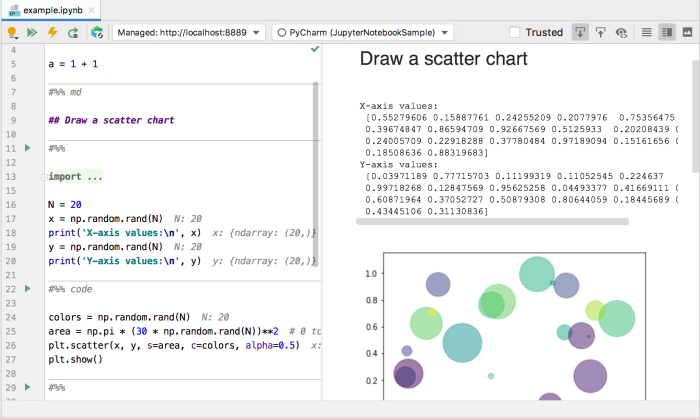
Jupyter Notebook vs PyCharm: Which Tool Fits Your Python Needs?
Jupyter Notebook vs PyCharm: You’ve got your Python project, but which tool is the right fit? This age-old debate rages on, and for good reason. Both Jupyter Notebook and PyCharm are powerful tools, each with their own strengths and weaknesses.
Jupyter Notebook, known for its interactive nature and data visualization prowess, is often the go-to choice for data scientists and researchers. On the other hand, PyCharm, with its robust features for professional Python development, is a favorite among developers building large-scale applications.
So, let’s dive into the world of Python development and see which tool reigns supreme for your specific needs.
Jupyter Notebook, with its cell-based structure, allows you to execute code snippets interactively, making it perfect for exploring data, testing hypotheses, and creating visual representations of your findings. PyCharm, a full-fledged IDE (Integrated Development Environment), provides a comprehensive suite of tools for coding, debugging, testing, and version control.
It excels in handling complex projects, large codebases, and collaborating with teams. The choice between the two boils down to your project’s specific requirements and your personal preferences.
Jupyter Notebook vs. PyCharm: Choosing the Right Tool for Your Data Science Journey: Jupyter Notebook Vs Pycharm
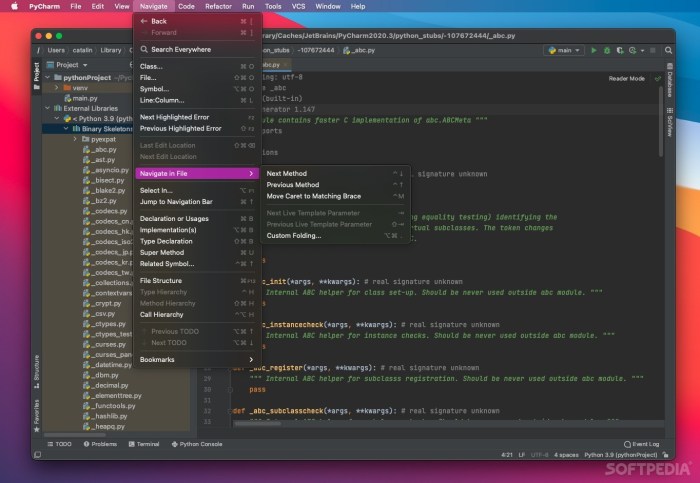
In the world of data science and Python development, selecting the right tool is crucial for efficient workflow and project success. Two popular choices, Jupyter Notebook and PyCharm, offer distinct advantages and cater to different needs. This article delves into the core functionalities, strengths, and limitations of each tool, helping you make an informed decision for your data science endeavors.
Jupyter Notebook
Jupyter Notebook is an open-source web application that provides an interactive environment for writing and executing Python code. It excels in data exploration, visualization, and prototyping, making it a preferred choice for data scientists, researchers, and educators.
Core Functionalities of Jupyter Notebook
- Interactive Code Execution:Jupyter Notebook allows you to execute code snippets individually, providing immediate feedback and enabling iterative development. This feature is particularly useful for exploring data, testing hypotheses, and visualizing results.
- Markdown Support:Jupyter Notebook supports Markdown, a lightweight markup language, allowing you to create formatted text, headings, lists, and images within your notebook. This makes it possible to document your code, add explanations, and create interactive reports.
- Rich Output:Jupyter Notebook can display various output formats, including text, images, plots, tables, and interactive widgets. This enables you to create visually appealing and informative presentations of your data analysis results.
- Kernel Support:Jupyter Notebook supports multiple programming languages, including Python, R, Julia, and Scala. This flexibility allows you to leverage different languages and tools within the same notebook.
Target Audience for Jupyter Notebook
- Data Scientists:Jupyter Notebook provides an intuitive environment for data exploration, visualization, and model prototyping. It’s ideal for tasks like data cleaning, feature engineering, and model evaluation.
- Researchers:Jupyter Notebook enables researchers to document their work, share code and results, and create interactive reports. It’s a valuable tool for scientific computing and data analysis.
- Educators:Jupyter Notebook is widely used in education for teaching programming, data science, and other computational subjects. Its interactive nature makes it an engaging tool for learning and experimenting.
Jupyter Notebook
Jupyter Notebook is a powerful and versatile tool that has become a cornerstone of data science and scientific computing. Its interactive nature, coupled with its ability to combine code, visualizations, and rich text, makes it an ideal environment for exploring data, building models, and documenting insights.
Choosing between Jupyter Notebook and PyCharm for your Python projects is a familiar dilemma. Jupyter shines for data exploration and quick experimentation, while PyCharm offers a robust IDE for larger, more structured projects. It’s interesting to think about how these tools might be used in the development of cutting-edge hardware like the Apple Vision Pro.
iFixit’s Apple Vision Pro teardown gives a look at the insides of the spatial computer , and I imagine both Jupyter and PyCharm play a role in creating the complex software that powers this new kind of computing.
Interactive Data Exploration and Visualization
Jupyter Notebook’s interactive environment allows for seamless exploration and visualization of data. Its core feature is the ability to execute code cells individually, enabling users to experiment with different approaches and immediately see the results. This iterative approach facilitates a deep understanding of the data and helps identify patterns and trends.
- Interactive Plots:Jupyter Notebook integrates seamlessly with popular data visualization libraries such as Matplotlib, Seaborn, and Plotly. This integration allows users to create various types of charts and graphs directly within the notebook, enabling real-time exploration of data relationships. For example, a user could visualize the distribution of a dataset using a histogram or explore the relationship between two variables using a scatter plot.
- Interactive Widgets:Jupyter Notebook also supports interactive widgets that allow users to manipulate data and parameters dynamically. These widgets can be used to create interactive dashboards, filter data, and explore different model configurations. This dynamic interaction provides a powerful way to engage with the data and gain insights.
Data Analysis and Machine Learning
Jupyter Notebook is widely used for data analysis and machine learning tasks. Its ability to combine code, visualizations, and markdown text makes it an excellent tool for documenting the entire workflow, from data loading and preprocessing to model training and evaluation.
- Data Cleaning and Transformation:Jupyter Notebook facilitates data cleaning and transformation through its support for Python’s data manipulation libraries such as Pandas. Data can be loaded, cleaned, transformed, and prepared for analysis or modeling within the notebook. For example, missing values can be imputed, categorical variables can be encoded, and data can be reshaped as needed.
This integrated approach streamlines the data preparation process.
- Model Building and Evaluation:Jupyter Notebook provides a platform for building and evaluating machine learning models using libraries like Scikit-learn. Users can experiment with different algorithms, tune hyperparameters, and visualize model performance metrics within the notebook. This allows for a comprehensive and iterative approach to model development.
Research and Documentation
Jupyter Notebook excels in research and documentation. Its ability to combine code, results, and text makes it an ideal tool for documenting research findings, sharing analysis, and collaborating with others.
- Reproducible Research:Jupyter Notebook enables reproducible research by capturing the entire workflow, including code, data, and results. This ensures that the analysis can be easily replicated and verified by others, promoting transparency and trust in research findings.
- Collaborative Workflows:Jupyter Notebook supports collaboration through shared notebooks and version control. This facilitates teamwork, allowing researchers to share their work, provide feedback, and contribute to the analysis process.
PyCharm
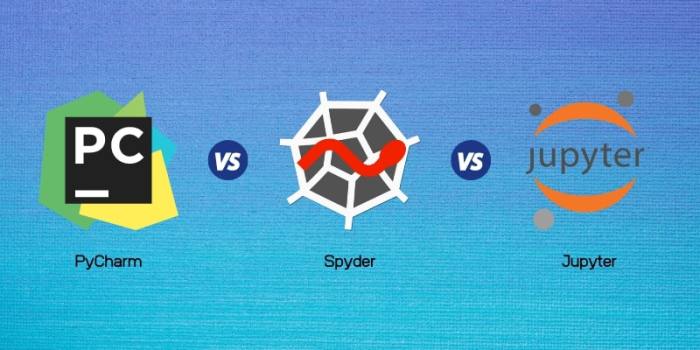
PyCharm is a powerful integrated development environment (IDE) specifically designed for Python development. It offers a comprehensive suite of tools and features that cater to both novice and seasoned Python programmers. Unlike Jupyter Notebook, which excels in interactive data exploration and visualization, PyCharm shines in its robust capabilities for professional Python development, including code refactoring, debugging, testing, and version control.
Code Refactoring
PyCharm’s refactoring capabilities are a game-changer for developers working with large codebases. It provides a wide range of automated code transformations that help maintain code quality and consistency. This includes:
- Renaming variables, functions, and classes across the entire project.
- Extracting methods and variables to improve code organization.
- Introducing new methods or classes with minimal effort.
- Converting code to use different data structures or algorithms.
Refactoring not only streamlines code maintenance but also enhances readability and maintainability, crucial for large-scale projects.
Debugging
PyCharm’s debugging tools are indispensable for identifying and resolving bugs efficiently. Features like:
- Setting breakpoints to pause execution at specific lines of code.
- Stepping through code line by line to inspect variables and their values.
- Evaluating expressions to understand the behavior of code snippets.
- Viewing call stacks to trace execution flow.
allow developers to pinpoint issues quickly and understand the root cause of errors. This significantly reduces debugging time and effort, especially for complex projects with intricate logic.
Testing
PyCharm seamlessly integrates with popular Python testing frameworks like unittest and pytest. This allows developers to write and execute tests directly within the IDE, ensuring code quality and correctness. Key features include:
- Running tests individually or in batches.
- Viewing test results with detailed information about failures.
- Generating test cases automatically based on existing code.
- Creating test coverage reports to identify areas of code that are not adequately tested.
Testing is an essential part of software development, and PyCharm’s integrated testing tools streamline this process, promoting robust and reliable code.
Version Control
PyCharm provides excellent support for version control systems like Git, enabling developers to manage their code effectively. This includes:
- Committing changes, pushing and pulling code from remote repositories.
- Resolving merge conflicts and reviewing code history.
- Branching and merging code to manage different versions of a project.
- Visualizing changes made to code and comparing different versions.
Version control is crucial for team collaboration and tracking code changes, and PyCharm’s integrated support makes this process smooth and efficient.
Supporting Complex Projects
PyCharm is designed to handle complex projects with large codebases and multiple dependencies. Features like:
- Intelligent code completion and navigation.
- Advanced code analysis and error detection.
- Integration with external tools and libraries.
- Project-wide search and refactoring.
enable developers to manage complex projects effectively, enhancing productivity and code quality.
Team Collaboration
PyCharm’s collaboration features facilitate teamwork on large projects. Features like:
- Shared code repositories and version control integration.
- Remote development and debugging capabilities.
- Built-in communication tools for team discussions.
- Code reviews and collaboration tools for improving code quality.
enable teams to work seamlessly together, promoting efficient development and code quality.
Comparison
Choosing the right tool for your data science journey can be a crucial decision. While both Jupyter Notebook and PyCharm offer powerful features, understanding their strengths and weaknesses is essential for making an informed choice.
Key Features Comparison
The following table summarizes the key features of Jupyter Notebook and PyCharm, highlighting their differences and similarities:
| Feature | Jupyter Notebook | PyCharm |
|---|---|---|
| Interactive Development | Excellent; provides a cell-based structure for interactive code execution, allowing for experimentation and exploration. | Good; offers interactive debugging and code execution, but lacks the same level of interactivity as Jupyter Notebook. |
| Data Visualization | Excellent; seamlessly integrates with popular data visualization libraries like Matplotlib and Seaborn. | Good; provides support for visualization libraries, but requires more configuration for integration. |
| Code Debugging | Basic; offers limited debugging capabilities, primarily through print statements and breakpoints. | Excellent; provides comprehensive debugging tools, including breakpoints, step-by-step execution, and variable inspection. |
| Project Management | Limited; offers basic project management features, but lacks advanced capabilities for organizing large projects. | Excellent; provides advanced project management tools, including code navigation, refactoring, and code completion. |
| Version Control | Basic; supports Git integration, but requires manual management of version control. | Excellent; offers seamless integration with Git, providing features like branching, merging, and commit history. |
| Collaboration | Excellent; allows for easy sharing and collaboration on notebooks through platforms like GitHub and JupyterHub. | Good; supports collaboration through features like shared repositories and code reviews, but requires more effort for seamless collaboration compared to Jupyter Notebook. |
Trade-offs, Jupyter notebook vs pycharm
The choice between Jupyter Notebook and PyCharm depends on specific project requirements and individual preferences.* Jupyter Notebookexcels in exploratory data analysis, rapid prototyping, and data visualization. Its interactive nature allows for quick experimentation and iteration, making it ideal for tasks involving data exploration and visualization. However, it lacks advanced debugging and project management features, which can be challenging for large and complex projects.
PyCharmis a more comprehensive IDE, offering advanced features for code debugging, project management, and version control. Its robust features are well-suited for building production-ready applications and managing large codebases. However, its interactive development experience is not as intuitive as Jupyter Notebook, making it less ideal for exploratory data analysis.
Real-World Scenarios
Here are some real-world scenarios where each tool excels:* Jupyter Notebook:
Data science research
For exploring data, creating visualizations, and documenting findings.
Data storytelling
For creating interactive narratives and presentations with embedded code and visualizations.
Machine learning experimentation
For quickly prototyping and testing different machine learning models.
Choosing between Jupyter Notebook and PyCharm for your project can be a tough call. Jupyter Notebook shines for data exploration and visualization, while PyCharm offers a more structured, professional development environment. If you’re starting a business, you’ll also need to consider the legal structure and its implications for taxation, which can be complex.
A helpful resource for understanding these complexities is the taxation for business entities guide , which can guide you through the process of setting up your business and navigating its tax obligations. Once you’ve settled on your business structure and tax strategy, you can then focus on choosing the right development environment like Jupyter Notebook or PyCharm for your specific needs.
PyCharm
Building production-ready applications
For developing complex data science applications with well-defined structures and functionalities.
Large-scale projects
Choosing between Jupyter Notebook and PyCharm often depends on your workflow. Jupyter Notebook is great for exploratory data analysis and prototyping, while PyCharm shines for larger projects with complex code structures. If you’re managing multiple businesses, you might also need a robust accounting software solution like the ones discussed in this article on accounting software for multiple businesses.
Ultimately, the best choice for you depends on your specific needs and the type of projects you’re working on.
For managing large codebases with multiple developers and collaborating on complex projects.
Data analysis pipelines
For creating robust and maintainable data analysis pipelines with advanced debugging and project management features.
Use Cases
Choosing the right tool for your data science journey depends heavily on the specific tasks you need to accomplish. Both Jupyter Notebook and PyCharm excel in different areas, catering to distinct workflows and project requirements.
Jupyter Notebook Use Cases
Jupyter Notebook is a powerful tool for interactive data analysis and visualization. It’s particularly well-suited for tasks that involve exploration, experimentation, and communication of insights.
- Data Exploration and Analysis:Jupyter Notebook provides a flexible environment for exploring and analyzing data. Its interactive nature allows you to execute code snippets, view results, and iterate quickly on your analysis. You can easily import and manipulate data using libraries like Pandas, NumPy, and SciPy, and visualize data using libraries like Matplotlib and Seaborn.
- Machine Learning Prototyping and Experimentation:Jupyter Notebook is ideal for experimenting with machine learning algorithms. Its interactive nature enables you to quickly test different models, hyperparameters, and feature engineering techniques. You can visualize model performance, analyze feature importance, and iterate on your model development process.
- Scientific Research and Data Visualization:Jupyter Notebook is widely used in scientific research for data analysis, visualization, and documentation. It allows researchers to share their work with collaborators and the broader scientific community. Its interactive nature makes it easy to present data insights and demonstrate the process of analysis.
PyCharm Use Cases
PyCharm is a robust IDE that provides a comprehensive set of features for building and maintaining large-scale Python applications. It’s a preferred choice for projects requiring code organization, refactoring, and advanced debugging capabilities.
- Web Development with Python Frameworks:PyCharm offers excellent support for popular Python web frameworks like Django and Flask. Its integrated debugger, code completion, and refactoring tools streamline web development workflows. It also provides support for HTML, CSS, and JavaScript, making it a comprehensive tool for front-end and back-end development.
- Building Large-Scale Applications:PyCharm is well-suited for developing complex and large-scale Python applications. Its advanced features, such as code navigation, refactoring, and unit testing, help manage code complexity and maintain code quality. It also integrates with popular version control systems, facilitating collaboration and code management.
- Developing Complex Software Systems:PyCharm’s powerful features, including its debugger, code completion, and refactoring tools, make it a suitable choice for developing complex software systems. It provides support for a wide range of Python libraries and frameworks, enabling developers to build robust and scalable applications.
Conclusion
Choosing between Jupyter Notebook and PyCharm for your data science projects depends on your specific needs and preferences. Both tools offer unique advantages and cater to different workflows.
Factors to Consider When Choosing
This section will discuss the factors to consider when choosing between Jupyter Notebook and PyCharm.
- Project Type:For exploratory data analysis, rapid prototyping, and interactive visualization, Jupyter Notebook is an excellent choice. Its interactive nature allows for easy experimentation and iterative development. For larger, more structured projects requiring code organization, testing, and debugging features, PyCharm’s comprehensive IDE capabilities are highly beneficial.
- Collaboration:Jupyter Notebook excels in collaborative environments due to its ability to share notebooks and easily track changes. PyCharm offers version control integration, but collaboration might require additional tools.
- Code Organization and Management:PyCharm’s robust features, including code completion, refactoring, and debugging, provide a structured environment for managing complex projects. Jupyter Notebook’s cell-based structure can be less organized for large projects, but it offers flexibility for experimentation and visualization.
- Learning Curve:Jupyter Notebook has a relatively gentle learning curve, making it accessible for beginners. PyCharm’s extensive features might require more time to learn and master.