Waterfall Project Management Tools: Streamlining Your Projects
Waterfall project management tools are the backbone of structured, sequential project execution. These tools, often used in industries like software development and construction, provide a roadmap for teams to follow, ensuring each phase is completed before moving to the next.
But what exactly are these tools, and how do they help bring order to the chaos of complex projects?
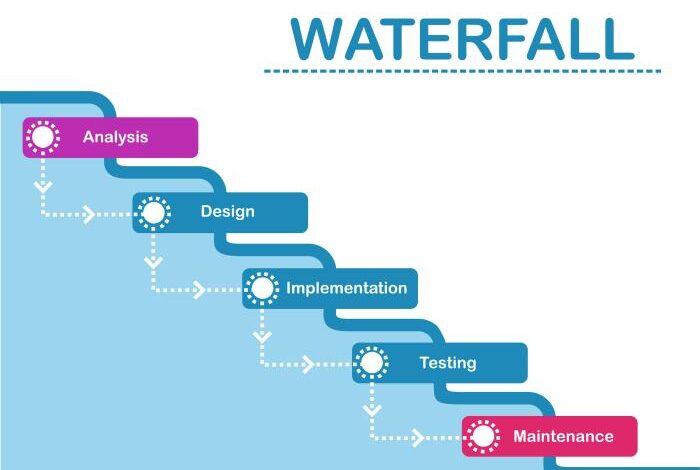
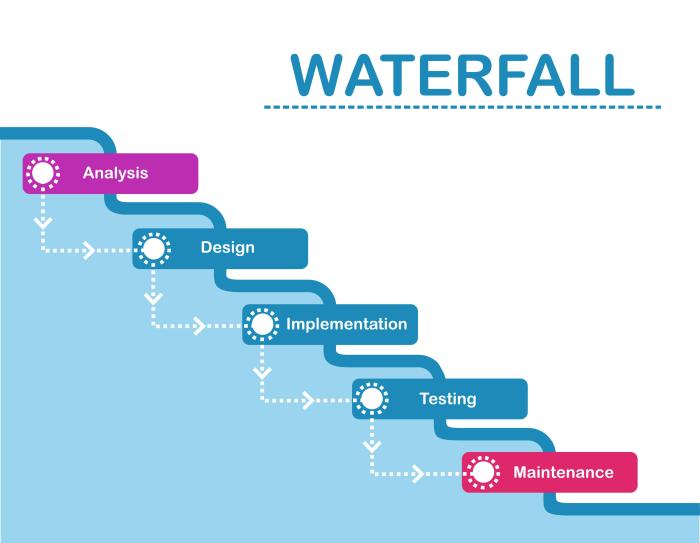
Imagine a waterfall, cascading down in a series of distinct steps. Each step represents a phase in a project, from initial planning to final delivery. Waterfall project management tools empower teams to navigate these phases systematically, minimizing risks and maximizing efficiency.
Introduction to Waterfall Project Management
Waterfall project management is a linear and sequential approach to project management where each phase of the project is completed before moving on to the next. It is a structured and well-defined methodology that has been widely used for decades, particularly in industries with well-defined requirements and predictable timelines.The waterfall model emphasizes a rigid and sequential progression through different phases, with each phase relying on the completion of the previous one.
This approach is often compared to a waterfall flowing downwards, where each stage is distinct and dependent on the one before it.
Key Characteristics of Waterfall Project Management
The waterfall model is characterized by its distinct phases, which are typically defined as follows:
- Requirements Gathering:This phase involves identifying and documenting the project’s objectives, scope, and deliverables. Stakeholders are involved in defining the project’s needs and expectations.
- Design:The design phase focuses on creating a detailed plan for how the project will be implemented. This includes outlining the project’s architecture, functionality, and technical specifications.
- Development:This phase involves the actual construction of the project, based on the design specifications. Developers implement the project’s features and functionality according to the defined plan.
- Testing:Once the project is developed, it undergoes rigorous testing to ensure it meets the specified requirements and functions as intended. This phase involves identifying and fixing any defects or bugs.
- Deployment:After successful testing, the project is deployed or released to users. This phase involves making the project available for use and providing necessary support and documentation.
- Maintenance:This phase involves ongoing support and updates to the project after its initial deployment. It ensures that the project remains functional and meets the evolving needs of users.
Advantages of Waterfall Project Management
The waterfall model offers several advantages, making it suitable for certain types of projects:
- Clear Structure and Documentation:The waterfall model provides a well-defined structure and clear documentation for each phase, making it easier to track progress and ensure accountability.
- Predictable Timelines:The sequential nature of the waterfall model allows for more predictable timelines, as each phase is completed before moving on to the next.
- Suitable for Well-Defined Requirements:The waterfall model is best suited for projects with clearly defined requirements and minimal uncertainty, where changes are less likely to occur.
- Easy to Manage:The structured approach of the waterfall model simplifies project management, as progress can be easily tracked and monitored.
Disadvantages of Waterfall Project Management
Despite its advantages, the waterfall model also has certain drawbacks:
- Lack of Flexibility:The sequential nature of the waterfall model makes it difficult to accommodate changes or feedback during the project lifecycle. Once a phase is completed, it is generally not revisited.
- Risk of Delays:If a problem is discovered in a later phase, it can significantly delay the project, as it requires revisiting previous phases to address the issue.
- Limited User Feedback:The waterfall model emphasizes upfront planning and design, limiting opportunities for user feedback and iteration during the development process.
- Difficult to Manage Complex Projects:For projects with complex requirements or frequent changes, the waterfall model can become cumbersome and inefficient.
Waterfall Project Management Tools
Waterfall project management is a linear and sequential approach where each phase must be completed before moving on to the next. It emphasizes planning and documentation, making it suitable for projects with well-defined requirements and minimal scope changes. Choosing the right tools can streamline workflows, enhance collaboration, and ensure project success.
Popular Waterfall Project Management Tools
The following is a list of popular waterfall project management tools, categorized by their features and functionalities:
Project Planning and Scheduling Tools
These tools are designed to help project managers create detailed project plans, schedule tasks, track progress, and manage resources effectively.
- Microsoft Project: A robust and feature-rich tool widely used for project planning, scheduling, and resource management. It offers advanced features like Gantt charts, resource allocation, and cost management.
- Pros: Comprehensive functionality, robust reporting capabilities, integration with other Microsoft products.
Waterfall project management tools are great for keeping things organized and on track, but sometimes you need a little extra insight into the human element. That’s where this hidden iPhone feature puts your friends and family’s locations directly into the Maps app using Find My comes in handy.
It can help you visualize the team’s location, which can be especially useful when coordinating meetings or field work. Just remember, always respect everyone’s privacy and only use this feature with consent. And of course, waterfall tools are still essential for maintaining the overall project plan and ensuring everyone is on the same page.
- Cons: Steep learning curve, expensive, may be overkill for smaller projects.
- Pros: Comprehensive functionality, robust reporting capabilities, integration with other Microsoft products.
- Smartsheet: A cloud-based project management platform that offers a wide range of features, including project planning, task management, collaboration, and reporting. It provides a user-friendly interface and integrates with other popular tools.
- Pros: Easy to use, flexible, collaborative features, integrates with other tools.
- Cons: Limited advanced project management features, may not be suitable for complex projects.
- Asana: A popular project management tool known for its intuitive interface and task management capabilities. It offers features like project planning, task lists, collaboration, and communication.
- Pros: User-friendly interface, free plan available, integrates with other tools.
- Cons: Limited advanced project management features, may not be suitable for complex projects.
Document Management and Collaboration Tools
These tools facilitate document sharing, collaboration, and version control, ensuring that project documentation is organized and accessible to all team members.
- Google Docs: A free and collaborative online document editor that allows teams to work on documents together in real-time. It offers features like version history, document sharing, and commenting.
- Pros: Free, easy to use, collaborative features, real-time editing.
- Cons: Limited advanced document management features, may not be suitable for large or complex projects.
- Dropbox Paper: A cloud-based collaboration platform that combines document editing, task management, and communication features. It allows teams to work on documents together, manage tasks, and communicate within the platform.
- Pros: Easy to use, collaborative features, integrates with Dropbox.
- Cons: Limited advanced document management features, may not be suitable for large or complex projects.
- Confluence: A wiki-based collaboration platform that provides a centralized repository for project documentation, knowledge sharing, and team communication. It offers features like page creation, version control, and search functionality.
- Pros: Comprehensive knowledge management features, customizable, integrates with other Atlassian products.
- Cons: Can be complex to set up and manage, requires a subscription.
Communication and Collaboration Tools
These tools facilitate communication and collaboration among team members, ensuring that everyone is on the same page and can work effectively together.
Waterfall project management tools are great for structured projects with clear deadlines, but they can sometimes feel rigid. It’s interesting to see how the big tech emissions market, which is becoming increasingly scrutinized , is impacting the way we approach sustainability in tech.
This focus on environmental responsibility might lead to more agile methodologies being adopted in the future, even for traditional waterfall projects.
- Slack: A real-time messaging platform that allows teams to communicate through channels, direct messages, and file sharing. It integrates with other popular tools and offers features like notifications, search, and integrations.
- Pros: Real-time communication, integrates with other tools, free plan available.
- Cons: Can be distracting, may not be suitable for formal communication.
- Microsoft Teams: A collaboration platform that combines communication, file sharing, and meeting features. It offers features like chat, video conferencing, file storage, and integration with other Microsoft products.
- Pros: Comprehensive collaboration features, integrates with other Microsoft products, free plan available.
- Cons: Can be complex to set up and manage, may not be suitable for smaller teams.
- Zoom: A video conferencing platform that allows teams to conduct meetings, webinars, and online training sessions. It offers features like screen sharing, recording, and breakout rooms.
- Pros: User-friendly interface, reliable video conferencing, free plan available.
- Cons: Limited collaboration features, may not be suitable for all types of meetings.
Key Features of Waterfall Project Management Tools
Waterfall project management tools are designed to streamline the execution of projects by providing a comprehensive suite of features that support each phase of the waterfall methodology. These tools are crucial for managing complex projects, ensuring timely completion, and achieving desired outcomes.
Task Management
Effective task management is essential for maintaining project organization and ensuring that all activities are completed on schedule. Waterfall project management tools offer robust task management features, including:
- Task Creation and Assignment:These tools allow users to create detailed task descriptions, assign tasks to specific team members, and set due dates. This ensures clarity and accountability for each project component.
- Task Dependencies:The tools enable users to define task dependencies, illustrating the sequential order in which tasks must be completed. This helps prevent delays and ensures that tasks are executed in the correct sequence.
- Task Prioritization:Users can prioritize tasks based on their importance and urgency, ensuring that critical activities are addressed first. This helps maintain focus and allocate resources effectively.
- Sub-task Breakdown:Complex tasks can be broken down into smaller, manageable sub-tasks, making them easier to track and complete. This promotes a sense of progress and reduces the feeling of being overwhelmed.
Progress Tracking
Tracking progress is essential for monitoring project performance and identifying potential issues early on. Waterfall project management tools provide various progress tracking features, including:
- Task Completion Status:The tools allow users to mark tasks as complete, providing a real-time overview of project progress. This helps identify bottlenecks and areas where additional support might be needed.
- Visual Progress Indicators:Many tools use visual indicators, such as Gantt charts or Kanban boards, to represent project progress. These visual aids offer a clear and intuitive understanding of project status and progress toward milestones.
- Reporting and Analytics:These tools generate reports and analytics that provide insights into project performance, such as task completion rates, time spent on tasks, and resource allocation. This data helps identify areas for improvement and optimize project execution.
Communication
Effective communication is crucial for successful project execution, ensuring that all team members are informed and aligned on project goals, progress, and any potential challenges. Waterfall project management tools facilitate communication through features such as:
- Internal Messaging:These tools often include internal messaging systems that allow team members to communicate directly within the project platform. This streamlines communication and reduces the need for external messaging channels.
- File Sharing:Team members can easily share project documents, presentations, and other relevant files within the platform, ensuring that everyone has access to the latest information.
- Notifications and Alerts:Users can set up notifications and alerts for specific events, such as task assignments, deadline reminders, or progress updates. This ensures that team members stay informed and are notified of important developments.
Reporting
Regular reporting is essential for keeping stakeholders informed about project progress, identifying potential risks, and making necessary adjustments. Waterfall project management tools offer robust reporting features, including:
- Status Reports:These tools generate regular status reports that provide an overview of project progress, including task completion rates, resource allocation, and any identified risks or issues.
- Customizable Reports:Users can customize reports to focus on specific aspects of the project, such as resource utilization, budget tracking, or risk assessment. This allows stakeholders to access information relevant to their specific needs.
- Data Visualization:Many tools use data visualization techniques, such as charts and graphs, to present complex information in an easily understandable format. This enhances the clarity and impact of reports, enabling stakeholders to quickly grasp project status and trends.
Implementing Waterfall Project Management Tools
Implementing a waterfall project management tool is a crucial step in streamlining workflows and improving project outcomes. The right tool can provide structure, visibility, and efficiency, but choosing and implementing the right tool requires careful planning and execution.
Waterfall project management tools are great for keeping things organized and on track, but sometimes you just need a little break from the routine. That’s where the Apple Watch Ultra 2 in gorgeous satin black comes in. It’s a sleek and stylish way to track your fitness goals and stay connected, and it can even help you de-stress with a few deep breaths.
Once you’re back to work, those waterfall project management tools will be waiting for you, ready to help you conquer your next challenge.
Selecting the Right Tool
Selecting the right tool involves considering the specific needs of your project and team. The following factors should be taken into account:
- Project Complexity:Complex projects require tools with robust features for managing dependencies, timelines, and resources. Simpler projects may be well-suited to basic tools with a user-friendly interface.
- Team Size:Large teams benefit from tools that facilitate collaboration and communication. Smaller teams may prefer tools that are more streamlined and intuitive.
- Budget:The cost of the tool is an important consideration. Open-source tools can be a cost-effective option, while commercial tools often offer more advanced features.
- Integration:The tool should integrate with other software used by your team, such as communication platforms, document management systems, and reporting tools.
Training and Onboarding
Training and onboarding are essential for ensuring team members can effectively use the chosen tool. Effective training programs:
- Provide clear instructions:Training materials should be comprehensive and easy to understand, covering all essential features and functionalities.
- Offer hands-on practice:Practical exercises and real-world scenarios allow team members to apply their knowledge and build confidence in using the tool.
- Provide ongoing support:A dedicated support team or resource center can help address questions and resolve issues that arise during the implementation process.
Maximizing Effectiveness
Once the tool is implemented, it is crucial to maximize its effectiveness. This can be achieved through:
- Regular reviews and adjustments:Periodically assess the tool’s performance and make necessary adjustments to optimize its use.
- Encourage feedback:Gather feedback from team members on their experiences with the tool to identify areas for improvement.
- Foster a culture of documentation:Encourage team members to document their work and processes within the tool to ensure consistency and transparency.
Case Studies and Examples
Seeing waterfall project management tools in action can provide valuable insights into their effectiveness and the real-world challenges they address. This section explores case studies showcasing organizations that have successfully leveraged these tools to achieve their project goals.
Successful Implementation of Waterfall Project Management Tools
These case studies highlight how organizations have used waterfall project management tools to achieve successful outcomes.
- Company A:This company was struggling with project delays and budget overruns. By implementing a waterfall project management tool, they gained better visibility into project progress and resource allocation. The tool’s features, including Gantt charts and task dependencies, enabled them to streamline their workflow and improve communication among team members.
This resulted in reduced project timelines and improved budget control.
- Company B:This organization needed to manage complex software development projects with multiple stakeholders. The waterfall project management tool they adopted provided a centralized platform for project documentation, communication, and task management. This facilitated collaboration and ensured that all stakeholders were aligned on project requirements and deliverables.
The tool also enabled them to track progress effectively and identify potential risks early on, leading to smoother project execution.
- Company C:This company faced challenges in maintaining consistent project quality. They implemented a waterfall project management tool that included quality assurance features, such as checklists and approval workflows. This helped them standardize their project processes, ensuring adherence to quality standards and reducing the likelihood of errors.
The tool also provided a platform for documenting and tracking quality issues, enabling them to address problems proactively and improve project outcomes.
Future Trends in Waterfall Project Management Tools
The world of project management is constantly evolving, with new tools and methodologies emerging to address the ever-changing demands of the modern workplace. While agile methodologies have gained significant traction, waterfall project management remains a valuable approach for certain types of projects, particularly those with well-defined requirements and predictable timelines.
In this context, waterfall project management tools are also undergoing a transformation, adapting to the evolving needs of businesses and incorporating new technologies to enhance their capabilities.
Integration with Other Tools
The trend towards seamless integration is a key driver in the development of waterfall project management tools. As businesses increasingly rely on a diverse range of software applications, the need for tools that can interact with other platforms is becoming more critical.
This integration allows for data sharing, automation, and a more streamlined workflow. For example, project management tools might integrate with communication platforms like Slack or Microsoft Teams to facilitate real-time collaboration and communication, or with CRM systems to manage customer interactions and track progress.
Artificial Intelligence and Machine Learning
Artificial intelligence (AI) and machine learning (ML) are transforming various industries, and project management is no exception. Waterfall project management tools are incorporating these technologies to automate tasks, improve decision-making, and provide insights into project performance. AI-powered tools can analyze project data, identify potential risks, and recommend solutions, allowing project managers to focus on strategic initiatives.
For instance, AI can analyze historical project data to predict project timelines, identify potential bottlenecks, and suggest resource allocation strategies.
Cloud-Based Solutions
The shift towards cloud computing has significantly impacted the landscape of project management tools. Cloud-based solutions offer numerous advantages, including scalability, accessibility, and cost-effectiveness. Waterfall project management tools are increasingly adopting cloud-based architectures, providing users with access to their projects and data from anywhere with an internet connection.
Cloud-based solutions also enable real-time collaboration and facilitate easier data sharing among team members.
Focus on User Experience
As competition in the project management software market intensifies, user experience (UX) is becoming a critical differentiator. Tools that are intuitive, easy to use, and visually appealing are more likely to be adopted and used effectively. Waterfall project management tools are focusing on improving their UX by adopting modern design principles, providing personalized dashboards, and offering intuitive navigation.
Enhanced Reporting and Analytics
Data-driven decision-making is essential for successful project management. Waterfall project management tools are enhancing their reporting and analytics capabilities to provide project managers with more comprehensive insights into project performance. These tools are incorporating dashboards, charts, and graphs to visualize key metrics, allowing project managers to track progress, identify trends, and make data-informed decisions.
For example, tools might provide reports on resource utilization, task completion rates, and project budget, allowing project managers to identify areas for improvement and optimize resource allocation.