Dashlane Free vs Premium: Which Password Manager Is Right for You?
Dashlane Free vs Premium: Navigating the world of online security can feel like a minefield, especially when it comes to protecting your precious passwords. Enter Dashlane, a popular password manager that offers both a free and premium plan. But which one is right for you?
Let’s dive into the features, security measures, pricing, and user experience of each plan to help you make an informed decision.
Whether you’re a casual internet user or a tech-savvy individual, having a reliable password manager is essential in today’s digital landscape. Dashlane stands out with its user-friendly interface, robust security features, and comprehensive password management capabilities. But with both a free and premium plan available, the question arises: which one best suits your needs and budget?
Dashlane Free Features
Dashlane’s free plan offers a solid foundation for password management, providing essential features to secure your online accounts. While it lacks some advanced functionalities, it’s a great starting point for individuals seeking basic password security.
Password Storage and Management
Dashlane’s free plan allows you to store an unlimited number of passwords securely in their encrypted vault. This ensures that your login credentials are protected from unauthorized access. The password manager automatically fills in your login details on websites and apps, eliminating the need to manually type them in.
- Password Generation:Dashlane can generate strong, unique passwords for each of your online accounts, enhancing your overall security posture.
- Password Security Audit:The free plan includes a password security audit feature that analyzes your saved passwords and identifies any weak or compromised credentials. This helps you proactively strengthen your online security.
Secure Browsing
The free plan includes a built-in secure browsing feature that helps protect you from phishing attacks and malicious websites. Dashlane alerts you if you’re about to visit a suspicious website, preventing you from potentially compromising your data.
Data Breach Monitoring
Dashlane monitors known data breaches and alerts you if any of your saved accounts have been compromised. This allows you to take immediate action, such as changing your password, to minimize potential damage.
Deciding between Dashlane’s free and premium tiers is a bit like choosing between a trusty old laptop and a sleek new model. The free version gets the job done, but premium unlocks features like unlimited devices and secure sharing. It reminds me of the iconic RIP M1 MacBook Air, the wedge-shaped great that changed Macbooks forever , which, while still functional, is now eclipsed by newer, more powerful machines.
Ultimately, the choice between Dashlane’s free and premium plans comes down to your individual needs and budget.
Device Support
The Dashlane free plan supports a limited number of devices, typically one or two. This means you can access your password vault and use the password manager on your primary computer and one mobile device. If you need to use Dashlane on more devices, you’ll need to upgrade to a premium plan.
Storage Capacity
The free plan offers limited storage capacity, typically around 50 passwords. This may be sufficient for individuals with a small number of online accounts, but it can become restrictive for users with numerous accounts.
Limited Customer Support, Dashlane free vs premium
Dashlane’s free plan provides limited customer support options. While you can access their knowledge base and FAQs, you may not have access to live chat or phone support.
No Advanced Features
The free plan does not include advanced features such as:
- Password Sharing:Sharing passwords with family members or trusted individuals is not available in the free plan.
- Two-Factor Authentication (2FA):Dashlane’s free plan does not offer 2FA support, which is a crucial security measure.
- VPN:Dashlane’s VPN service is not available in the free plan.
- Dark Web Monitoring:The free plan does not include dark web monitoring, which can detect if your personal information has been leaked online.
- Identity Theft Protection:Dashlane’s identity theft protection features are not available in the free plan.
Dashlane Premium Features
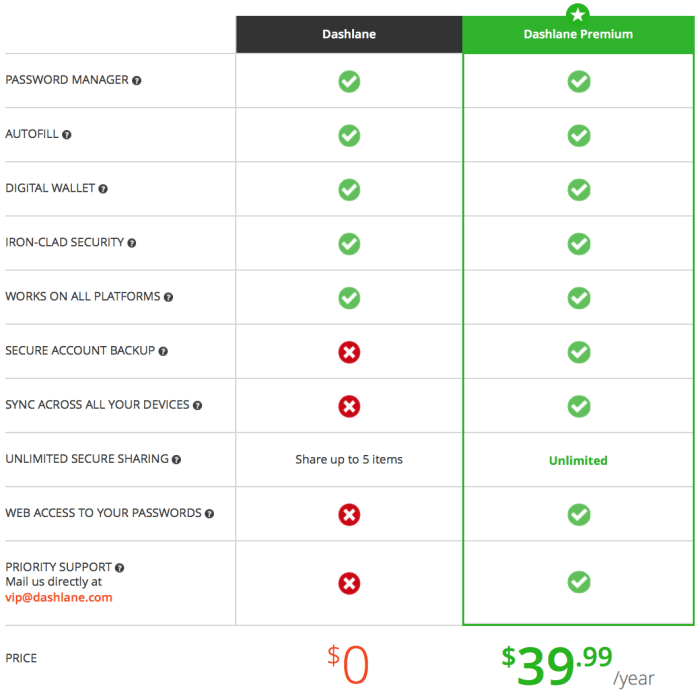
Dashlane Premium offers a range of enhanced features that go beyond the basic functionalities of the free plan. These features are designed to provide users with a more comprehensive and secure password management experience. This section delves into the premium features, highlighting their benefits and how they contrast with the free plan.
Premium Feature Comparisons
This section provides a clear comparison of features available in the Dashlane Free and Premium plans, highlighting the additional benefits offered by the premium version.
| Free Plan | Premium Plan |
|---|---|
| Unlimited password storage | Unlimited password storage |
| Basic password security monitoring | Advanced password security monitoring, including dark web scanning |
| One device access | Unlimited device access across all platforms |
| Basic customer support | Priority customer support with dedicated team |
| Limited features for sharing passwords | Secure password sharing with granular control |
| No VPN | Dashlane VPN for secure browsing and privacy |
| No identity theft monitoring | Identity theft monitoring and protection |
Advanced Password Security Monitoring
Dashlane Premium offers advanced password security monitoring that goes beyond the basic checks provided in the free plan. This includes dark web scanning, which alerts users if their credentials have been compromised in data breaches. This proactive approach helps users identify potential vulnerabilities and take immediate action to secure their accounts.
Secure Password Sharing
The premium plan enables users to share passwords securely with others, allowing them to grant specific access levels. This feature provides granular control over who can access what information, enhancing overall security and privacy.
Dashlane VPN
Dashlane Premium includes a built-in VPN (Virtual Private Network) that encrypts internet traffic, making online activities more secure and private. This feature is particularly valuable for users who frequently access public Wi-Fi networks, which can be susceptible to security breaches.
Identity Theft Monitoring
The premium plan provides identity theft monitoring, which alerts users to any suspicious activity related to their personal information. This proactive approach helps users detect potential identity theft attempts early on, enabling them to take swift action to mitigate any damage.
Security and Privacy
Protecting your sensitive information is paramount when using a password manager, and Dashlane takes security and privacy seriously. They employ a comprehensive suite of measures to safeguard your data, including encryption, two-factor authentication, and robust security protocols.
Encryption
Dashlane uses end-to-end encryption to protect your data, both when it’s stored in their servers and when it’s being transmitted. This means that only you, with your master password, can decrypt and access your data. Your data is encrypted using the Advanced Encryption Standard (AES) with a 256-bit key, which is considered a highly secure standard.
Two-Factor Authentication
Dashlane supports two-factor authentication (2FA), adding an extra layer of security to your account. When you enable 2FA, you’ll need to provide a unique code, typically sent to your phone or email, in addition to your password, to log in.
This makes it much harder for unauthorized individuals to access your account, even if they know your password.
Security Protocols
Dashlane’s free and premium plans share the same core security protocols, ensuring robust protection for all users. Both plans benefit from:
- End-to-end encryption: This ensures that your data is protected from unauthorized access, even by Dashlane itself.
- Secure storage: Your data is stored in encrypted vaults, making it virtually impossible for hackers to access.
- Regular security updates: Dashlane constantly updates its security protocols and software to protect against emerging threats.
Privacy Policy
Dashlane is committed to protecting your privacy and has a transparent privacy policy that Artikels how they collect, use, and share your data.
- Data collection: Dashlane collects data necessary for providing its services, such as your login information, website credentials, and payment details. However, they do not collect or store any personal data like your browsing history or email content.
- Data usage: Dashlane uses your data to provide its password management services, including storing your credentials, auto-filling forms, and generating secure passwords. They do not use your data for advertising or marketing purposes.
- Data sharing: Dashlane does not share your data with third parties, except when required by law or to protect the security of its users.
Pricing and Value
Dashlane offers both free and premium plans, each catering to different user needs and budgets. The free plan provides basic password management features, while the premium plan unlocks advanced functionalities like unlimited device syncing, secure note storage, and dedicated customer support.
Deciding between Dashlane’s free and premium plans can be tricky, especially when you consider the extra features like unlimited devices and secure VPN. It’s almost like choosing between a classic iPhone or the latest iPad Pro, which is exactly what Tim Cook did in a recent interview where he blind-ranked his top five Apple products of all time, including one of its most controversial sort of! tim cook blind ranks his top five apple products of all time including one of its most controversial sort of Anyway, back to Dashlane, I’d say if you’re serious about online security, the premium plan is definitely worth considering.
Pricing Comparison
The pricing of Dashlane’s free and premium plans is as follows:
| Plan | Price | Features |
|---|---|---|
| Free | $0/month |
|
| Premium | $3.99/month (annual billing) |
|
Value Proposition
The free plan is a good option for users who only need basic password management features and are comfortable with limited device access. However, for users who require advanced security features, unlimited device syncing, and dedicated customer support, the premium plan offers significant value.For example, a user who frequently travels and uses multiple devices would benefit greatly from the unlimited device syncing feature of the premium plan.
Similarly, a user who stores sensitive information online would appreciate the secure note storage and dark web monitoring features.Ultimately, the best plan for you depends on your individual needs and budget.
User Experience: Dashlane Free Vs Premium
Dashlane’s user experience is a key factor in its popularity. The app is designed to be user-friendly and intuitive, making it easy for both tech-savvy and novice users to manage their passwords and other sensitive information. This section delves into the user interface and usability of the Dashlane app and website, explores user reviews and feedback, and compares Dashlane’s user experience to other password management services.
App and Website Interface
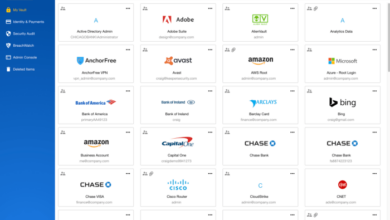
Dashlane boasts a clean and straightforward interface, both on its website and app. The layout is well-organized, making it easy to navigate through different features. The app’s design is consistent across platforms, ensuring a seamless experience whether you’re using it on your desktop, laptop, smartphone, or tablet.The app’s dashboard provides a clear overview of your most frequently used passwords and other essential information.
It offers quick access to features like password generation, autofill, and secure note storage.
User Reviews and Feedback
Dashlane generally receives positive reviews from users, with many praising its ease of use and intuitive interface. Users appreciate the app’s autofill feature, which saves them time and effort when logging into websites and filling out online forms.
Deciding between Dashlane’s free and premium plans can be tricky, especially when considering the extra features offered by the premium version. But hey, if you’re looking for a distraction from that decision, check out the upcoming OLED iPad Pro bezels are the thinnest pro models have ever been and a new matte finish option is on the way ! Those super slim bezels and a matte finish?
Talk about a design upgrade! Anyway, back to Dashlane, it’s all about weighing the benefits of the premium plan against your personal needs.
“Dashlane is the best password manager I’ve ever used. It’s so easy to use and it makes my life so much easier. I highly recommend it to anyone looking for a password manager.”
User review on Trustpilot.
Some users highlight the app’s ability to automatically detect weak passwords and suggest stronger alternatives. This feature enhances security and promotes good password hygiene.
Comparison to Other Password Management Services
Dashlane is considered one of the top password management services available, alongside competitors like LastPass, 1Password, and Bitwarden. When compared to these services, Dashlane often stands out for its user-friendly interface and comprehensive feature set. For example, Dashlane’s autofill feature is often cited as being more reliable and efficient than other services.
The app’s ability to automatically detect weak passwords and suggest stronger alternatives is also a key differentiator. However, it’s important to note that user preferences can vary widely. Some users may prefer the more minimalist interface of a service like 1Password, while others might appreciate the advanced security features offered by Bitwarden.
Ultimately, the best password management service for you will depend on your individual needs and preferences.
Alternative Options
While Dashlane is a popular and robust password manager, it’s not the only option available. Several other services offer comparable features, each with its own strengths and weaknesses. Exploring these alternatives can help you find the best fit for your needs and budget.
Comparison of Alternative Password Managers
It’s important to compare the features and pricing of different password managers to determine which one is best for you. Here’s a table that summarizes the key features and pricing of some popular alternatives to Dashlane:
| Service | Free Plan | Paid Plan | Price (per year) | Key Features |
|---|---|---|---|---|
| 1Password | Limited features | Unlimited features | $3.99/month (family plan) | Strong security, excellent user interface, robust features for teams, cross-platform compatibility, 1GB of encrypted storage |
| LastPass | Basic password storage | Advanced features, including password sharing, multi-factor authentication, and unlimited password storage | $36/year (family plan) | Secure password storage, multi-factor authentication, password sharing, unlimited password storage, browser extensions, mobile apps, and a free plan with limited features. |
| Bitwarden | Free and open-source | Premium features, including unlimited password storage, advanced security features, and priority support | $10/year (family plan) | Open-source, highly secure, cross-platform compatibility, free and paid plans, advanced features like password sharing, multi-factor authentication, and two-factor authentication. |
| Keeper | Limited features | Premium features, including password sharing, emergency access, and dark web monitoring | $29/year (personal plan) | Secure password storage, password sharing, emergency access, dark web monitoring, and a free plan with limited features. |
Pros and Cons of Popular Alternatives
Each password manager has its own set of advantages and disadvantages. Understanding these pros and cons can help you make an informed decision.
1Password
Pros
- Excellent user interface
- Robust features for teams
- Cross-platform compatibility
- 1GB of encrypted storage
Cons
LastPass
Pros
Cons
Bitwarden
Pros
Cons
Keeper
Pros
Cons
Recommendations
Choosing between Dashlane Free and Dashlane Premium depends on your individual needs and how much you value password management and security. While the free plan offers a solid foundation, the premium plan unlocks a more robust and comprehensive experience.
Dashlane Free Plan: Ideal for Basic Needs
The Dashlane Free plan is suitable for individuals with limited password management requirements and a basic understanding of online security. Here’s when it’s a good fit:
- You only need to manage a small number of passwords, perhaps for personal accounts.
- You are comfortable with the limitations of a free plan, such as the absence of advanced features.
- You are not concerned about the potential security risks associated with storing your passwords online.
Dashlane Premium Plan: For Enhanced Security and Convenience
The Dashlane Premium plan is recommended for individuals who prioritize online security and convenience. Here are scenarios where the premium plan offers significant value:
- You have a large number of passwords to manage, including work accounts, financial institutions, and social media platforms.
- You require advanced features such as password health monitoring, dark web monitoring, and VPN access.
- You want the peace of mind that comes with knowing your passwords are protected by a robust security system.
Choosing the Best Option
To choose the best Dashlane plan for you, consider the following:
- Number of passwords:If you have a large number of passwords, the premium plan’s unlimited password storage capacity is essential.
- Security features:If you value advanced security features such as password health monitoring, dark web monitoring, and VPN access, the premium plan is the better choice.
- Budget:The free plan is a cost-effective option for basic password management, while the premium plan offers more features at a higher price.
- Personal needs:Ultimately, the best Dashlane plan depends on your individual needs and priorities. If you are comfortable with the limitations of the free plan, it may be sufficient. However, if you prioritize security and convenience, the premium plan offers greater value.