Free Business Email Address: A Smart Start for Your Business
Free business email addresses are a fantastic starting point for any new business. They offer a professional touch without breaking the bank. Whether you’re a solopreneur or a growing startup, having a dedicated email address helps establish credibility and streamline communication.
This guide will explore the benefits of free business email addresses, highlighting popular providers like Gmail and Outlook. We’ll delve into setting up your account, crafting professional emails, and even discuss alternatives for when you’re ready to take your business to the next level.
Benefits of Free Business Email Addresses
In the early stages of a business, especially for startups and small enterprises, establishing a professional online presence is crucial, and a free business email address can be a valuable asset. While paid email services offer a wider range of features, free email addresses provide a cost-effective and efficient way to manage communication.
Cost Savings
One of the most significant advantages of using free business email addresses is the cost savings. Free email services eliminate the recurring expenses associated with paid services, allowing businesses to allocate their budget to other essential areas. This cost-effectiveness is particularly attractive for startups and small businesses with limited financial resources.
Features Offered by Free Email Providers
Free email providers offer a range of features that can be beneficial for businesses. These features often include:
- Large storage capacity: Free email services typically provide ample storage space for emails, attachments, and other files, ensuring that businesses can manage their communication efficiently.
- Spam filters: Spam filters help protect businesses from unsolicited emails, ensuring that only legitimate messages reach their inboxes.
- Mobile access: Free email services allow businesses to access their emails from any device with an internet connection, enabling them to stay connected and respond to inquiries promptly.
- Calendar integration: Some free email providers offer calendar integration, allowing businesses to schedule appointments, manage deadlines, and coordinate with team members.
- Collaboration tools: Free email services may also include collaboration tools, such as shared folders and document sharing, enabling businesses to work together effectively.
Examples of Successful Businesses
Numerous successful businesses have used free business email addresses in their early stages, demonstrating the effectiveness of these services. For example, Airbnb, a global online marketplace for lodging, initially relied on free email services to manage communication with users and hosts.
Similarly, Dropbox, a file hosting service, used free email addresses to build their customer base and establish a strong online presence.
Comparison of Free Email Providers
Different free email providers offer varying features and capabilities. Some of the popular options include:
| Provider | Features | Storage | Spam Filter | Mobile Access |
|---|---|---|---|---|
| Gmail | Large storage, spam filters, mobile access, calendar integration, collaboration tools | 15GB | Excellent | Yes |
| Yahoo Mail | Large storage, spam filters, mobile access, calendar integration | 1TB | Good | Yes |
| Outlook.com | Large storage, spam filters, mobile access, calendar integration, collaboration tools | 5GB | Excellent | Yes |
Popular Free Business Email Providers
Choosing the right free business email provider can be a daunting task. With so many options available, it’s important to weigh your needs and priorities before making a decision. This section explores some of the most popular free business email providers and their key features, helping you make an informed choice.
A free business email address can be a game-changer for small businesses, offering a professional look and a centralized communication hub. But what happens when you need to stay on top of important updates? That’s where the notification features in Google Workspace apps, like Gmail and Calendar, come in.
Learn more about customizing these notifications to ensure you never miss a beat, whether it’s a new email, a calendar reminder, or a crucial team update. With these notifications, you can manage your business email effectively and keep your workflow running smoothly.
Comparison of Popular Free Business Email Providers
The following table provides a comprehensive comparison of some of the most popular free business email providers. Each provider offers a unique set of features, storage limits, and security protocols. Consider your specific requirements and preferences when making your selection.
| Provider | Features | Storage Limit | Security Protocols |
|---|---|---|---|
| Zoho Mail | Calendar, contacts, task management, file sharing, email templates, spam filters, virus protection | 5GB | TLS/SSL encryption, two-factor authentication, spam and virus filtering |
| ProtonMail | End-to-end encryption, calendar, contacts, file storage, spam filters, virus protection | 5GB | End-to-end encryption, TLS/SSL encryption, two-factor authentication, spam and virus filtering |
| Tutanota | End-to-end encryption, calendar, contacts, file storage, spam filters, virus protection | 1GB | End-to-end encryption, TLS/SSL encryption, two-factor authentication, spam and virus filtering |
| Mail.com | Calendar, contacts, file storage, spam filters, virus protection | 1GB | TLS/SSL encryption, two-factor authentication, spam and virus filtering |
| GMX Mail | Calendar, contacts, file storage, spam filters, virus protection | 1GB | TLS/SSL encryption, two-factor authentication, spam and virus filtering |
Strengths and Weaknesses of Popular Free Business Email Providers
- Zoho Mail: Zoho Mail stands out for its comprehensive suite of features, including calendar, contacts, task management, file sharing, and email templates. It offers a generous storage limit of 5GB. However, its interface might seem cluttered for some users.
- ProtonMail: ProtonMail is known for its strong focus on privacy and security, offering end-to-end encryption for all emails. It provides a user-friendly interface and a 5GB storage limit. However, its free plan lacks advanced features like email templates.
- Tutanota: Tutanota prioritizes privacy and security, offering end-to-end encryption and a user-friendly interface. It provides a 1GB storage limit, which might be insufficient for users with large email volumes.
- Mail.com: Mail.com offers a simple and straightforward interface with basic features like calendar, contacts, and file storage. It provides a 1GB storage limit and supports various email domains. However, it lacks advanced features like email templates or task management.
- GMX Mail: GMX Mail provides a user-friendly interface with features like calendar, contacts, and file storage. It offers a 1GB storage limit and supports various email domains. However, its free plan lacks advanced features like email templates or task management.
Setting Up a Free Business Email Address
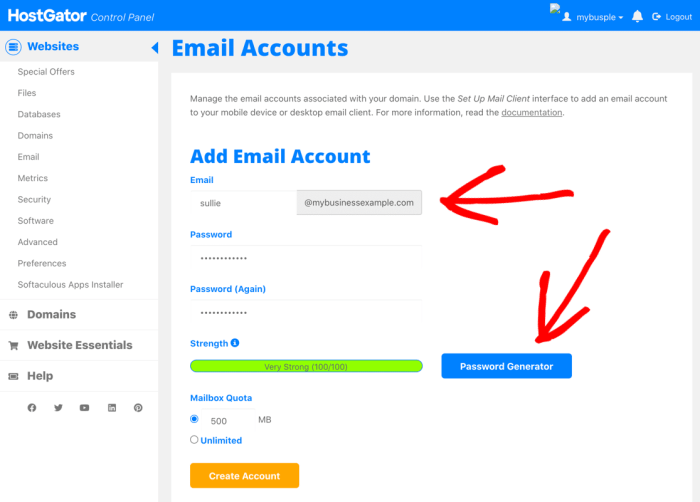
Setting up a free business email address is a straightforward process that can be completed within minutes. It involves choosing a provider, creating an account, verifying your email address, and configuring your email client.
Creating a Free Business Email Account
To begin, select a free business email provider that aligns with your needs. Once you’ve chosen a provider, navigate to their website and click on the “Sign Up” or “Create Account” button. You’ll be prompted to provide basic information, such as your name, desired email address, and password.
Ensure that your chosen email address reflects your business name for professionalism.
Verifying Your Email Address
After creating your account, you’ll need to verify your email address. This is a crucial step to ensure the security of your account and prevent spam. Most providers send a verification email to the address you provided. Click on the verification link in the email to confirm your account.
Setting Up an Email Client
Once your account is verified, you can set up an email client to access your business email. Email clients are software applications that allow you to send and receive emails. Popular options include:
- Microsoft Outlook:A widely used email client with advanced features for managing emails, contacts, and calendars.
- Mozilla Thunderbird:An open-source email client known for its customization options and security features.
- Apple Mail:The default email client on macOS and iOS devices, offering a user-friendly interface and seamless integration with Apple devices.
- Gmail:Google’s web-based email service that can be accessed through a web browser or a dedicated mobile app.
To set up an email client, you’ll need to configure it with your email provider’s settings. This typically involves entering your email address, password, and server information. You can find detailed instructions for configuring specific email clients on their respective websites or online tutorials.
Configuring Email Settings
Once your email client is set up, you can configure your email settings to customize how you send and receive emails. Common settings include:
- Incoming Mail Server:The server that receives emails sent to your address.
- Outgoing Mail Server (SMTP):The server that sends emails from your address.
- Port Numbers:The specific ports used for communication between your email client and the servers.
- Security Settings:Enable SSL/TLS encryption for secure email communication.
You can access these settings through your email client’s settings or preferences menu. Consult your email provider’s documentation or online resources for specific instructions on configuring email settings.
A free business email address can be a great way to establish your online presence, but it’s important to be aware of the potential security risks. Social engineering attacks often target unsuspecting users, and understanding the tactics they employ is crucial for protecting your information.
Check out this article on 6 persuasion tactics used in social engineering attacks to learn how to spot and avoid these common scams. By staying informed and practicing good online hygiene, you can make sure your free business email address remains a valuable asset, not a liability.
Customizing Email Signatures and Creating Email Templates
Email signatures are a valuable way to personalize your emails and provide essential contact information. You can create a professional signature within your email client’s settings. Include your name, title, company, website, and phone number. Email templates can streamline your communication by allowing you to reuse pre-written email messages.
A free business email address can be a great starting point, but as your business grows, you’ll need a robust system to manage your operations. A good best retail POS system can streamline your inventory, sales, and customer data, which will help you make better decisions and ultimately grow your business.
And once you’re ready to upgrade your email, a professional email address will project a more polished image for your company.
Most email clients offer template creation features. Create templates for common email scenarios, such as welcome emails, follow-up messages, or newsletters.
Free Business Email Address Best Practices
A professional email address is a crucial part of your business’s online presence. It reflects your brand image and helps build trust with clients and partners. Choosing the right email address and maintaining a secure and professional inbox are essential for successful communication.
Choosing a Professional Email Address
Selecting a professional email address is vital for establishing credibility and projecting a polished image. Here are some tips for choosing a suitable email address:
- Use your business name or a variation of it.This helps customers easily identify your business and makes it memorable. For example, if your business is called “Acme Widgets,” you could use “[email protected]” or “[email protected].”
- Keep it simple and easy to spell.Avoid using complex words, numbers, or special characters. This ensures people can easily remember and type your email address.
- Avoid using personal email addresses.Using a personal email address like “[email protected]” for business purposes can appear unprofessional and may lead to confusion.
- Use a relevant domain name.Your email address should reflect your business’s domain name. For instance, if your website is “www.acmewidgets.com,” your email address should be “[email protected]” or a similar variation.
Maintaining Consistency Across Platforms, Free business email address
Consistency in your email address across various platforms is crucial for maintaining brand recognition and preventing confusion.
- Use the same email address on all your business profiles and websites.This ensures customers can easily find you and contact you through their preferred channels.
- Update your email address on all relevant platforms.If you change your email address, ensure you update it on all your business profiles, social media accounts, and websites. This prevents outdated information and ensures you receive all important communications.
Email Etiquette for Business Communications
Professional email etiquette is essential for maintaining a positive business image and fostering strong relationships.
- Use a clear and concise subject line.Your subject line should accurately reflect the content of your email and entice the recipient to open it. Avoid using vague or overly casual language.
- Use a professional tone and language.Avoid using slang, jargon, or overly informal language. Ensure your writing is clear, concise, and grammatically correct.
- Proofread your emails carefully.Typos and grammatical errors can damage your credibility and professionalism. Take the time to proofread your emails before sending them.
- Be respectful of the recipient’s time.Keep your emails brief and to the point. Avoid unnecessary details or lengthy explanations.
- Respond promptly to emails.Prompt responses demonstrate professionalism and attentiveness. Aim to respond to emails within 24 hours, especially if they are urgent.
Maintaining a Secure and Professional Inbox
A secure and organized inbox is crucial for efficient communication and protecting sensitive information.
- Use a strong password.Your password should be at least 12 characters long and include a mix of uppercase and lowercase letters, numbers, and symbols. Avoid using easily guessable information like your name or birthdate.
- Enable two-factor authentication.Two-factor authentication adds an extra layer of security by requiring you to enter a code from your phone or email in addition to your password.
- Be cautious of phishing emails.Phishing emails are designed to trick you into giving away personal information. Be wary of emails from unknown senders or emails with suspicious links.
- Keep your email software updated.Software updates often include security patches that protect against vulnerabilities. Ensure your email software is always up to date.
- Regularly check your inbox for spam.Spam emails can clutter your inbox and potentially contain malware. Regularly check your spam folder and mark any unwanted emails as spam.
- Use a professional email signature.Your email signature should include your name, title, company name, and contact information. This provides recipients with the necessary information to reach you.
- Organize your inbox with folders.Create folders for different types of emails, such as “clients,” “projects,” or “personal.” This helps you easily find the emails you need and keeps your inbox organized.
Alternatives to Free Business Email Addresses
While free business email addresses offer a convenient starting point, they often lack the features and security required for professional growth. As your business expands, it’s essential to consider alternatives that provide greater control, reliability, and scalability.
Paid Business Email Services
Paid business email services offer a range of features and benefits that can significantly enhance your business communication. These services typically provide more storage space, advanced security measures, and robust customer support.
- Features: Paid business email services often include features like custom domains, email aliases, email forwarding, spam filtering, virus protection, and mobile access. Some providers offer advanced features like email marketing tools, calendar integration, and collaboration tools.
- Costs: The cost of paid business email services varies depending on the provider, features, and number of users. Prices typically range from a few dollars per user per month to tens of dollars per user per month. Some providers offer discounts for annual subscriptions or larger user groups.
- Examples: Popular paid business email services include Google Workspace, Microsoft 365, Zoho Mail, and GoDaddy Email.
Custom Domain Names with Free Email Providers
Using a custom domain name with a free email provider can offer a balance between cost-effectiveness and professionalism. This approach allows you to maintain a consistent brand identity while utilizing the free email service’s basic features.
- Pros: Using a custom domain name with a free email provider can provide a professional appearance, improve brand recognition, and enhance email deliverability.
- Cons: Free email providers may have limited features, restricted storage space, and less reliable customer support. Additionally, they may display advertisements or include branding elements in your emails.
- Examples: Some free email providers that allow custom domain names include Zoho Mail, ProtonMail, and Fastmail.
Drawbacks of Relying Solely on Free Email Services
While free email services can be helpful for personal use, they may not be suitable for businesses that require a high level of professionalism, security, and reliability.
- Limited Features: Free email services often lack advanced features like email marketing tools, calendar integration, and collaboration tools, which are essential for businesses.
- Security Concerns: Free email providers may have less robust security measures, making your data vulnerable to hacking and spam. Additionally, they may not offer two-factor authentication or other security features.
- Reliability Issues: Free email providers may experience downtime or outages, which can disrupt your business communication. They may also have limited storage space, which can lead to email delivery issues.
- Lack of Control: Free email providers may display advertisements or include branding elements in your emails, which can detract from your brand image. You may also have limited control over your email address and domain name.
Alternative Email Solutions
Besides paid business email services and free email providers, several alternative email solutions can cater to specific business needs.
- Hosted Email Services: These services provide a dedicated email server hosted by a third-party provider. They offer a higher level of security, reliability, and control than free email providers. Examples include Rackspace Email, Intermedia Email, and Mimecast.
- Email Marketing Platforms: These platforms specialize in sending bulk emails for marketing purposes. They offer advanced features like email segmentation, automation, and analytics. Examples include Mailchimp, Constant Contact, and Campaigner.