Top Security Tools Developers Need to Know
Top security tools developers are essential for building secure and reliable software. They play a crucial role in identifying and mitigating vulnerabilities that could expose sensitive data and disrupt business operations. In today’s digital landscape, where cyber threats are constantly evolving, it’s more important than ever for developers to have the right tools and knowledge to protect their applications and users.
This blog post will explore the importance of security tools in the software development lifecycle, discuss different types of security tools available, and highlight essential tools that developers should consider using. We will also cover best practices for implementing security tools in development workflows, staying updated with security trends, and creating secure code.
The Importance of Security Tools for Developers
In today’s digital landscape, software development is an intricate process that requires constant vigilance against security threats. Developers play a crucial role in building secure applications, and utilizing the right security tools is essential to mitigate risks and protect users from vulnerabilities.
The Role of Security Tools in the Software Development Lifecycle
Security tools are indispensable for developers, acting as a safety net throughout the entire software development lifecycle (SDLC). From the initial planning and design phases to the deployment and maintenance of applications, these tools help identify and address potential security weaknesses.
- Requirement Gathering and Design:Security tools assist in identifying and defining security requirements early in the SDLC, ensuring that security considerations are incorporated from the outset.
- Code Review and Analysis:Static analysis tools analyze source code for potential vulnerabilities before the code is compiled or executed, identifying issues like buffer overflows, SQL injection flaws, and cross-site scripting (XSS) vulnerabilities.
- Testing and Validation:Dynamic analysis tools simulate real-world attacks to identify vulnerabilities in running applications. Penetration testing, a form of dynamic analysis, uses ethical hacking techniques to uncover security flaws and assess the application’s overall security posture.
- Deployment and Monitoring:Security tools like intrusion detection systems (IDS) and intrusion prevention systems (IPS) monitor network traffic and applications for suspicious activity, alerting administrators to potential threats and preventing malicious attacks.
Consequences of Neglecting Security Practices
Ignoring security best practices and failing to use appropriate security tools can lead to severe consequences for developers and their organizations, including:
- Data Breaches and Theft:Unsecured applications are vulnerable to data breaches, exposing sensitive information like customer data, financial records, and intellectual property to unauthorized access.
- Financial Losses:Data breaches can result in significant financial losses due to legal penalties, remediation costs, and reputational damage.
- Loss of Customer Trust:Security breaches can erode customer trust, leading to decreased sales and brand reputation.
- Competitive Advantage:Organizations with poor security practices may face competitive disadvantages as customers choose to do business with companies that prioritize security.
Common Security Vulnerabilities
Developers must be aware of common security vulnerabilities that they need to address during the development process. Some of the most prevalent vulnerabilities include:
- Cross-Site Scripting (XSS):XSS attacks allow attackers to inject malicious scripts into web pages, potentially stealing user data or hijacking their accounts.
- SQL Injection:SQL injection attacks exploit vulnerabilities in database queries to gain unauthorized access to sensitive data.
- Buffer Overflow:Buffer overflow attacks exploit vulnerabilities in how applications handle data input, potentially allowing attackers to execute arbitrary code.
- Authentication and Authorization Flaws:Weak authentication and authorization mechanisms can allow unauthorized users to access sensitive resources or perform actions they are not authorized to perform.
Real-World Case Studies of Security Breaches
- Equifax Data Breach (2017):A major data breach at Equifax, a credit reporting agency, exposed the personal information of millions of individuals. The breach was attributed to a known vulnerability in the Apache Struts web framework, which Equifax had failed to patch.
This incident highlights the importance of keeping software up-to-date with security patches.
- Target Data Breach (2013):In 2013, Target suffered a major data breach that compromised the credit card information of millions of customers. The breach was caused by a combination of factors, including weak security practices, vulnerabilities in the company’s point-of-sale system, and a failure to detect and respond to suspicious activity.
Types of Security Tools for Developers
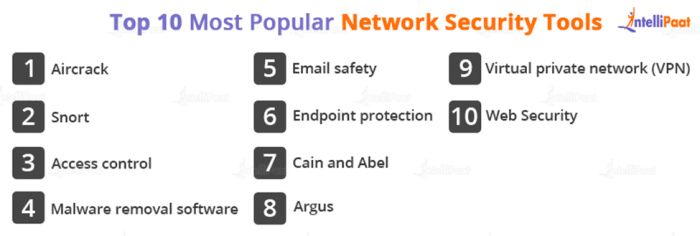
Security tools are indispensable for developers in today’s digital landscape. They empower developers to proactively identify, mitigate, and prevent security vulnerabilities throughout the software development lifecycle (SDLC). These tools provide comprehensive solutions, offering a wide range of functionalities and features that cater to different security needs.
Static Code Analysis
Static code analysis tools examine source code without executing it, identifying potential security vulnerabilities and coding errors. They analyze code structure, syntax, and logic to detect common security flaws such as SQL injection, cross-site scripting (XSS), and buffer overflows.
- SonarQube:A popular open-source platform for code quality and security analysis. It offers comprehensive static code analysis, supporting various programming languages. SonarQube excels in identifying code smells, vulnerabilities, and security hotspots, providing detailed reports and metrics for code quality improvement.
- Checkmarx:A commercial static code analysis solution that utilizes advanced algorithms and machine learning to detect complex vulnerabilities. It offers in-depth analysis, supporting a wide range of languages and frameworks. Checkmarx’s strength lies in its ability to identify sophisticated security flaws that may be missed by other tools.
While we’re on the topic of top security tools developers, I was surprised to see the news that Valve just dropped Mac support for its biggest titles, including Team Fortress 2, Portal 2, and Half-Life. This decision might have implications for how security tools are implemented in the future, as developers need to consider the platform landscape when building and deploying their products.
It’s a reminder that the world of software development is constantly evolving, and we need to be adaptable to stay ahead of the curve.
- Fortify:A comprehensive security analysis platform that combines static and dynamic analysis capabilities. Fortify’s static code analysis component offers a robust set of rules and patterns for detecting vulnerabilities in code. It integrates with various development environments and provides detailed reports for remediation.
Dynamic Analysis, Top security tools developers
Dynamic analysis tools evaluate software behavior during runtime, executing code and monitoring its interactions with the environment. These tools identify vulnerabilities that may not be apparent during static analysis, such as runtime errors, memory leaks, and security misconfigurations.
- Burp Suite:A widely used web security testing tool that combines dynamic analysis, penetration testing, and security auditing capabilities. Burp Suite intercepts and analyzes network traffic, identifying vulnerabilities such as XSS, SQL injection, and authentication flaws. Its user-friendly interface and extensive features make it a valuable tool for web application security professionals.
- AppScan:A commercial dynamic analysis tool that automates web application security testing. AppScan utilizes a combination of automated and manual testing techniques to identify vulnerabilities. It offers comprehensive reporting, remediation guidance, and integration with development workflows.
- ZAP:An open-source web application security scanner that provides dynamic analysis capabilities. ZAP is known for its user-friendliness and extensibility. It supports various security testing techniques, including spidering, active scanning, and fuzzing. ZAP’s open-source nature makes it a popular choice for developers and security researchers.
Penetration Testing Tools
Penetration testing tools simulate real-world attacks to identify security vulnerabilities and weaknesses in applications and systems. These tools utilize a range of techniques, including network scanning, vulnerability scanning, and exploitation attempts, to assess the security posture of a target system.
- Metasploit:A powerful penetration testing framework that provides a comprehensive suite of tools and exploits for vulnerability assessment. Metasploit offers a vast library of exploits, payloads, and auxiliary modules for testing various vulnerabilities. Its extensibility and customization options make it a favorite among security professionals.
- Kali Linux:A Debian-based Linux distribution specifically designed for penetration testing and security auditing. Kali Linux comes pre-installed with a wide range of security tools, including penetration testing tools, vulnerability scanners, and forensic analysis tools. Its comprehensive toolkit makes it a valuable resource for security professionals.
- Nessus:A commercial vulnerability scanner that identifies and assesses vulnerabilities in networks and systems. Nessus offers a wide range of scanning capabilities, including network scanning, vulnerability scanning, and compliance auditing. Its comprehensive reporting and remediation guidance make it a popular choice for organizations.
Security Monitoring Tools
Security monitoring tools provide real-time visibility into security events and activities within a system or network. These tools continuously analyze logs, network traffic, and system behavior to detect suspicious activities, security breaches, and potential threats.
- Splunk:A powerful log management and security information and event management (SIEM) platform. Splunk provides real-time analysis of security events, enabling organizations to identify and respond to threats quickly. Its comprehensive features and extensibility make it a popular choice for large organizations.
- Elasticsearch, Logstash, Kibana (ELK):An open-source log management and analytics stack. ELK provides a comprehensive solution for collecting, analyzing, and visualizing security events. Its flexibility and scalability make it a popular choice for organizations of all sizes.
- Graylog:An open-source log management and security analytics platform. Graylog offers a user-friendly interface and comprehensive features for collecting, analyzing, and visualizing security events. Its open-source nature and extensibility make it a popular choice for organizations looking for a cost-effective solution.
Essential Security Tools for Developers
As developers, we must prioritize security alongside functionality. There are various security tools available to help us build robust and secure applications. This section will delve into some of the most popular and effective security tools for developers, explaining their strengths and functionalities.
Static Application Security Testing (SAST)
SAST tools are crucial for finding vulnerabilities in the source code during the development phase. They analyze the code to identify potential security flaws, such as SQL injection, cross-site scripting (XSS), and buffer overflows. SAST tools can be integrated into the development workflow, enabling early detection and remediation of security issues.
- SonarQube: A widely used open-source platform for code quality and security analysis. It offers a comprehensive set of rules and plugins to detect various vulnerabilities and code smells. SonarQube integrates seamlessly with popular development tools and provides detailed reports for easy analysis and remediation.
- Checkmarx: A commercial SAST solution that provides advanced code analysis capabilities. It utilizes a proprietary engine to identify complex vulnerabilities, including those related to cryptography, authentication, and authorization. Checkmarx offers comprehensive reporting and remediation guidance to assist developers in addressing security issues.
- Fortify: Another popular commercial SAST tool that provides deep code analysis and vulnerability detection. Fortify leverages a powerful engine to identify a wide range of security flaws, including those related to data leakage, insecure communication, and improper error handling. It offers a comprehensive suite of tools for code analysis, reporting, and remediation.
Dynamic Application Security Testing (DAST)
DAST tools perform security testing on running applications. They simulate real-world attacks to identify vulnerabilities that might not be detectable through static analysis. DAST tools are valuable for finding runtime issues like injection flaws, insecure authentication, and authorization vulnerabilities.
- Burp Suite: A widely used commercial DAST tool that offers a comprehensive suite of features for security testing. It includes tools for web application scanning, vulnerability analysis, and manual penetration testing. Burp Suite provides detailed reports and insights to help developers understand and remediate vulnerabilities.
- ZAP (Zed Attack Proxy): An open-source DAST tool that provides a user-friendly interface for security testing. ZAP offers automated scanning, manual testing, and reporting features. It supports various web technologies and is widely used for security testing of web applications.
- Arachni: A powerful open-source DAST tool that provides advanced scanning capabilities. It utilizes a sophisticated engine to detect various vulnerabilities, including those related to injection flaws, cross-site scripting, and authentication bypasses. Arachni offers customizable scanning options and detailed reporting for thorough security analysis.
Interactive Application Security Testing (IAST)
IAST tools bridge the gap between SAST and DAST by providing dynamic analysis during runtime. They integrate with the application code and monitor its behavior, identifying vulnerabilities that might not be detectable through static or dynamic analysis alone. IAST tools are particularly effective for finding vulnerabilities related to data flow, runtime logic, and complex interactions.
- Contrast Security: A commercial IAST solution that provides real-time security analysis during application execution. It integrates with the application code and monitors runtime behavior to identify vulnerabilities. Contrast Security offers detailed reporting and remediation guidance to assist developers in addressing security issues.
- Aqua Security: A commercial IAST tool that provides comprehensive security analysis for containerized applications. It integrates with the application code and monitors runtime behavior to identify vulnerabilities, including those related to container security and runtime environment. Aqua Security offers a comprehensive suite of tools for container security and application protection.
- Hdiv: An open-source IAST tool that provides dynamic analysis during runtime. It integrates with the application code and monitors runtime behavior to identify vulnerabilities, including those related to data flow, runtime logic, and complex interactions. Hdiv offers customizable scanning options and detailed reporting for thorough security analysis.
Security Code Analysis Tools
Security code analysis tools help developers identify and fix security vulnerabilities in their code. These tools use static analysis techniques to examine the code for potential security flaws and provide detailed reports with recommendations for remediation.
- Brakeman: An open-source security code analysis tool specifically designed for Ruby on Rails applications. It analyzes Rails applications for common security vulnerabilities, including SQL injection, cross-site scripting, and mass assignment. Brakeman provides detailed reports with remediation guidance to help developers secure their Rails applications.
- Bandit: An open-source security code analysis tool for Python applications. It identifies common security vulnerabilities in Python code, including SQL injection, cross-site scripting, and insecure use of cryptography. Bandit provides detailed reports with remediation guidance to help developers secure their Python applications.
- Find Security Bugs (FindBugs): An open-source security code analysis tool that identifies potential security vulnerabilities in Java applications. It analyzes Java bytecode for common security flaws, including SQL injection, cross-site scripting, and insecure use of cryptography. FindBugs provides detailed reports with remediation guidance to help developers secure their Java applications.
Keeping your devices secure is crucial, especially when dealing with sensitive data. Top security tools developers are constantly innovating, and it seems like Apple might be joining the race with a major upgrade to their HomePod. The recent leak of the HomePod 3 hints at a display, which could significantly impact the device’s security features.
This development highlights the increasing importance of security in smart home devices, a trend that top security tools developers are actively addressing.
Vulnerability Scanners
Vulnerability scanners are essential tools for identifying security vulnerabilities in software and systems. They perform automated scans to detect known vulnerabilities and provide detailed reports with remediation guidance.
- Nessus: A popular commercial vulnerability scanner that offers a comprehensive suite of features for security assessment. It provides automated scanning, vulnerability analysis, and reporting capabilities. Nessus supports a wide range of operating systems and applications and is widely used for security audits and vulnerability management.
- OpenVAS: An open-source vulnerability scanner that provides a powerful platform for security assessment. It offers automated scanning, vulnerability analysis, and reporting capabilities. OpenVAS supports a wide range of operating systems and applications and is widely used for security audits and vulnerability management.
- Nmap: A powerful open-source network scanner that provides a wide range of capabilities for network security analysis. It can be used to identify open ports, services, and vulnerabilities on network devices. Nmap offers customizable scanning options and detailed reporting for thorough network security analysis.
Security Monitoring and Logging Tools
Security monitoring and logging tools are crucial for detecting and responding to security incidents. They collect and analyze security events, provide real-time monitoring, and generate alerts for suspicious activity.
- Splunk: A popular commercial security information and event management (SIEM) platform that provides a comprehensive suite of features for security monitoring and analysis. It collects and analyzes security events from various sources, provides real-time monitoring, and generates alerts for suspicious activity.
Splunk offers a wide range of features for security incident response and threat intelligence.
- Elasticsearch, Logstash, and Kibana (ELK Stack): An open-source SIEM solution that provides a powerful platform for security monitoring and analysis. It collects and analyzes security events from various sources, provides real-time monitoring, and generates alerts for suspicious activity. The ELK Stack offers a wide range of features for security incident response and threat intelligence.
- Graylog: An open-source SIEM platform that provides a user-friendly interface for security monitoring and analysis. It collects and analyzes security events from various sources, provides real-time monitoring, and generates alerts for suspicious activity. Graylog offers a wide range of features for security incident response and threat intelligence.
Comparison Table
| Tool | Category | Features | Strengths ||—|—|—|—|| SonarQube | SAST | Code quality and security analysis, integration with development tools, detailed reports | Comprehensive analysis, open-source, integration with popular tools || Checkmarx | SAST | Advanced code analysis, proprietary engine, comprehensive reporting | Powerful engine, deep analysis, remediation guidance || Fortify | SAST | Deep code analysis, vulnerability detection, comprehensive suite of tools | Powerful engine, wide range of vulnerabilities detected, comprehensive tools || Burp Suite | DAST | Web application scanning, vulnerability analysis, manual penetration testing | Comprehensive features, detailed reports, manual testing capabilities || ZAP (Zed Attack Proxy) | DAST | Automated scanning, manual testing, reporting features | User-friendly interface, open-source, supports various web technologies || Arachni | DAST | Advanced scanning capabilities, customizable options, detailed reporting | Powerful engine, wide range of vulnerabilities detected, customizable scanning || Contrast Security | IAST | Real-time security analysis, integration with application code, detailed reporting | Real-time analysis, runtime vulnerability detection, remediation guidance || Aqua Security | IAST | Comprehensive security analysis for containerized applications, integration with application code, detailed reporting | Container security focus, runtime vulnerability detection, comprehensive tools || Hdiv | IAST | Dynamic analysis during runtime, integration with application code, customizable scanning options | Dynamic analysis, runtime vulnerability detection, customizable scanning || Brakeman | Security Code Analysis | Analysis of Ruby on Rails applications, identification of common vulnerabilities, detailed reports | Focus on Rails applications, open-source, remediation guidance || Bandit | Security Code Analysis | Analysis of Python applications, identification of common vulnerabilities, detailed reports | Focus on Python applications, open-source, remediation guidance || Find Security Bugs (FindBugs) | Security Code Analysis | Analysis of Java applications, identification of common vulnerabilities, detailed reports | Focus on Java applications, open-source, remediation guidance || Nessus | Vulnerability Scanners | Automated scanning, vulnerability analysis, reporting capabilities | Comprehensive features, wide range of operating systems and applications, vulnerability management || OpenVAS | Vulnerability Scanners | Automated scanning, vulnerability analysis, reporting capabilities | Powerful platform, open-source, wide range of operating systems and applications || Nmap | Vulnerability Scanners | Network scanning, identification of open ports, services, and vulnerabilities | Powerful network scanner, customizable options, detailed reporting || Splunk | Security Monitoring and Logging | Security information and event management, real-time monitoring, alert generation | Comprehensive features, wide range of sources, security incident response || Elasticsearch, Logstash, and Kibana (ELK Stack) | Security Monitoring and Logging | Security information and event management, real-time monitoring, alert generation | Powerful platform, open-source, wide range of features || Graylog | Security Monitoring and Logging | Security information and event management, real-time monitoring, alert generation | User-friendly interface, open-source, wide range of features |
Top security tools developers are constantly innovating to keep up with the evolving threat landscape. Understanding the basics of cloud computing is crucial for anyone working in this field, as many security tools are cloud-based. For a quick overview of key cloud computing terms, check out this mini glossary cloud computing terms you should know.
Armed with this knowledge, you can better understand the capabilities of top security tools developers and choose the right solutions for your organization.
Implementing Security Tools in Development Workflows

Integrating security tools into your development workflow is essential for building secure applications. It helps you catch vulnerabilities early in the development cycle, reducing the risk of costly security breaches and ensuring the overall security of your software.
Integrating Security Tools into Development Workflows
Integrating security tools into your development workflow requires a strategic approach that considers the specific needs of your project and team. Here are some best practices to follow:
- Start Early:Security should be considered from the very beginning of the development process. This means incorporating security tools into your design, coding, and testing phases.
- Choose the Right Tools:Select tools that are relevant to your specific needs and technologies. There are various tools available, and it’s important to choose those that align with your project’s requirements.
- Automate Security Checks:Automate security checks as much as possible to reduce manual effort and ensure consistency. Integrate security tools into your continuous integration and continuous delivery (CI/CD) pipeline.
- Provide Training:Train developers on how to use security tools effectively. This includes understanding the tools’ capabilities, interpreting results, and taking appropriate actions.
- Regularly Update Tools:Keep your security tools updated with the latest security patches and vulnerability databases. This ensures you have the most current protection against emerging threats.
Using Security Tools Effectively
To effectively use security tools, it’s important to understand their functionality and how to interpret their results. Here are some steps to follow:
- Understand Tool Capabilities:Familiarize yourself with the specific capabilities of the security tool you’re using. This includes understanding the types of vulnerabilities it can detect and the reporting format.
- Configure Tools Properly:Configure the tools according to your project’s specific requirements. This may involve setting thresholds for severity levels, excluding specific files or directories, and customizing reporting formats.
- Interpret Results:Understand how to interpret the results provided by the security tool. This includes identifying the type of vulnerability, its severity level, and the location within the code.
- Prioritize Fixes:Prioritize fixing vulnerabilities based on their severity level and potential impact. Address critical vulnerabilities first, and then work your way down the list.
- Document Findings:Document the vulnerabilities found, the actions taken to address them, and the results of the fixes. This helps track your progress and ensure ongoing security.
Automating Security Checks
Automating security checks is crucial for efficiency and consistency. By integrating security tools into your CI/CD pipeline, you can ensure that security checks are performed automatically at each stage of the development process.
- Static Code Analysis:Integrate static code analysis tools into your CI/CD pipeline to automatically scan code for vulnerabilities during the build process. Tools like SonarQube and Checkmarx can be integrated to identify common security flaws.
- Dynamic Application Security Testing (DAST):Integrate DAST tools into your CI/CD pipeline to perform automated security testing during the deployment phase. Tools like OWASP ZAP and Burp Suite can be used to identify vulnerabilities in running applications.
- Software Composition Analysis (SCA):Use SCA tools to analyze the dependencies of your application and identify any known vulnerabilities in third-party libraries. Tools like Snyk and JFrog Xray can help you manage open-source risks.
- Security Testing as Code:Treat security testing as code by defining security tests in your CI/CD pipeline. This allows you to automate security checks and ensure consistent testing across different environments.
Security Best Practices for Developers

Security is paramount in software development, and it’s crucial for developers to adopt a proactive approach to building secure applications. By adhering to best practices, developers can minimize vulnerabilities and enhance the overall security posture of their software.
Secure Coding Practices
Secure coding practices are fundamental to developing robust and resilient software. These practices aim to prevent common vulnerabilities that attackers exploit.
Secure coding is a set of practices that developers should follow to minimize security risks in their code. It involves writing code that is resistant to attacks, including buffer overflows, SQL injection, cross-site scripting (XSS), and more.
Here are some essential secure coding practices:
- Input Validation and Sanitization:Always validate and sanitize user inputs to prevent malicious data from entering the system. For example, using regular expressions to filter out unwanted characters or escape special characters to prevent SQL injection attacks.
- Output Encoding:Properly encode outputs to prevent XSS attacks. Encode HTML characters, URLs, and other sensitive data before displaying them on the web page.
- Secure Authentication and Authorization:Implement robust authentication and authorization mechanisms to protect sensitive data and resources. Use strong password policies, multi-factor authentication, and access control lists to restrict access to authorized users.
- Secure Session Management:Securely manage user sessions to prevent hijacking or unauthorized access. Use HTTPS, secure cookies, and session timeouts to protect user data.
- Error Handling:Implement proper error handling to prevent attackers from exploiting vulnerabilities. Avoid displaying sensitive information in error messages and log errors appropriately.
- Regular Security Audits:Conduct regular security audits to identify and address potential vulnerabilities. Use automated tools and manual reviews to assess the security posture of the application.
- Code Review:Implement code review processes to identify and fix security flaws before deployment. Peer review can help catch vulnerabilities that automated tools might miss.
- Security Awareness Training:Provide developers with security awareness training to educate them about common vulnerabilities and best practices. This training should be ongoing and cover new threats and technologies.
Essential Security Measures
Developers should implement a range of security measures to protect their applications from various threats. Here is a checklist of essential security measures:
- Use Secure Development Frameworks:Leverage secure development frameworks that provide built-in security features, such as input validation, output encoding, and secure authentication.
- Employ Static Code Analysis Tools:Use static code analysis tools to identify potential security vulnerabilities in the codebase. These tools can detect common flaws like SQL injection, XSS, and buffer overflows.
- Utilize Dynamic Code Analysis Tools:Employ dynamic code analysis tools to test the application during runtime. These tools can identify vulnerabilities that static analysis might miss, such as security misconfigurations and runtime errors.
- Implement Secure Communication Protocols:Use secure communication protocols like HTTPS to encrypt data transmitted between the client and the server. This protects sensitive information from eavesdropping and man-in-the-middle attacks.
- Employ Security Testing Techniques:Regularly perform security testing, including penetration testing and vulnerability scanning, to identify and remediate security weaknesses.
- Keep Software Up to Date:Patch vulnerabilities promptly by updating software and libraries to the latest versions. This ensures that known vulnerabilities are addressed and the application remains secure.
Staying Updated with Security Trends: Top Security Tools Developers
The cybersecurity landscape is constantly evolving, with new threats and vulnerabilities emerging regularly. To remain effective, developers need to stay abreast of these trends and adapt their security practices accordingly. This involves actively seeking out and absorbing information from various sources and actively engaging in the cybersecurity community.
Resources and Communities for Staying Informed
Staying informed about the latest security trends is crucial for developers. This involves accessing reliable resources and engaging with relevant communities. Here are some valuable options:
- Security Blogs and Websites: Many reputable websites and blogs provide insightful analysis and commentary on current security threats, vulnerabilities, and best practices. Some notable examples include:
- The SANS Institute (https://www.sans.org/): A renowned cybersecurity training and research organization that offers a wealth of resources, including articles, podcasts, and webinars.
- OWASP (https://owasp.org/): The Open Web Application Security Project, a non-profit organization focused on improving web application security. It provides a range of resources, including the OWASP Top 10 list of common web vulnerabilities.
- SecurityWeek (https://www.securityweek.com/): A news website that covers the latest security news, trends, and research.
- Security Newsletters and Alerts: Subscribing to security newsletters and alerts from reputable sources can keep developers informed about emerging threats and vulnerabilities.
- SecurityFocus (https://www.securityfocus.com/): A leading provider of security news, analysis, and advisories.
- CERT (https://www.us-cert.gov/): The US Computer Emergency Readiness Team, a government agency that provides security advisories and alerts.
- Security Forums and Communities: Online forums and communities offer a platform for developers to connect with other security professionals, exchange knowledge, and discuss current trends.
- Stack Overflow (https://stackoverflow.com/): A popular platform for asking and answering programming questions, including those related to security.
- Hacker News (https://news.ycombinator.com/): A news aggregator that features articles and discussions on technology, including security topics.
Participating in Security Conferences and Training Programs
Attending security conferences and participating in training programs is an excellent way for developers to gain insights from industry experts and learn about the latest security trends.
- Conferences: Conferences offer a platform for developers to network with other professionals, attend presentations on emerging threats and vulnerabilities, and learn about new security tools and techniques.
- Black Hat USA (https://www.blackhat.com/us-19/): A leading security conference that features presentations and workshops on a wide range of security topics.
- DEF CON (https://www.defcon.org/): A renowned hacking conference that attracts security professionals from around the world.
- Training Programs: Training programs provide developers with in-depth knowledge and practical skills in various security areas.
- SANS Institute (https://www.sans.org/): Offers a wide range of security training courses, from introductory to advanced levels.
- OWASP (https://owasp.org/): Provides training programs on web application security, including the OWASP Top 10 vulnerabilities.