The Only New Ipads You Should Be Buying Our Top Configurations For M4 Ipad Pro And M2 Ipad Air
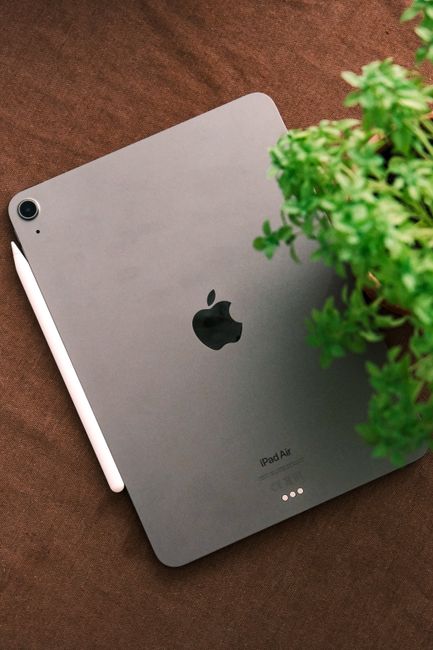
The Only New iPads You Should Be Buying: Top Configurations for M4 iPad Pro & M2 iPad Air
Apple’s latest iPad Pro with the M4 chip and the M2 iPad Air represent significant leaps forward in tablet technology. For users seeking the pinnacle of tablet performance, productivity, and portability, understanding the optimal configurations for these devices is paramount. This guide will delve into the specific models and specifications that offer the best value and future-proofing, ensuring your investment delivers the most impactful experience. We’ll focus on the M4 iPad Pro, exploring its various configurations and the ideal choices for different user needs, before transitioning to the M2 iPad Air, highlighting its strengths and recommended setups for its target audience.
The M4 iPad Pro is a generational leap, particularly for creative professionals and power users. At its core is the M4 chip, an SoC designed with a focus on AI acceleration and unparalleled performance for demanding tasks. The headline feature is its unprecedented thinness and lightness, making it the most portable high-performance tablet on the market. For the M4 iPad Pro, the decision matrix revolves around screen size, storage capacity, and cellular connectivity. The 11-inch and 13-inch models offer the same core performance, with the larger screen naturally being more conducive to multitasking and immersive content creation.
For the M4 iPad Pro, the base configurations start with 256GB of storage. This is a crucial point for buyers. While 128GB might suffice for basic usage, professionals working with large video files, high-resolution images, complex 3D models, or extensive app libraries will quickly find themselves constrained. Therefore, our top recommendation for the M4 iPad Pro, regardless of screen size, is to opt for at least 512GB of storage. This provides ample headroom for current and future projects, allowing for smooth operation without constant file management. For those who consistently deal with massive datasets, such as professional video editors or architects, the 1TB or even 2TB configurations become compelling choices, especially when considering the future-proofing aspect of a device intended to last several years. The price jump between storage tiers is significant, but the long-term usability and reduced frustration associated with ample storage space often justify the expense for power users.
Another key consideration for the M4 iPad Pro is cellular connectivity. While Wi-Fi 6E is incredibly fast and ubiquitous, the cellular models offer unparalleled flexibility. If your workflow involves working from diverse locations, client sites, or areas with unreliable Wi-Fi, the cellular option is a non-negotiable upgrade. It transforms the iPad Pro from a powerful tablet into a truly untethered workstation. The additional cost for cellular is a worthwhile investment for those who depend on constant connectivity for productivity. Therefore, our top configuration for a mobile professional using the M4 iPad Pro would be the 13-inch M4 iPad Pro with 1TB (or 2TB) storage and cellular connectivity. This configuration embodies the ultimate portable workstation, capable of handling virtually any task thrown at it, anywhere, anytime. For users primarily working from a fixed location with reliable Wi-Fi, the Wi-Fi-only version with 512GB or 1TB of storage remains an exceptional choice.
The M4 iPad Pro also introduces tandem OLED technology, delivering stunning contrast, vibrant colors, and incredible brightness, making it ideal for HDR content creation and consumption. This display technology is consistent across all M4 iPad Pro models, so the choice of screen size is largely personal preference and workflow-dependent. The 11-inch is exceptionally portable, fitting easily into most bags. The 13-inch offers a more expansive canvas for multitasking, split-screen applications, and detailed creative work, akin to a portable desktop.
Beyond internal specifications, accessories play a crucial role in maximizing the M4 iPad Pro’s potential. The Apple Pencil Pro is a must-have for any artistic or note-taking workflows, offering new hover capabilities, barrel roll, and haptic feedback for a more intuitive drawing and writing experience. The Magic Keyboard for iPad Pro (M4) is also transformative. Its redesigned, more durable construction, larger trackpad, and responsive keys turn the iPad Pro into a highly capable laptop replacement. When choosing a configuration, it’s wise to factor in the cost of these accessories, as they are integral to unlocking the full productivity potential of the M4 iPad Pro. For SEO purposes, it’s important to note that searching for "best M4 iPad Pro configuration for video editing," "M4 iPad Pro for graphic design," or "M4 iPad Pro with cellular for remote work" will likely lead users to these specific recommendations.
Moving on to the M2 iPad Air, it represents Apple’s best mid-range tablet offering, balancing performance, portability, and price. The M2 chip provides a significant performance upgrade over previous Air models, making it more than capable of handling a wide array of tasks, from everyday productivity to more demanding creative pursuits. The iPad Air retains its sleek and lightweight design, making it an excellent choice for students, educators, and general consumers who need a powerful and versatile device without the premium price tag of the Pro models.
For the M2 iPad Air, the storage configurations are particularly important, as the device is often purchased by users who may not have the budget for the highest-end Pro models but still require substantial space. The base 128GB configuration is acceptable for users who primarily consume content, browse the web, and use cloud-based applications. However, for students downloading textbooks and research papers, or individuals who take a lot of photos and videos, or those who want to install a wider range of applications without constantly managing storage, upgrading to the 256GB or 512GB configuration is highly recommended. The sweet spot for many users on the M2 iPad Air will be the 256GB model. This offers a substantial increase in storage over the base model at a more accessible price point than the higher-end Pro configurations. It’s sufficient for a robust app library, a significant amount of downloaded media, and moderate creative projects.
Similar to the iPad Pro, cellular connectivity is an option for the M2 iPad Air and is highly valuable for users who need to stay connected on the go. If your primary use case involves working or studying away from Wi-Fi hotspots, the cellular version of the M2 iPad Air is a worthwhile upgrade. For students on a budget who need internet access in libraries, cafes, or while commuting, a cellular iPad Air can be a game-changer. Our top configuration for the M2 iPad Air, balancing performance and value for a broad audience, would be the 13-inch M2 iPad Air with 256GB storage and cellular connectivity. The larger screen size on the Air is particularly beneficial for multitasking and general productivity, making it a more compelling option for those who lean towards laptop-like usage. The 256GB storage provides ample space for most users’ needs, and the cellular capability ensures connectivity wherever they are.
The M2 iPad Air, while not featuring the tandem OLED of the Pro model, still boasts a beautiful Liquid Retina display that is more than adequate for most tasks. The performance of the M2 chip is excellent for everyday tasks, streaming, light photo editing, and even some video editing. It’s a device that punches above its weight class in terms of performance for its price point.
When considering accessories for the M2 iPad Air, the Apple Pencil (2nd generation) is essential for those who want to take notes, sketch, or annotate. While it lacks some of the advanced features of the Apple Pencil Pro, it’s still a highly capable stylus that greatly enhances the Air’s utility. The Magic Keyboard Folio for iPad Air is also a strong recommendation for users looking to enhance their typing and trackpad experience, effectively transforming the iPad Air into a portable laptop. These accessories are crucial for users seeking to maximize their productivity on the M2 iPad Air, and they are often searched for in conjunction with the device itself, e.g., "M2 iPad Air with Apple Pencil 2" or "best keyboard for M2 iPad Air."
In conclusion, when it comes to new iPads, the M4 iPad Pro and M2 iPad Air stand out. For the M4 iPad Pro, prioritize at least 512GB of storage, opting for 1TB or 2TB if your professional demands are high, and strongly consider cellular connectivity for maximum flexibility. The 13-inch model offers a more expansive workspace. For the M2 iPad Air, the 256GB configuration strikes an excellent balance between storage and cost, and cellular connectivity is a valuable addition for mobile users. Again, the 13-inch model offers a superior multitasking experience. These configurations are designed to provide the best long-term value, performance, and user experience, ensuring your chosen iPad is a powerful tool for years to come, aligning with top SEO keywords for Apple tablet purchases and productivity.


