WhatsApp Expands Apple Watch Experience with Full System Emoji Reaction Support


The landscape of wrist-based messaging continues to evolve as Meta platforms optimize their ecosystems for wearable technology. WhatsApp has officially begun rolling out support for the complete watchOS emoji library to its dedicated Apple Watch application. This update marks a significant milestone in closing the feature gap between messaging on iOS devices and Apple’s wearable platform, eliminating a restriction that previously limited users to a heavily curated selection of default reactions directly from their wrists.
Background and Evolution of WhatsApp on watchOS
For years, the experience of using WhatsApp on an Apple Watch was rudimentary at best. Users relied almost exclusively on standard system notifications pushed from their iPhones. While these notifications allowed wearers to read incoming messages and dictate or quick-reply with text, a native, standalone application for watchOS was conspicuously absent. This forced millions of global users to retrieve their iPhones for nearly every action beyond basic text replies.
That dynamic shifted dramatically late last year when Meta released a fully featured, standalone WhatsApp application designed specifically for the Apple Watch. The launch introduced robust capabilities long sought after by the platform’s user base, including comprehensive chat history synchronization, voice message playback, call notifications, and direct emoji reactions.
However, the initial iteration of the watchOS app included a notable compromise: emoji reactions were restricted to a rigid preset of just six standard emojis. Users who wished to express nuanced emotions, humor, or cultural context outside of those six default choices were required to pull out their iPhones, dampening the untethered convenience that smartwatches are fundamentally designed to provide.
The Rollout of the Full watchOS Emoji Library
According to detailed tracking reports from the industry publication WABetaInfo, WhatsApp is actively dismantling this limitation. The latest software update introduces an expansive emoji picker directly within the watchOS application, mirroring the depth of the system-wide emoji library available across Apple’s ecosystem.
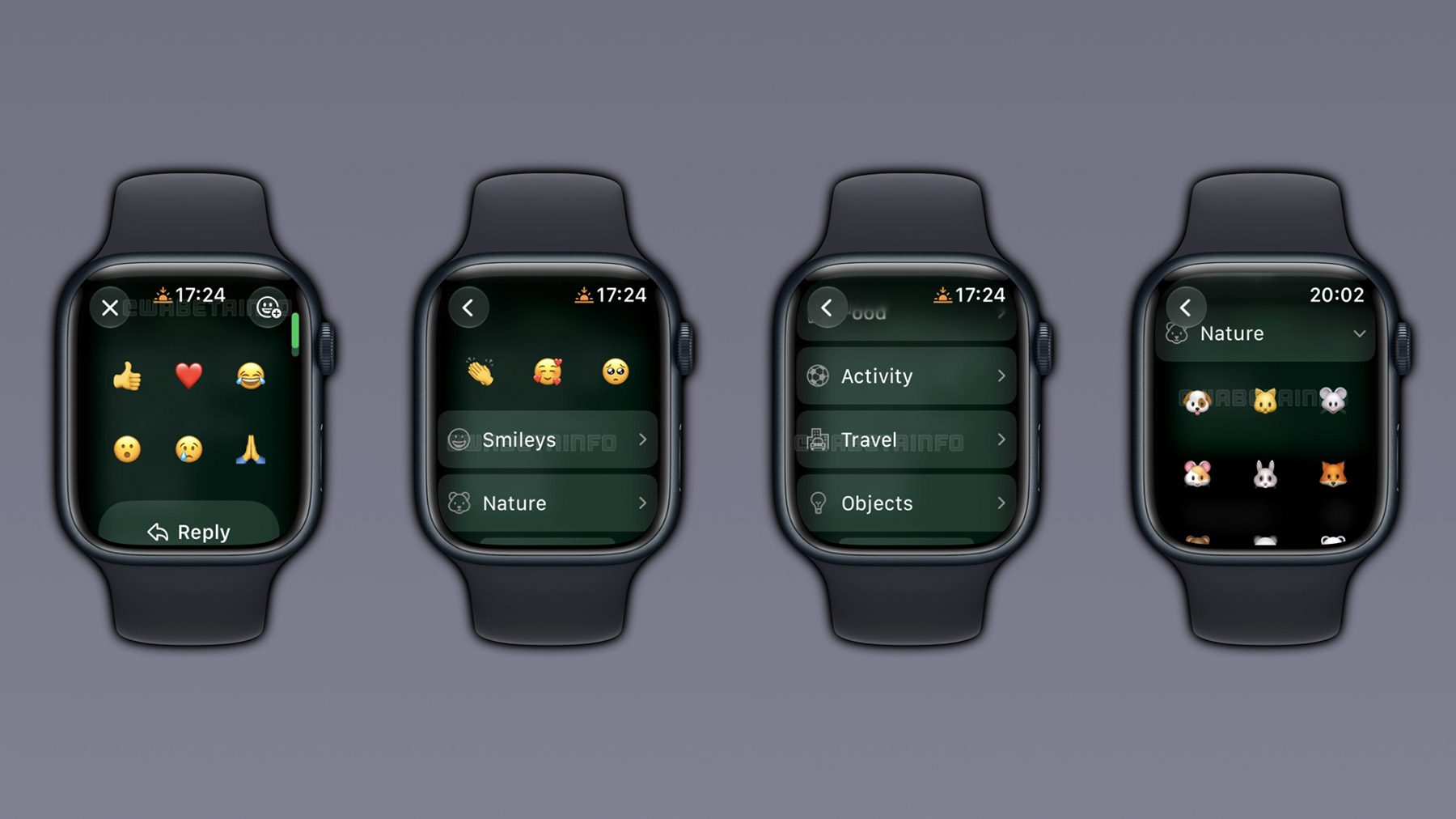
While the familiar interaction model—tapping and holding a message—still defaults to the quick-selection row of six frequently used or standard emojis, users can now tap an expanded menu icon. This action launches a comprehensive library organized systematically into familiar categories.
Industry analysts tracking the deployment note that the integration has been meticulously designed to fit the compact screen constraints of the Apple Watch without sacrificing usability. The interface neatly categorizes expressions into eight distinct groups:
- Smileys and Emotion
- Animals and Nature
- Food and Drink
- Activity and Sports
- Travel and Places
- Objects
- Symbols
- Flags
In addition to categorical navigation, the updated emoji interface features a dedicated section for recently used emojis positioned at the top of the picker. This thoughtful design choice minimizes scrolling, ensuring that users can deploy their preferred reactions with maximum efficiency during fast-paced conversations.

Gradual Deployment Strategy and Availability
As is standard practice for major software deployments across Meta’s application portfolio, the full emoji reaction feature is rolling out via a staged server-side update. Industry watchers and beta testers note that while the feature is officially active as of this week, it may take several weeks to reach the entire global user base.
Users eager to access the expanded library are advised to ensure that both their iPhone and Apple Watch are running the latest compatible software versions and that their WhatsApp application is updated to the most recent build available through the App Store. Because the rollout is managed progressively on Meta’s backend servers, manual app updates alone may not instantly trigger the feature’s appearance, requiring patience as the deployment scales globally.
Implications for Wearable Communication and Ecosystem Parity
The continuous refinement of the WhatsApp Apple Watch app underscores a broader industry shift: consumers increasingly expect parity between primary mobile devices and secondary wearables. Smartwatches have transitioned rapidly from simple fitness trackers and notification mirrors to fully functional communication hubs capable of handling complex interactions independently.

From a product design perspective, expanding input options on a constrained screen size presents distinct engineering challenges. Watch manufacturers and third-party developers continually balance the need for rich, expressive communication features against the physical limitations of tiny touch targets and battery conservation constraints. By integrating native system categories and persistent "recent" lists, WhatsApp has streamlined user input, reducing the cognitive and physical friction of typing or reacting on a small display.
Furthermore, this update strengthens Meta’s competitive positioning in regions and demographics where Apple Watch adoption is exceptionally high. As messaging platforms battle for daily user engagement, eliminating minor inconveniences—such as being forced to switch devices merely to send a specific emoji—plays a critical role in user retention and satisfaction.
As the staged rollout continues to scale globally over the coming weeks, millions of Apple Watch users will soon find themselves equipped with the full spectrum of digital expression right on their wrists, cementing the wearable device as an increasingly self-sufficient tool for modern communication.