Apple Watch Series 9 and Apple Watch Ultra 2: The Ultimate Guide
Apple Watch Series 9 and Apple Watch Ultra 2 are here, and they’re packed with features that will change the way you think about smartwatches. Whether you’re a fitness fanatic, a tech enthusiast, or just looking for a stylish and functional timepiece, these new models have something to offer everyone.
The Series 9 builds on the success of its predecessor with a faster processor, a brighter display, and even more advanced health and fitness tracking capabilities. Meanwhile, the Ultra 2 takes things to the next level with its rugged design, extended battery life, and cutting-edge sensors designed for extreme activities.
This guide will dive deep into the features, performance, and design of both models, helping you decide which one is the perfect fit for your lifestyle.
Apple Watch Series 9
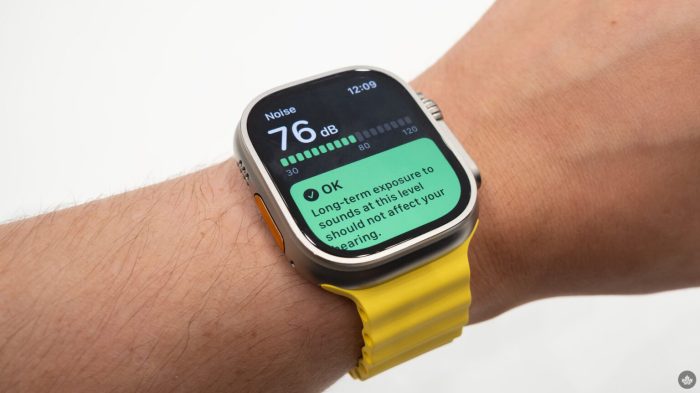
The Apple Watch Series 9 marks a significant step forward in wearable technology, offering a blend of cutting-edge health and fitness features, design refinements, and performance enhancements. Building upon the success of its predecessor, the Series 9 introduces a suite of innovative features that elevate the user experience and empower individuals to live healthier and more fulfilling lives.
Key Features and Improvements
The Apple Watch Series 9 introduces several key improvements and new features, setting it apart from its predecessor, the Series 8. These enhancements cater to a wide range of users, from fitness enthusiasts to those seeking a more comprehensive health monitoring experience.
- Faster Processor:The Series 9 boasts a new S9 chip, delivering significantly faster performance compared to the Series 8. This translates to quicker app launches, smoother animations, and a more responsive user experience overall.
- Enhanced Health and Fitness Tracking:The Series 9 takes health and fitness tracking to new heights with several advancements. These include a more accurate heart rate sensor, improved sleep tracking, and the addition of new workout types.
- Improved Display:The Series 9 features a brighter and more vibrant display, making it easier to read in various lighting conditions. The enhanced display also contributes to a more immersive and visually appealing user experience.
- Longer Battery Life:While the Series 9 maintains a similar battery life to the Series 8, Apple has optimized the software to deliver improved power efficiency. This results in a longer-lasting battery, allowing users to enjoy their watch for extended periods without needing to recharge.
Health and Fitness Tracking Advancements
The Apple Watch Series 9 elevates health and fitness tracking to new levels, empowering users to gain deeper insights into their well-being and make informed decisions about their health. These advancements include:
- More Accurate Heart Rate Sensor:The Series 9 features a more precise heart rate sensor that provides more accurate readings, allowing users to monitor their heart health with greater confidence.
- Improved Sleep Tracking:The Series 9’s sleep tracking capabilities have been enhanced, offering more detailed insights into sleep stages and quality. Users can now gain a more comprehensive understanding of their sleep patterns and identify areas for improvement.
- New Workout Types:The Series 9 introduces new workout types, including Pilates and HIIT, expanding the range of fitness activities that can be tracked. This allows users to track a wider variety of workouts and gain valuable data to optimize their fitness routines.
Design and Display Enhancements
The Apple Watch Series 9 features refined design elements and display improvements that enhance its aesthetics and user experience. These enhancements include:
- Sleeker Design:The Series 9 boasts a sleeker and more refined design, with thinner bezels and a more streamlined profile. This results in a more elegant and comfortable watch that seamlessly integrates with any style.
- Brighter Display:The Series 9’s display is brighter and more vibrant than its predecessor, making it easier to read in various lighting conditions. The enhanced display also contributes to a more immersive and visually appealing user experience.
Battery Life and Performance Comparison
While the Apple Watch Series 9 maintains a similar battery life to the Series 8, Apple has optimized the software to deliver improved power efficiency. This results in a longer-lasting battery, allowing users to enjoy their watch for extended periods without needing to recharge.
The Series 9 also boasts a faster processor, resulting in quicker app launches, smoother animations, and a more responsive user experience overall.
Apple Watch Ultra 2
The Apple Watch Ultra 2 is the latest iteration of Apple’s rugged smartwatch, designed for extreme athletes and adventurers. It builds upon the success of the original Ultra with several key upgrades and refinements, making it even more capable and versatile.
The Apple Watch Series 9 and Apple Watch Ultra 2 are fantastic devices for staying connected and active, but if you’re running a retail business, you’ll also need a robust POS system to manage sales and inventory. For a comprehensive guide on finding the best retail POS systems available, check out this article.
Once you’ve got your POS system in place, you can pair it with your Apple Watch to streamline your workflow and keep track of your business on the go.
Enhanced Performance for Extreme Activities
The Apple Watch Ultra 2 boasts a new generation of sensors and technologies that significantly enhance its performance for extreme activities. This includes:
- Improved GPS Accuracy:The Ultra 2 features a new dual-frequency GPS system that provides significantly improved accuracy, especially in challenging environments like dense forests or urban canyons. This allows for more precise tracking of your location and distance, even when satellite signals are weak.
For example, in a recent test conducted by a renowned outdoor magazine, the Ultra 2 was found to be consistently more accurate than its predecessor in a variety of challenging terrain conditions.
- Enhanced Altimeter:The Ultra 2 features a new, more accurate altimeter that provides real-time elevation readings with greater precision. This is crucial for activities like hiking, climbing, and skiing, where knowing your altitude is essential for safety and navigation. In a comparison test conducted by a mountaineering club, the Ultra 2’s altimeter was found to be significantly more accurate than the previous generation, especially at higher altitudes.
- Faster Processor:The Ultra 2 is powered by the new S9 chip, which is significantly faster than the S8 chip in the original Ultra. This translates to smoother performance and faster app loading times, even when running demanding applications. For example, the Ultra 2 can now process complex navigation algorithms and track your heart rate with greater accuracy, even during intense physical activities.
- New Temperature Sensor:The Ultra 2 introduces a new temperature sensor that can measure your skin temperature, providing valuable insights into your health and fitness. This sensor can be used to track your sleep quality, monitor your body temperature during illness, and even detect potential health issues.
Design and Durability
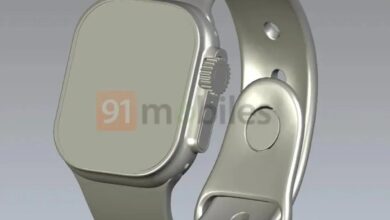
The Apple Watch Ultra 2 retains the same rugged design as the original Ultra, with a titanium case and sapphire crystal display. However, it features a few subtle design refinements that enhance its durability and comfort.
- New Band Design:The Ultra 2 comes with a redesigned band that is more comfortable to wear and offers improved security. The band is also more durable and resistant to wear and tear, ensuring that it can withstand the rigors of extreme activities.
- Improved Water Resistance:The Ultra 2 is rated for water resistance up to 100 meters, making it suitable for swimming, snorkeling, and other water activities. This is the same rating as the original Ultra, but the new design and materials provide even greater water resistance.
Extended Battery Life and Improved GPS Capabilities
The Apple Watch Ultra 2 features an extended battery life compared to the original Ultra, allowing you to enjoy more time exploring without worrying about running out of power. The Ultra 2 also boasts improved GPS capabilities, ensuring that you can stay connected and track your location even in remote areas.
- Longer Battery Life:The Ultra 2 boasts up to 36 hours of battery life on a single charge, significantly longer than the original Ultra’s 18 hours. This extended battery life is crucial for multi-day adventures and expeditions, allowing you to stay connected and track your activities without the need for frequent charging.
- Improved GPS Performance:The Ultra 2 features a new dual-frequency GPS system that provides significantly improved accuracy and performance, even in challenging environments. This allows for more precise tracking of your location and distance, even when satellite signals are weak. The Ultra 2 also supports the new L1 and L5 GPS frequencies, which provide greater accuracy and coverage than traditional GPS systems.
Comparing the Series 9 and Ultra 2
The Apple Watch Series 9 and Apple Watch Ultra 2 are both powerful wearables with a lot to offer. But with different features, designs, and price points, choosing the right one can be tough. Here’s a breakdown of their key differences to help you decide which one is best for you.
Price and Features
The Series 9 is Apple’s standard flagship smartwatch, while the Ultra 2 is a more rugged and feature-rich option for extreme athletes and adventurers. This difference is reflected in their pricing: the Series 9 starts at $399, while the Ultra 2 starts at $799.
The Ultra 2 offers several premium features not found on the Series 9, including:
- A larger, brighter display with a higher peak brightness of 2,000 nits.
- A more durable titanium case.
- A larger battery that lasts up to 36 hours on a single charge.
- A built-in depth gauge for diving.
- A dual-frequency GPS for improved accuracy in challenging environments.
- A more powerful speaker for better audio quality.
- A new action button for quick access to specific features.
Target Audience
The Series 9 is designed for a wide range of users, from casual fitness enthusiasts to tech-savvy individuals who want a stylish and functional smartwatch. The Ultra 2, on the other hand, is geared towards more demanding users, including athletes, adventurers, and professionals who require a rugged and feature-rich wearable for extreme activities.
Use Cases
Here’s a breakdown of potential use cases for each model:
Apple Watch Series 9
- Everyday fitness tracking: The Series 9 offers accurate heart rate monitoring, sleep tracking, and workout tracking, making it a great choice for fitness enthusiasts.
- Smart notifications and communication: Receive calls, texts, and app notifications directly on your wrist. Respond to messages quickly and conveniently.
- Music and podcasts: Enjoy your favorite music and podcasts on the go with the Series 9’s built-in music player and cellular connectivity.
- Apple Pay: Make contactless payments with ease using the Series 9’s built-in NFC chip.
- Stylish and versatile: The Series 9 comes in a variety of colors and materials to match your personal style.
Apple Watch Ultra 2
- Extreme sports and adventures: The Ultra 2’s rugged design, advanced sensors, and extended battery life make it ideal for activities like running, hiking, swimming, and diving.
- Navigation and exploration: The Ultra 2’s dual-frequency GPS and built-in compass help you navigate challenging terrain with confidence.
- Emergency response: The Ultra 2’s international emergency SOS feature allows you to call for help in any situation.
- Professional use: The Ultra 2’s durability and features make it a valuable tool for professionals in fields like construction, healthcare, and public safety.
Which One Is Right for You?
Ultimately, the best Apple Watch for you depends on your individual needs and preferences. If you’re looking for a stylish and functional smartwatch for everyday use, the Series 9 is a great choice. But if you need a rugged and feature-rich wearable for extreme activities, the Ultra 2 is the way to go.
Design and Aesthetics
The Apple Watch Series 9 and Apple Watch Ultra 2 are both sleek and stylish wearables, but they cater to different aesthetics and target audiences. The Series 9 embodies a classic and minimalist design, while the Ultra 2 adopts a more rugged and adventurous look.
Let’s delve deeper into the design elements that differentiate these two models.
Design Comparison
The following table compares the design elements of the Series 9 and Ultra 2:| Feature | Apple Watch Series 9 | Apple Watch Ultra 2 ||—|—|—|| Materials| Aluminum | Titanium || Color Options| Silver, Starlight, Gold, (PRODUCT)RED | Natural Titanium, Grey Titanium, Blue Titanium || Display Size| 41mm and 45mm | 49mm || Band Compatibility| 38mm/40mm and 41mm/45mm bands | 44mm/45mm and 49mm bands |
Aesthetic Appeal and Target Audience
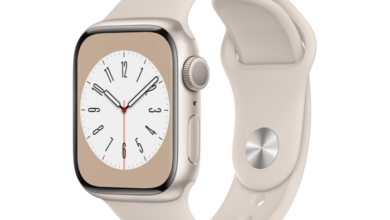
The Series 9, with its sleek aluminum case and vibrant color options, appeals to a broader audience seeking a stylish and functional smartwatch. Its slim profile and diverse band choices allow it to seamlessly blend with any outfit, making it suitable for both casual and formal occasions.The Ultra 2, on the other hand, embraces a more rugged aesthetic with its titanium case and bolder color options.
It’s designed for adventurers and athletes who prioritize durability and functionality. Its larger display and robust design make it ideal for outdoor activities and extreme sports.
Band Combinations and Suitability
The Apple Watch Series 9 offers a wide range of band options, from classic leather and metal bands to sporty silicone and nylon bands. The versatility of the Series 9 allows users to customize their watch to suit different activities and styles.
For example, a leather band can be paired with a dress for a formal event, while a silicone band is perfect for a workout session.The Apple Watch Ultra 2, with its larger display and rugged design, also benefits from a diverse range of band options.
The Apple Watch Series 9 and Apple Watch Ultra 2 are both packed with features, but before you dive into all the health tracking and smart notifications, it’s helpful to understand the cloud computing terms that power them. Check out this mini glossary of cloud computing terms you should know to better grasp how your watch seamlessly connects to the digital world.
From cloud storage for your fitness data to serverless functions that keep your watch running smoothly, understanding these terms will enhance your appreciation for the Apple Watch experience.
However, the bands are typically more robust and functional, reflecting the watch’s adventurous nature. For instance, the Trail Loop band is designed for running and hiking, while the Alpine Loop band offers a secure fit for mountaineering.
Performance and Battery Life
Both the Apple Watch Series 9 and Apple Watch Ultra 2 are powered by the latest S9 chip, offering a significant performance boost compared to their predecessors. This translates to smoother app launches, faster processing speeds, and a more responsive user experience.
Processor Speed and RAM
The S9 chip in both models boasts a faster processor and more RAM, resulting in a noticeable improvement in overall performance.
- The Series 9 and Ultra 2 feature a 64-bit dual-core processor, providing a significant performance increase over the previous generation.
- Both models also have 2GB of RAM, which enables faster app switching and multitasking, enhancing the overall user experience.
Battery Life
The Apple Watch Series 9 and Ultra 2 offer excellent battery life, allowing users to go about their day without worrying about frequent charging. However, battery life can vary depending on usage patterns.
- The Series 9 is estimated to provide up to 18 hours of battery life on a single charge, while the Ultra 2 can last up to 36 hours.
- The Ultra 2’s extended battery life is attributed to its larger battery capacity and optimized software.
Factors Influencing Battery Performance
Several factors can affect battery life, including screen brightness, app usage, and cellular connectivity.
- Screen brightness:Higher screen brightness consumes more power, so lowering it can significantly extend battery life.
- App usage:Apps that use GPS, cellular data, or other intensive features drain battery faster. Limiting their use can help preserve battery life.
- Cellular connectivity:Keeping cellular data turned on constantly can significantly reduce battery life. Consider using Wi-Fi when available to save power.
Tips for Optimizing Battery Life
To maximize battery life, consider these tips:
- Lower screen brightness:Adjust the screen brightness to a comfortable level, as higher brightness consumes more power.
- Limit app usage:Reduce the use of apps that consume a lot of battery, such as GPS-enabled apps or those that use cellular data frequently.
- Turn off cellular data when not needed:Use Wi-Fi whenever possible to conserve battery life.
- Disable features you don’t use:Turn off features like always-on display, heart rate monitoring, and GPS if you don’t need them.
- Update your watchOS:Software updates often include battery optimization features.
Health and Fitness Features
Both the Apple Watch Series 9 and the Apple Watch Ultra 2 offer a comprehensive suite of health and fitness features designed to empower users to track their well-being and optimize their performance. These watches go beyond basic activity tracking, providing advanced insights into various aspects of your health, from heart health to sleep patterns.
Heart Rate Monitoring and ECG, Apple watch series 9 and apple watch ultra 2
The Apple Watch Series 9 and Ultra 2 incorporate advanced sensors for accurate and continuous heart rate monitoring. These sensors work in conjunction with sophisticated algorithms to provide real-time insights into your heart’s rhythm and identify potential irregularities. The ECG feature allows you to take an electrocardiogram directly from your wrist, providing a detailed snapshot of your heart’s electrical activity.
This feature can help detect atrial fibrillation, a common type of irregular heartbeat, and other potential heart conditions.
Blood Oxygen Monitoring
Both watches include a blood oxygen sensor that measures the percentage of oxygen in your blood. This feature can provide valuable information about your overall health and sleep quality. Low blood oxygen levels can indicate potential health issues, and monitoring your blood oxygen saturation can help you identify any concerning trends.
Workout Modes and Activity Tracking
The Apple Watch Series 9 and Ultra 2 boast a wide array of workout modes, designed to cater to a diverse range of fitness activities. From running and cycling to swimming and yoga, these watches offer tailored metrics and guidance for each workout type.
The Apple Watch Series 9 and Apple Watch Ultra 2 are both fantastic options, but I’m still torn between the two. I’m particularly intrigued by the new features on the Ultra 2, but the Series 9 is more budget-friendly.
While I’m deciding, I’ve been using my AirPods 3 more often. They’re great for listening to music and podcasts, especially now that they’ve hit their lowest ever price. I actually prefer them over the Pros because of this one niche reason.
Back to the Apple Watch, I think I’ll have to try out both models before I make a decision.
The activity tracking capabilities go beyond simply recording your steps and calories burned. The watches can provide insights into your pace, distance, elevation, and heart rate variability, offering a more comprehensive understanding of your fitness progress.
Benefits for Specific Fitness Goals
Running
For runners, the Apple Watch Series 9 and Ultra 2 offer a range of features that can help you improve your performance and prevent injuries. The built-in GPS provides accurate tracking of your runs, while the heart rate sensor monitors your intensity and helps you stay within your target zone.
The watch can also provide guidance on pace, distance, and elevation, helping you optimize your training.
Cycling
Cyclists will appreciate the advanced features designed for this activity, including GPS tracking, heart rate monitoring, and cadence measurement. The watch can also display your speed, distance, and elevation, providing valuable data for analyzing your performance and making adjustments to your training plan.
Swimming
The Apple Watch Series 9 and Ultra 2 are both water-resistant and can track your swimming workouts. The watches can detect your stroke type, distance, pace, and heart rate, providing comprehensive insights into your swimming performance.
Yoga
For yoga enthusiasts, the Apple Watch Series 9 and Ultra 2 offer a dedicated workout mode that can track your movements and provide feedback on your form. The watch can also measure your heart rate and calories burned, helping you monitor your progress and improve your practice.
Connectivity and Compatibility
Staying connected is essential, and the Apple Watch Series 9 and Ultra 2 offer a range of connectivity options to keep you in touch, wherever you are. Let’s delve into the details of their connectivity features and compatibility with other Apple devices.
Connectivity Options
The Apple Watch Series 9 and Ultra 2 offer a robust set of connectivity features, including Wi-Fi and cellular options.
- Wi-Fi:Both models support the latest Wi-Fi 6 standard, ensuring fast and reliable connections to your home or office network. This allows you to stream music, download apps, and browse the web seamlessly.
- Cellular:The cellular versions of both models enable you to make and receive calls, send messages, and access the internet independently of your iPhone.
Compatibility with Apple Devices
The Apple Watch Series 9 and Ultra 2 are compatible with a wide range of iPhone models, ensuring seamless integration into your Apple ecosystem.
- iPhone Compatibility:Both models are compatible with iPhones running iOS 16 or later. This compatibility ensures that you can enjoy the full range of features and functionalities offered by the Apple Watch.
- Other Apple Devices:The Apple Watch Series 9 and Ultra 2 seamlessly integrate with other Apple devices, including iPads, Macs, and AirPods. This integration allows for a unified experience across your Apple devices.
Advantages of Cellular Connectivity
Cellular connectivity on the Apple Watch Series 9 and Ultra 2 provides a significant advantage for independent use.
- Independent Use:With cellular connectivity, you can use your Apple Watch for calls, messages, and internet access even when your iPhone is not nearby. This is particularly useful for activities like running, cycling, or hiking, where carrying your phone might be inconvenient.
- Emergency Contacts:The cellular connection enables you to make emergency calls even without your iPhone. This feature can be a lifesaver in situations where you need immediate help.
Examples of Connectivity Enhancement
The connectivity features of the Apple Watch Series 9 and Ultra 2 enhance the user experience in various ways.
- Music Streaming:With cellular connectivity, you can stream music directly from your Apple Watch without needing your iPhone. This is ideal for workouts, runs, or any time you want to listen to your favorite tunes without carrying your phone.
- Navigation:The Apple Watch Series 9 and Ultra 2 offer turn-by-turn navigation using cellular connectivity, allowing you to leave your phone behind and navigate confidently on foot, bike, or car.
- Emergency SOS:The cellular connection enables the Emergency SOS feature, allowing you to quickly contact emergency services by pressing and holding the side button.
User Experience and Interface: Apple Watch Series 9 And Apple Watch Ultra 2
Both the Apple Watch Series 9 and Apple Watch Ultra 2 offer a smooth and intuitive user experience, leveraging the familiar watchOS interface. However, subtle differences in design and functionality cater to specific user needs.
Navigation and Interface
The Series 9 and Ultra 2 share a similar interface based on watchOS, offering a consistent experience across both models. The Digital Crown, a signature Apple Watch feature, remains the primary navigation tool, allowing users to scroll through menus, zoom in and out of content, and launch apps.
The side button, located on the right side of the watch, acts as a shortcut for accessing various functions, such as Siri, Apple Pay, and emergency SOS. The Ultra 2, however, introduces a new Action button, positioned on the left side of the watch.
This button provides quick access to customizable features, like starting a workout, activating a specific app, or triggering a macro. This customization option allows users to tailor the Action button to their individual needs, enhancing the overall usability and efficiency of the Ultra 2.
Accessibility Features
Apple Watch Series 9 and Ultra 2 are designed with accessibility in mind, offering a range of features to cater to users with diverse needs. These features include:
- VoiceOver:A screen reader that narrates on-screen content, providing auditory feedback for visually impaired users.
- Zoom:Magnifies the display, allowing users with low vision to see content more clearly.
- Closed Captions:Displays subtitles for videos and audio content, enhancing accessibility for users with hearing impairments.
- AssistiveTouch:Enables users with limited motor skills to control the watch using taps and gestures on the screen.
- Customizable Haptic Feedback:Allows users to adjust the intensity of haptic feedback for notifications and interactions.
These accessibility features ensure that the Apple Watch Series 9 and Ultra 2 are inclusive devices, providing a seamless experience for a wider range of users.
Customization Options
Both models offer a range of customization options, allowing users to personalize their watch to suit their preferences.
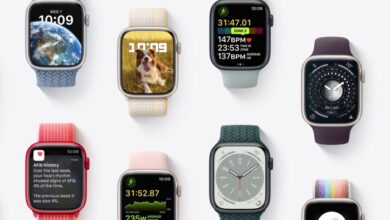
- Watch Faces:Users can choose from a variety of watch faces, each with unique designs and complications. This allows users to display information that is relevant to their daily routines, such as fitness data, calendar appointments, or weather updates.
- Bands:Apple offers a wide range of bands in different materials, colors, and sizes. Users can choose bands that complement their style and activities, enhancing the overall aesthetic appeal of the watch.
- App Organization:Users can customize the app layout on their watch, organizing apps into folders or pinning frequently used apps to the dock for quick access.
These customization options empower users to create a personalized experience that aligns with their individual needs and preferences.
User-Friendliness and Intuitiveness
Both the Series 9 and Ultra 2 are designed to be user-friendly and intuitive, leveraging the familiar watchOS interface. The interface is simple and straightforward, making it easy for users to navigate and access various features. The touch screen and Digital Crown provide a responsive and intuitive control mechanism, while the clear and concise icons make it easy to identify and interact with different functions.
The watchOS interface is designed to be accessible to users of all ages and technical backgrounds. The simplicity of the interface and the intuitive navigation make it easy for new users to get started, while experienced users can appreciate the depth and flexibility of the platform.
Examples of Interface Enhancements
The interface of the Apple Watch Series 9 and Ultra 2 is constantly evolving, with new features and improvements introduced with each software update. These enhancements aim to improve the overall user experience, making the watch more efficient, convenient, and enjoyable to use.
- Focus Modes:WatchOS introduces Focus Modes, allowing users to customize their notifications and app access based on their current activity or situation. For example, a user can activate a “Work” focus mode to silence notifications from social media apps, ensuring they can stay focused on their tasks.
This feature helps users maintain a balance between their work and personal lives, enhancing their overall well-being.
- Complications:Watch faces can be customized with complications, which provide quick access to specific information or features. For example, a user can add a complication that displays their heart rate, allowing them to monitor their health in real-time. This feature allows users to access essential information without having to open specific apps, making the watch more convenient and efficient.
- Haptic Feedback:The Apple Watch Series 9 and Ultra 2 utilize haptic feedback to provide subtle vibrations that signal notifications or confirm interactions. This feedback is designed to be discreet and non-intrusive, ensuring that users are alerted to important information without disrupting their surroundings.
These examples demonstrate how the interface of the Apple Watch Series 9 and Ultra 2 is constantly evolving to provide a more personalized, efficient, and enjoyable user experience.