Find the Best Receipt Scanning Apps for Effortless Organization
Best receipt scanning apps are revolutionizing how we manage our finances. Gone are the days of cluttered wallets and lost receipts. These apps simplify expense tracking, offer a digital record of your spending, and even help you snag rewards points.
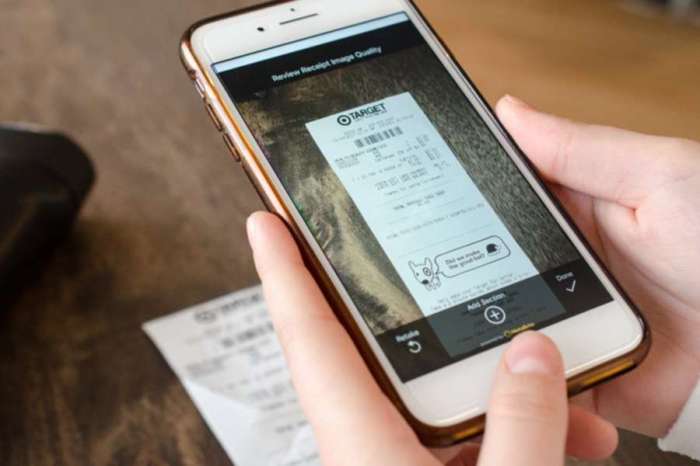
Imagine a world where your receipts are instantly digitized, categorized, and stored securely in the cloud. With a simple snap of your phone, you can track your expenses, analyze your spending habits, and even claim tax deductions with ease.
That’s the power of receipt scanning apps, and it’s changing the way we manage our money.
Receipt Scanning Apps: Streamline Your Finances
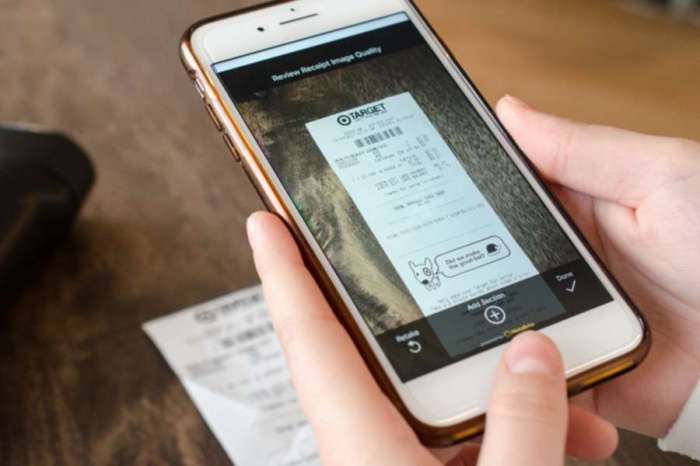
Receipt scanning apps have become increasingly popular in recent years, offering a convenient and efficient way to manage your finances. These apps allow you to digitally capture and store receipts, eliminating the need for bulky paper files. By digitizing receipts, you can easily track your expenses, categorize them, and access them anytime, anywhere.
Benefits of Receipt Scanning Apps
Receipt scanning apps offer a plethora of benefits for both individuals and businesses. These apps can simplify expense tracking, improve organization, and enhance financial insights.
- Effortless Expense Tracking:One of the most significant advantages of receipt scanning apps is their ability to streamline expense tracking. By automatically capturing and storing receipts, these apps eliminate the need for manual data entry. You can easily search for specific receipts, filter them by date, merchant, or category, and gain valuable insights into your spending habits.
- Enhanced Organization:Receipt scanning apps provide a centralized platform for storing and managing receipts. Instead of sifting through piles of paper receipts, you can easily access all your receipts digitally, organized by date, merchant, or category. This eliminates clutter and saves you time and effort when searching for specific receipts.
- Improved Financial Insights:By providing a comprehensive overview of your expenses, receipt scanning apps empower you to make informed financial decisions. You can analyze your spending patterns, identify areas where you can save money, and track your progress towards your financial goals.
Challenges of Traditional Receipt Management
Traditional methods of receipt management often present several challenges, including:
- Lost or Damaged Receipts:Paper receipts are prone to getting lost, damaged, or misplaced. This can make it difficult to track expenses and claim refunds or reimbursements.
- Time-Consuming Data Entry:Manually entering receipt information into spreadsheets or accounting software can be a tedious and time-consuming task.
- Lack of Organization:Paper receipts often end up scattered in wallets, purses, or desk drawers, making it difficult to find specific receipts when needed.
- Environmental Impact:Paper receipts contribute to deforestation and waste, which can negatively impact the environment.
Key Features of Receipt Scanning Apps
Receipt scanning apps have become indispensable tools for individuals and businesses alike, offering a streamlined and efficient way to manage expenses and track finances. These apps leverage advanced technology to automate the process of capturing, analyzing, and organizing receipt data, providing valuable insights into spending habits and financial performance.
Image Capture and Processing
Receipt scanning apps excel at capturing high-quality images of receipts using your smartphone’s camera. They often employ sophisticated image processing techniques to enhance the clarity and readability of the scanned documents, ensuring accurate data extraction.
Data Extraction
Once an image is captured, the app’s powerful algorithms analyze the receipt and extract key information, such as:
- Date of purchase
- Total amount spent
- Merchant name and location
- Itemized list of purchased goods or services
- Tax details
This extracted data is then organized and stored within the app, providing a comprehensive record of your expenses.
Finding the best receipt scanning app can be a real game-changer for keeping track of your expenses, but let’s face it, the tech world is constantly evolving. It’s fascinating how Apple’s Vision Pro, with its impressive eye-tracking capabilities, could potentially shift the focus away from bulky AR glasses in the future.
This impressive Vision Pro feature will scale back on Apple’s future glasses-like version , and that could impact how we interact with technology, including those handy receipt scanning apps.
Expense Tracking and Categorization
Receipt scanning apps allow you to categorize your expenses, making it easier to track spending patterns and identify areas for potential savings. You can create custom categories, such as groceries, dining, transportation, entertainment, and more, based on your individual needs.
I’ve been trying out all the best receipt scanning apps lately, trying to find the one that’s perfect for keeping track of my expenses. I’m really impressed with how much easier it is to organize my receipts now, but I have to say, after two weeks with iOS 18, this one change could be the biggest quality of life improvement of the iPhones next software update ! It’s a game-changer for managing receipts and keeping track of my spending.
I’m definitely sticking with my favorite receipt scanning app, but this new feature is a welcome addition.
Cloud Storage and Synchronization
Most receipt scanning apps offer secure cloud storage, ensuring that your receipt data is backed up and accessible from any device. This cloud synchronization feature enables you to access your receipts and expense reports anytime, anywhere, and seamlessly share them with others.
Integration with Other Financial Tools, Best receipt scanning apps
Receipt scanning apps often integrate with other popular financial tools, such as bank accounts, credit card accounts, and budgeting apps. This integration allows for a more holistic view of your finances, providing a comprehensive picture of your income, expenses, and net worth.
Comparison of Popular Receipt Scanning Apps
Choosing the right receipt scanning app can be a daunting task, as there are many options available, each with its own set of features and benefits. This section delves into a comparative analysis of some popular receipt scanning apps, highlighting their key features, pricing, user experience, and pros and cons.
Comparison of Popular Receipt Scanning Apps
To make an informed decision, it’s helpful to compare the features and pricing of different apps. Here’s a table comparing some popular receipt scanning apps:
| App Name | Key Features | Pricing | User Interface | Pros | Cons |
|---|---|---|---|---|---|
| Expensify | Receipt scanning, expense tracking, mileage tracking, reporting, integrations with accounting software | Free plan, paid plans starting at $9 per month | Intuitive and user-friendly interface, mobile-first design | Comprehensive features, robust reporting capabilities, excellent integrations | Paid plans can be expensive for individual users |
| Shoeboxed | Receipt scanning, expense tracking, mileage tracking, mail forwarding, data extraction | Free plan, paid plans starting at $15 per month | Clean and simple interface, easy to use | Excellent data extraction capabilities, mail forwarding service, good customer support | Paid plans can be expensive, limited free plan features |
| Wave | Receipt scanning, expense tracking, invoicing, accounting software | Free plan, paid plans starting at $29 per month | Modern and intuitive interface, easy to navigate | Free plan with comprehensive features, integrated accounting software | Limited features in the free plan, some features require paid plans |
| Zoho Expense | Receipt scanning, expense tracking, mileage tracking, reporting, approval workflows | Free plan, paid plans starting at $5 per user per month | User-friendly interface, mobile-first design, customizable reporting | Affordable pricing, good reporting capabilities, customizable approval workflows | Limited features in the free plan, can be complex for small businesses |
| Receipt Bank | Receipt scanning, expense tracking, invoice processing, data extraction | Paid plans starting at $19.95 per month | Simple and intuitive interface, good data extraction capabilities | Excellent data extraction capabilities, robust automation features, good customer support | No free plan, can be expensive for individual users |
“The best receipt scanning app for you will depend on your specific needs and budget.”
Finding the best receipt scanning app can be a game-changer for tracking expenses, especially if you’re like me and always lose those little paper slips. But speaking of tech updates, did you hear about the major Vision Pro issue Apple just patched in VisionOS 11 beta?
You can now reset your password without visiting an Apple Store , which is a huge relief for those who’ve been locked out. Anyway, back to those receipt scanners – I’m still on the hunt for one that can automatically categorize my purchases, but I’ll keep you updated on my findings!
It’s important to consider your specific needs and budget when choosing a receipt scanning app. For example, if you’re a small business owner, you might want to choose an app with robust reporting and approval workflow features. If you’re an individual user, you might prefer an app with a free plan and a simple user interface.
Tips for Choosing the Best Receipt Scanning App: Best Receipt Scanning Apps
Choosing the right receipt scanning app can significantly simplify your financial management. With a plethora of options available, it’s crucial to consider your specific needs and preferences to make an informed decision.
Personal Needs and Preferences
The best receipt scanning app for you will depend on your individual needs and preferences. Consider the following factors:
- Frequency of use:If you frequently make purchases and need to track receipts, an app with advanced features like automatic receipt capture or integration with other financial tools might be beneficial. For occasional users, a basic app with simple scanning capabilities may suffice.
- Desired features:Some apps offer additional features like mileage tracking, expense categorization, or reporting capabilities. Determine which features are essential for your financial management goals.
- User interface:A user-friendly interface is crucial for a seamless and enjoyable experience. Look for an app with a clean layout, intuitive navigation, and easy-to-understand features.
Budget and Pricing Plans
Receipt scanning apps offer various pricing plans, ranging from free to subscription-based.
- Free apps:While free apps provide basic functionality, they often have limitations like limited storage space or restricted features. They might also display ads.
- Subscription-based apps:Paid apps typically offer more advanced features, unlimited storage, and enhanced data security. Consider your budget and the value you place on these benefits.
Device Compatibility
Ensure the app is compatible with your device’s operating system. Most apps are available for both iOS and Android devices.
Integration with Other Financial Tools, Best receipt scanning apps
If you use other financial management tools like budgeting apps or accounting software, consider apps that integrate seamlessly with them. This can streamline your financial workflow and reduce manual data entry.
Data Security and Privacy
Your financial data is sensitive, so choose an app that prioritizes data security and privacy. Look for apps that use encryption to protect your information and have a clear privacy policy outlining how they handle your data.
Practical Applications of Receipt Scanning Apps
Receipt scanning apps are more than just digital organizers for your paper clutter. They offer a wide range of practical applications that can significantly benefit both individuals and businesses in various aspects of their financial lives.
Personal Expense Tracking
Receipt scanning apps streamline personal expense tracking, making it easier to manage your budget and achieve your financial goals. By automatically extracting key information from receipts, such as date, merchant, and amount, these apps eliminate the need for manual data entry, saving you time and effort.
- Categorization and Analysis:Most receipt scanning apps allow you to categorize expenses, providing insights into where your money is going. This helps you identify areas where you can cut back and make informed spending decisions. For example, you can track how much you spend on groceries, dining out, entertainment, or transportation.
- Budgeting and Goal Setting:By analyzing your spending patterns, you can set realistic budgets and track your progress toward achieving your financial goals. You can set up alerts to notify you when you exceed your budget for specific categories. For instance, you can set a monthly limit for eating out or shopping.
- Receipt Organization:No more searching through piles of paper receipts. Receipt scanning apps keep all your receipts organized in a digital format, easily accessible whenever you need them. This simplifies the process of finding receipts for returns, warranty claims, or tax preparation.
Business Expense Management
Receipt scanning apps are essential tools for businesses of all sizes, simplifying expense management and improving financial reporting. These apps automate the process of capturing, organizing, and analyzing business expenses, reducing administrative overhead and increasing efficiency.
- Expense Reporting:Employees can easily scan receipts and submit expense reports, eliminating the need for manual data entry and reducing the risk of errors. The app can automatically generate reports, providing a clear overview of business expenses.
- Tax Preparation:Receipt scanning apps simplify tax preparation by organizing and categorizing business expenses, making it easier to claim deductions. They can generate reports that are compatible with accounting software, streamlining the tax filing process.
- Improved Accuracy and Efficiency:By eliminating manual data entry, receipt scanning apps reduce the risk of human errors in expense reporting. This ensures that financial records are accurate and reliable, improving the overall efficiency of expense management.
Tax Preparation
Receipt scanning apps simplify tax preparation by helping you organize and categorize your expenses, making it easier to claim deductions. These apps can automatically extract relevant information from receipts, such as date, merchant, and amount, and categorize them based on tax-deductible categories.
- Deduction Tracking:Many receipt scanning apps offer features for tracking deductible expenses, such as medical expenses, charitable donations, and business expenses. They can generate reports that you can use to support your tax claims.
- Organized Financial Records:By digitizing your receipts, you can easily access and organize your financial records for tax preparation. This eliminates the need for searching through piles of paper receipts and ensures that you have all the necessary documentation for filing your taxes.
- Simplified Tax Filing:Receipt scanning apps can help you prepare your taxes more efficiently by providing organized financial records and reports. This can reduce the time and effort required for tax preparation, making the process less stressful.
Rewards and Loyalty Programs
Many receipt scanning apps integrate with rewards and loyalty programs, allowing you to earn points and redeem rewards for your everyday purchases.
- Automatic Points Tracking:The apps can automatically track your points earned from purchases, making it easier to keep track of your rewards balance. You can set up alerts to notify you when you have enough points for a reward.
- Personalized Offers:Some apps offer personalized deals and promotions based on your purchase history. This can help you save money and find better deals on products and services you use regularly.
- Simplified Redemption:You can often redeem rewards directly through the app, making it easier to claim your rewards without having to manually track points or contact customer service.
Future Trends in Receipt Scanning Technology
Receipt scanning apps have revolutionized how we manage our finances, but the technology behind them is constantly evolving. As artificial intelligence (AI) and machine learning (ML) advance, we can expect even more sophisticated and user-friendly receipt scanning apps in the future.
Improved Image Recognition and Data Extraction
The accuracy and speed of data extraction from receipts are critical for the effectiveness of receipt scanning apps. Advances in image recognition and natural language processing (NLP) will significantly enhance these capabilities.
- AI-powered image recognition: AI algorithms can learn to identify different receipt layouts and formats, even those with complex designs or handwritten text. This will enable apps to extract data from a wider range of receipts, including those from international retailers or specialty stores.
- Advanced NLP: NLP algorithms will be able to understand the context of the text on receipts, even when it’s ambiguous or contains abbreviations. This will improve the accuracy of data extraction, especially for items with unusual names or descriptions.
Enhanced Security and Privacy Features
As receipt scanning apps become more integrated into our financial lives, security and privacy become paramount.
- End-to-end encryption: This technology ensures that receipt data is encrypted during transmission and storage, making it inaccessible to unauthorized parties. This is crucial for protecting sensitive financial information.
- Biometric authentication: Using fingerprint or facial recognition to access the app adds an extra layer of security and prevents unauthorized access to receipt data.
- Data anonymization: Advanced anonymization techniques can remove personally identifiable information from receipts before they are stored or shared, further enhancing privacy.
Integration with Emerging Financial Technologies
Receipt scanning apps are increasingly integrating with other financial technologies, creating a more seamless and connected financial experience.
- Integration with personal finance apps: Users can automatically categorize and track their expenses in their preferred personal finance apps, streamlining budgeting and financial management.
- Integration with loyalty programs: Apps can automatically track rewards points earned from receipts, providing users with a comprehensive overview of their loyalty program status.
- Integration with cryptocurrency wallets: Future apps may allow users to track cryptocurrency transactions and manage their digital assets directly within the app.