Website performance management often demands rapid diagnostics when key traffic metrics suddenly decline, competitor articles capture higher rankings, or conversion rates drop on critical landing pages. Traditionally, digital marketers and search engine optimization (SEO) professionals rely on extensive, site-wide crawls to identify these issues. However, targeted investigations can begin much faster without the need to process an entire domain. Semrush’s free SEOquake Chrome extension allows digital professionals to audit any webpage directly within the browser interface, evaluating technical signals, on-page optimization, and linking structures instantaneously.

Understanding the SEOquake Tool and Its Diagnostic Framework

Developed by digital marketing software provider Semrush, SEOquake functions as a browser-based utility designed to assess individual webpages in real-time. By installing the extension from the Chrome Web Store and activating it on any target URL, users can bypass comprehensive site crawling and immediately access critical performance metrics.

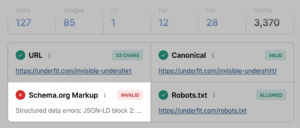
The extension structures its diagnostic feedback using a color-coded reporting system, which assists auditors in rapidly identifying severe errors, minor warnings, and fully optimized elements. Green indicators typically signal that a specific metric aligns with industry standards, while orange indicators highlight potential warnings requiring professional judgment. Red flags point to critical issues—such as schema markup errors or broken tracking systems—that demand immediate remediation to protect search visibility and user experience.

The Three-Minute Page Audit Workflow: Triage, Diagnose, and Resolve

Executing an effective page audit requires a structured, time-efficient methodology. Industry workflows generally divide the assessment into a three-minute sequence, moving rapidly from initial triage to deep technical diagnosis.

Minute One: Triage via the Quick View Pop-Up

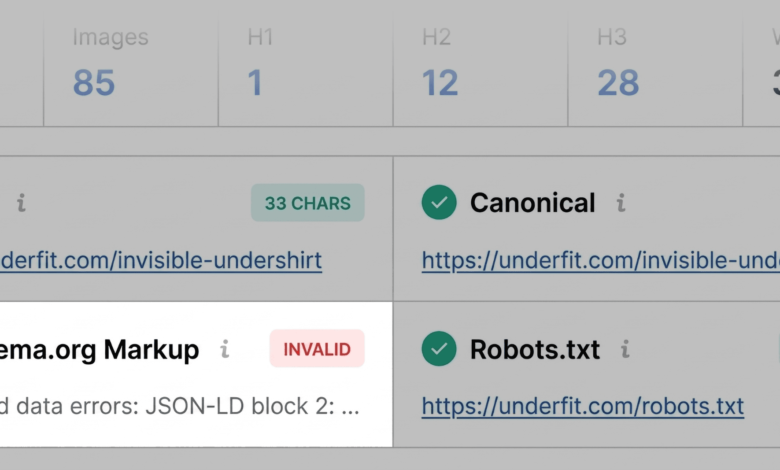
The first 60 seconds of the audit focus on triage, answering a fundamental question: Is there an obvious, high-priority defect impacting the page? Clicking the SEOquake browser icon opens the Quick View pop-up, which contains several distinct tabs, including Page Info, Audit, and Content.

Auditors typically spend approximately twenty seconds reviewing each of these primary tabs. The Page Info tab supplies an immediate snapshot of core optimization elements, allowing professionals to verify title tags, meta descriptions, HTTP status codes, and canonical tags against best practices. During this initial scan, critical errors—such as invalid Schema.org structured data—are often highlighted in red. For e-commerce product pages, corrupted JSON-LD structured data can disqualify a page from earning rich results, removing vital pricing, availability, and review ratings from search engine results pages (SERPs).

Moving next to the Audit tab, the extension evaluates technical compliance items such as mobile-friendliness, viewport configurations, and XML sitemap references. While orange warnings in this section do not always represent immediate emergencies, they require careful evaluation to prevent compounding optimization risks. Finally, reviewing the Content tab clarifies heading hierarchies (H1 through H6) and image optimization metrics, revealing whether critical elements like image alternative (alt) text are missing across visual assets.

Minutes Two and Three: Deep-Dive Diagnostics Using the Full Report

Once initial red flags and warnings are identified during the triage phase, the audit transitions into a deeper diagnostic phase lasting two to three minutes. By selecting the "View Full Report" option within the Quick View menu, analysts gain access to comprehensive panels covering full audits, keyword density, internal and external links, and broader domain analytics.

Within the Full Audit panel, technical metrics are categorized by crawlability, indexation, and structured data validation. Auditors can launch direct integrations with diagnostic utilities like the Google Rich Results Test to confirm whether structured data errors prevent search engines from parsing product or article schemas.

The Keyword Density panel evaluates the frequency and prominence of visible terms, utilizing keyword clouds and structured tables to verify topic coverage. This analysis ensures that primary search terms appear naturally within key HTML elements—such as title tags, meta descriptions, and primary headings—while preventing issues related to keyword stuffing or sparse topical coverage. Simultaneously, the Links panel audits the health of all internal and external paths, flagging broken hyperlinks, JavaScript-based routing issues, and response code errors that degrade user navigation and crawl efficiency.

Contextualizing Page Performance Through Semrush Domain Analytics

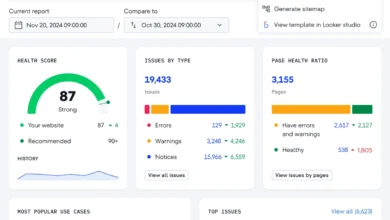
An effective SEO audit must distinguish between page-specific errors and systemic, site-wide technical problems. The Semrush integration panel within SEOquake provides this crucial context by displaying domain-level authority metrics, organic traffic estimates, and backlink profiles.

When a high-authority domain experiences declining performance on a single URL, the underlying cause is typically content-specific or tied to a localized template error. Conversely, structural warnings—such as missing XML sitemap declarations or recurring JSON-LD validation failures across multiple product templates—usually indicate broader technical issues rooted in the website’s content management system or codebase. When site-wide anomalies are detected, professionals typically escalate the investigation by initiating a comprehensive site crawl using dedicated platforms like Semrush Site Audit.

Implications for Modern Digital Strategy

The integration of browser-based diagnostic tools into daily workflows reflects a broader industry shift toward agile, decentralized SEO management. By enabling instantaneous page-level triage, tools like SEOquake reduce the time required to isolate performance bottlenecks, allowing marketing teams to prioritize technical fixes, enhance user accessibility, and maintain search visibility in an increasingly competitive digital marketplace.