Apple Patches Critical Hide My Email Vulnerability After Over a Year, Exposing User Privacy Concerns

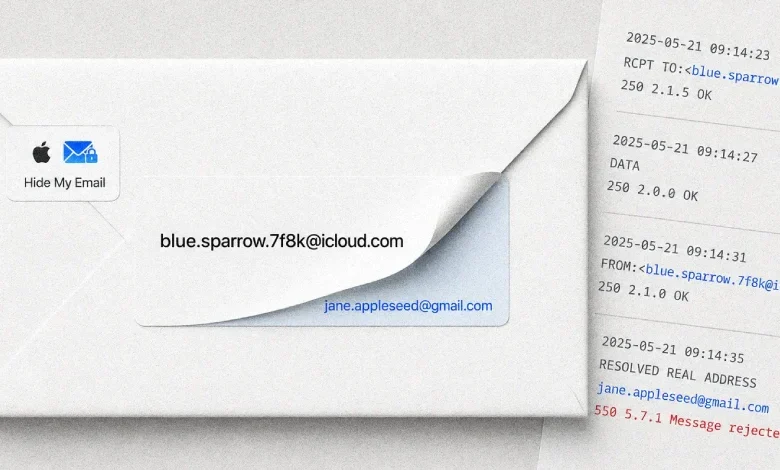
San Francisco, CA – July 21, 2026 – Apple has finally addressed a significant security vulnerability in its popular Hide My Email service, a feature designed to protect user privacy by generating unique, disposable email addresses. The flaw, which allowed for the unmasking of users’ real email addresses, was patched on July 3, 2026, after remaining undiscovered and unaddressed by the tech giant for over a year. This development comes to light following extensive reporting by 404 Media and follows a class-action lawsuit filed against Apple, alleging deceptive practices regarding the privacy assurances of the Hide My Email feature.
The Hide My Email service, a key component of Apple’s iCloud+ subscription, was introduced in June 2021 as a robust solution to combat spam and enhance user anonymity online. By creating random, randomly generated email addresses that forward all incoming mail to a user’s primary inbox, the service aimed to shield individuals from unwanted solicitations and protect their digital identity. However, the recent revelation of this critical vulnerability has cast a long shadow over these privacy promises, raising questions about the efficacy and security of Apple’s privacy-focused offerings.
Unmasking the Vulnerability: A Year-Long Struggle for a Fix
The security lapse was brought to Apple’s attention on June 13, 2025, by Tyler Murphy, co-founder of EasyOptOuts, an organization dedicated to helping individuals manage their online presence and privacy. Despite this early disclosure, Apple’s attempts to rectify the issue proved unsuccessful on multiple occasions. Initial patching efforts in March 2026 and a subsequent attempt on June 30, 2026, both failed to fully resolve the underlying problem, leaving users exposed for an extended period.
Details surrounding the vulnerability were initially withheld to prevent potential exploitation. However, with the successful deployment of the fix on July 3, 2026, more information has become available, shedding light on the technical intricacies of the flaw.

The Mechanism of Exposure: Spam Rejection as the Unwitting Culprit
The core of the vulnerability lay in a seemingly innocuous aspect of email delivery: the automatic rejection of messages flagged as spam. According to Murphy and his EasyOptOuts co-founder, Ben Weiner, the issue was triggered when a targeted Hide My Email address received a message that was automatically classified and rejected as spam. In such instances, the sender’s genuine email address, intended to be masked, would inadvertently appear within the email logs.
"We don’t know how often hidden email addresses were leaked in email logs," Murphy and Weiner stated in their communication with 404 Media. "For many major email hosts, the leak was triggered simply by an email being automatically rejected as spam, even if it was a legitimate message. Such emails probably didn’t make it to your inbox, so you can’t review your spam folder to learn whether you were affected."
This mechanism presented a significant privacy risk. Legitimate communications, inadvertently misclassified by spam filters, could have exposed users’ real email addresses without their knowledge or consent. The lack of a readily accessible spam folder for these forwarded emails meant that affected users would have no immediate way of knowing if their privacy had been compromised.
A Timeline of Exposure and Resolution
The unfolding of this vulnerability can be traced through a series of key dates:
- June 2021: Apple announces and launches the Hide My Email feature as part of iCloud+.
- June 13, 2025: Tyler Murphy of EasyOptOuts discloses the vulnerability to Apple.
- March 2026: Apple makes an initial, unsuccessful attempt to patch the vulnerability.
- June 30, 2026: A second patching attempt by Apple also fails to resolve the issue.
- July 3, 2026: Apple successfully deploys a fix for the Hide My Email vulnerability.
- July 2026: Following the patch, detailed reporting emerges regarding the nature and timeline of the vulnerability.
It is important to note that even with the fix in place, a potential residual risk remains. Any Hide My Email address created before July 7, 2026, may have had its associated real email address captured in mail transfer logs when non-malicious emails were bounced. This suggests that while the active exploitation vector has been closed, historical data might still hold sensitive information.

The Broader Context: A Class-Action Lawsuit and Consumer Trust
The timing of this security fix is particularly significant, as it arrives amidst a class-action lawsuit filed against Apple. The lawsuit, Alvarez v. Apple Inc., accuses the tech giant of misleading consumers about the privacy protections offered by Hide My Email, a service for which users pay. The complaint argues that Apple marketed Hide My Email as a robust privacy feature, either directly through iCloud+ subscriptions or indirectly through broader privacy assurances, yet failed to deliver on these promises.
According to the legal filing, "Apple promised Hide My Email as a privacy feature customers paid for, whether directly through iCloud+ or indirectly through Apple’s product-wide privacy representations, and failed to deliver it." The lawsuit further alleges that Apple was aware of the problem for over a year and neglected to address it promptly. Crucially, the plaintiffs claim that during this extended period, Apple did not disable or pause the Hide My Email service, nor did it issue warnings to its customers or correct its public statements regarding the feature’s privacy capabilities.
This legal challenge highlights a growing concern among consumers regarding the trustworthiness of privacy-enhancing technologies offered by major tech companies. When a feature designed to protect user data is found to have inherent flaws, it erodes consumer confidence and can lead to significant reputational damage for the company involved.
Implications for Users and the Industry
The Hide My Email vulnerability has several critical implications for both individual users and the broader tech industry:
- Erosion of Trust: For users who relied on Hide My Email for privacy, this incident represents a significant breach of trust. The very feature intended to safeguard their digital identity proved to be a potential liability. This could lead to increased skepticism towards privacy features offered by other platforms.
- Importance of Disclosure and Transparency: The extended period before a successful fix was implemented, despite early disclosure, raises questions about Apple’s internal processes for addressing security vulnerabilities. While the company eventually resolved the issue, the delay underscores the critical need for swift and transparent communication with users when security flaws are discovered.
- Rethinking Email Privacy Solutions: This incident may prompt a re-evaluation of how email privacy services are designed and implemented. The reliance on complex forwarding systems and the potential for misclassification by spam filters present inherent challenges that need to be addressed through more robust and foolproof mechanisms.
- Legal and Regulatory Scrutiny: The ongoing class-action lawsuit signals a potential increase in legal and regulatory scrutiny of privacy claims made by technology companies. As consumers become more aware of their digital rights, companies will face greater accountability for misrepresenting the security and privacy of their products.
- Impact on iCloud+ Subscriptions: While specific data on subscription cancellations is not yet available, it is plausible that some users may reconsider their iCloud+ subscriptions due to concerns about the reliability of its privacy features.
The successful patching of the Hide My Email vulnerability marks a crucial step in restoring user confidence. However, the year-long delay and the concurrent legal challenges serve as a stark reminder of the constant vigilance required in the cybersecurity landscape. As technology evolves, so too do the methods employed by those seeking to exploit vulnerabilities. For companies like Apple, maintaining user trust hinges not only on developing innovative features but also on ensuring their robust security and transparent communication when issues arise. The future of digital privacy hinges on these critical elements, demanding a commitment to proactive security measures and unwavering integrity in all consumer-facing representations.
Related posts: