Kamerin Stokes Sentenced to 30 Months in Prison for Selling Access to Tens of Thousands of Hacked DraftKings Accounts


Memphis, Tennessee – Kamerin Stokes, a 23-year-old resident of Memphis, Tennessee, has been sentenced to 30 months in federal prison for his role in a large-scale scheme that involved the sale of access to tens of thousands of compromised DraftKings accounts. The sentencing, handed down by U.S. District Judge Loretta A. Preska, also includes three years of supervised release and significant financial penalties, including over $1.3 million in restitution and more than $125,000 in forfeiture.
Stokes, also known online by the moniker "TheMFNPlug," operated a digital marketplace where he facilitated the resale of stolen account credentials. His conviction stems from his involvement in a sophisticated cyberattack that, in November 2022, leveraged a massive credential-stuffing operation to compromise approximately 68,000 DraftKings accounts. This breach exposed the sensitive data of a substantial number of users and led to substantial financial losses for both the company and its customers.
The broader conspiracy involved several individuals, with Nathan Austad, also known as "Snoopy," and Joseph Garrison identified as the architects of the initial account hijacking. Court documents reveal that Austad and Garrison utilized lists of credentials previously exfiltrated from various data breaches to systematically gain unauthorized access to DraftKings accounts. Their illicit activities were not confined to simply acquiring the data; they actively monetized this access by selling it to other malicious actors, including Stokes, who then resold it to a wider network of individuals intent on exploiting the compromised accounts.
A Chronology of Cybercrime and Its Consequences
The timeline of events leading to Stokes’s sentencing paints a picture of a persistent criminal enterprise:
November 2022: The precipice of the large-scale compromise. Austad and Garrison initiated a credential-stuffing attack, exploiting vulnerabilities and previously leaked login information to infiltrate tens of thousands of DraftKings accounts. This operation, described as a "massive credential-stuffing attack," ultimately affected nearly 68,000 accounts.

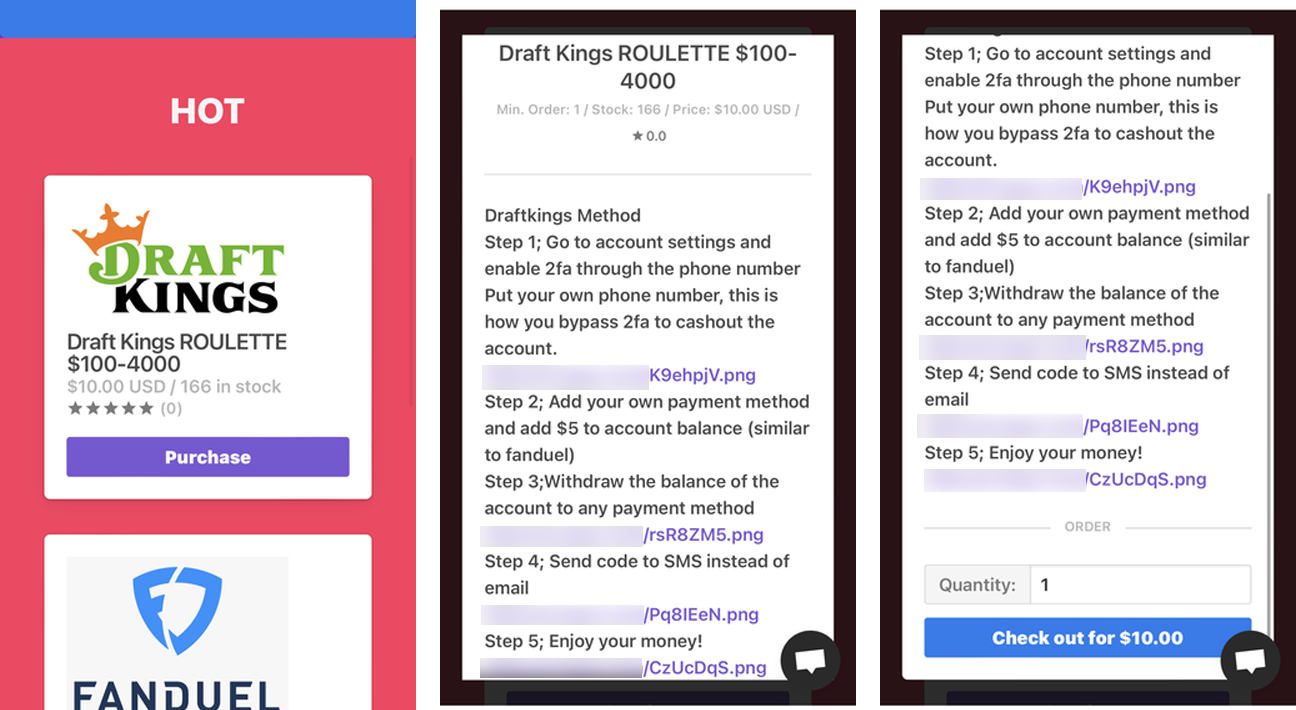
Post-November 2022: The fallout begins. The compromised accounts were not only accessed but also actively exploited. Prosecutors stated that Austad and Garrison sold access to these hijacked accounts, generating significant revenue. Simultaneously, they operated their own "shops," peddling stolen account credentials for DraftKings, FanDuel, and even Chick-fil-A, amassing over $2.1 million in profits from these direct sales.
Simultaneously: Kamerin Stokes entered the picture as a key reseller. He purchased a substantial volume of the compromised DraftKings accounts from Austad and Garrison, subsequently marketing and selling them through his own online platform. Stokes’s operation added another layer to the distribution of stolen account access, amplifying the reach of the cybercriminals.
December 2022: DraftKings faces significant financial repercussions. The betting giant was compelled to issue refunds totaling hundreds of thousands of dollars. This action was necessitated after fraudsters, having gained access to the compromised accounts, systematically withdrew all available funds. The company’s statement indicated that these withdrawals occurred following the implementation of a new payment method and a nominal $5 deposit intended to verify its validity, a process that the cybercriminals exploited.
May 2023: The legal net tightens. Joseph Garrison, identified as a key accomplice in the initial hacking operation, was charged. This marked a significant step in the ongoing investigation by federal authorities, signaling a concerted effort to bring all involved parties to justice.
Stokes’s Arrest and Subsequent Actions: Following his arrest and subsequent guilty plea, Stokes was released pending trial. However, instead of ceasing his illicit activities, he audaciously reopened his online shop. Disturbingly, his new venture was marketed with the tagline "fraud is fun," a clear demonstration of his disregard for the law and the harm he inflicted. This relaunch was not solely an act of defiance; Stokes later admitted that he reopened the shop in part to generate funds to pay his legal defense team.
Remand into Custody: Stokes’s decision to resume his criminal enterprise while awaiting sentencing proved to be his undoing. His violation of the conditions of his pretrial release led to his immediate remand into federal custody.

Sentencing: On Thursday, U.S. Attorney Jay Clayton announced the sentencing of Kamerin Stokes. The 30-month prison sentence reflects the severity of his actions and the significant harm caused to victims.
The Mechanics of the Attack and Financial Implications
The DraftKings hack was a classic example of credential-stuffing, a brute-force method that exploits the widespread practice of password reuse. Cybercriminals amass lists of usernames and passwords leaked from previous data breaches of unrelated websites. They then systematically attempt to log into accounts on other services using these stolen credentials. When a match is found, the attacker gains unauthorized access.
In this instance, Austad and Garrison were able to infiltrate approximately 68,000 DraftKings accounts by leveraging such stolen credential lists. The sheer volume of compromised accounts underscores the scale of the initial breach that provided the attackers with their arsenal.
The subsequent financial impact was substantial. Prosecutors stated that the individuals who exploited the compromised accounts managed to steal approximately $635,000 from around 1,600 of these accounts. This direct theft represents a significant financial loss for individual users.
Beyond the direct theft, DraftKings itself incurred substantial costs. The company was forced to refund hundreds of thousands of dollars to compensate users for the funds stolen from their accounts. This not only represents a direct financial outlay but also carries the intangible cost of damaged customer trust and reputational harm.
The profits generated by the scheme were considerable. Austad and Garrison alone reportedly made over $2.1 million from selling compromised accounts, not just from DraftKings but also from other platforms like FanDuel and Chick-fil-A. Kamerin Stokes, by purchasing these accounts in bulk and reselling them, played a crucial role in the further monetization and dissemination of the stolen access. His own operation contributed to the overall illicit revenue generated by the conspiracy.
The restitution and forfeiture amounts ordered against Stokes – $1,327,061 in restitution and $125,965.53 in forfeiture – are intended to recoup some of the financial losses incurred by victims and to strip the perpetrator of any ill-gotten gains.
Official Responses and Broader Implications
U.S. Attorney Jay Clayton, in a press release detailing Stokes’s sentencing, did not mince words regarding the defendant’s behavior. "Kamerin Stokes victimized thousands of users of an online betting website through a cyberattack," Clayton stated. He further emphasized Stokes’s audacity in reopening his criminal enterprise with a provocative tagline after pleading guilty, highlighting the remark about needing to pay his attorneys as a stark illustration of his criminal mindset.
The prosecution’s stance underscores the seriousness with which federal authorities view large-scale cyber fraud. The sentencing of Stokes is presented not just as a punitive measure against an individual but as a signal to others engaged in similar illicit activities.
The implications of this case extend far beyond the individual perpetrators and their immediate victims. It serves as a potent reminder of several critical cybersecurity issues:
- The Pervasiveness of Credential Stuffing: This attack method remains a significant threat due to the widespread reuse of passwords across different online services. Users who do not employ unique, strong passwords for each of their accounts remain vulnerable.
- The Value of Stolen Credentials: The profitability of selling compromised account access demonstrates the high demand for such data in the cybercriminal underground. This fuels further data breaches and incentivizes the creation of sophisticated hacking tools and techniques.
- The Importance of Robust Security Measures by Companies: DraftKings, like any online platform handling sensitive user data and financial transactions, faces constant threats. The incident highlights the need for continuous vigilance, sophisticated fraud detection systems, and rapid response mechanisms to mitigate the impact of breaches. The fact that a $5 deposit was exploited for verification points to potential areas where security protocols could be further strengthened.
- The Role of Resellers in Cybercrime: Stokes’s case illustrates how individuals can profit by acting as intermediaries in the distribution of stolen data, amplifying the reach and impact of the initial attackers. This highlights the interconnectedness of the cybercriminal ecosystem.
- The Challenge of Deterrence: Despite the legal consequences, the allure of quick financial gain continues to draw individuals into cybercrime. Stokes’s decision to reopen his shop, even while under investigation, underscores the persistent challenge of deterring such activities.
The financial and reputational damage inflicted by this incident serves as a stark warning. For consumers, it underscores the paramount importance of strong, unique passwords and enabling multi-factor authentication wherever possible. For companies, it reinforces the ongoing need for significant investment in cybersecurity infrastructure, proactive threat intelligence, and rapid incident response capabilities to protect their users and their own operations from the ever-evolving landscape of cyber threats. The 30-month sentence for Kamerin Stokes represents a significant legal consequence, but the broader fight against such sophisticated cybercriminal networks is an ongoing and critical endeavor.