The digital landscape is currently witnessing a significant shift in aesthetic preferences, as modern creators increasingly look toward the past to define the visual language of the present. Following the massive resurgence of the VHS aesthetic, a new retro trend has emerged at the forefront of video production: the Mini DV look. Often categorized under the broader "LoFi" movement, this aesthetic captures the specific digital imperfections of the late 1990s and early 2000s. As high-definition 4K and 8K footage becomes the industry standard, the intentional degradation of image quality has become a sophisticated tool for filmmakers, music video directors, and social media influencers seeking to evoke nostalgia and authenticity.
The Historical Context of the Mini DV Format
To understand why the Mini DV look is being replicated today, one must examine its historical significance. Launched in 1995, the Mini DV (Digital Video) format represented a pivotal transition point in media history. It was the bridge between the purely analog world of VHS and Betamax and the fully tapeless digital workflows we use today. Mini DV utilized a small cassette tape to store digital data, offering a resolution that was superior to analog formats but characterized by specific digital artifacts that are now considered iconic.
During its peak, Mini DV was the format of choice for independent filmmakers and home movie enthusiasts alike. Cameras like the Sony VX1000 became legendary in subcultures, most notably in the skateboarding community, where the format’s specific wide-angle look and motion handling defined an entire era of sports cinematography. The look is defined by a 4:3 aspect ratio, visible aliasing, a limited dynamic range that often resulted in "blown-out" highlights, and a unique form of digital noise that differs significantly from the organic grain of film or the magnetic static of VHS.

The Resurgence of the LoFi Aesthetic
The return to Mini DV is not merely a technical whim but a response to the "clinical" nature of modern digital sensors. Industry analysts note that as cameras have become more perfect, the human element of "imperfection" has gained value. This phenomenon, often referred to as "Digital Humanism" in design circles, suggests that audiences crave the textures of the past to feel a sense of groundedness.
Data from social media platforms like TikTok and Instagram show a marked increase in the use of "Y2K" filters, with millions of posts utilizing hashtags related to vintage tech. This cultural shift has forced professional post-production houses to develop workflows that can convincingly mimic the limitations of 25-year-old hardware using contemporary software like Adobe After Effects.
Technical Workflow: Recreating Mini DV in After Effects
Recreating this look requires a counter-intuitive approach: the intentional destruction of high-quality data. The process involves several distinct stages, moving from structural composition changes to color manipulation and edge refinement.
Phase I: Establishing the Low-Resolution Canvas
The first step in the transformation is the creation of a "Mini DV Comp." Unlike modern HD projects, the foundation of this look is a drastically reduced resolution. Professionals recommend setting the composition size to 200 px by 150 px. This creates the necessary 4:3 aspect ratio while forcing the software to discard the majority of the image data.
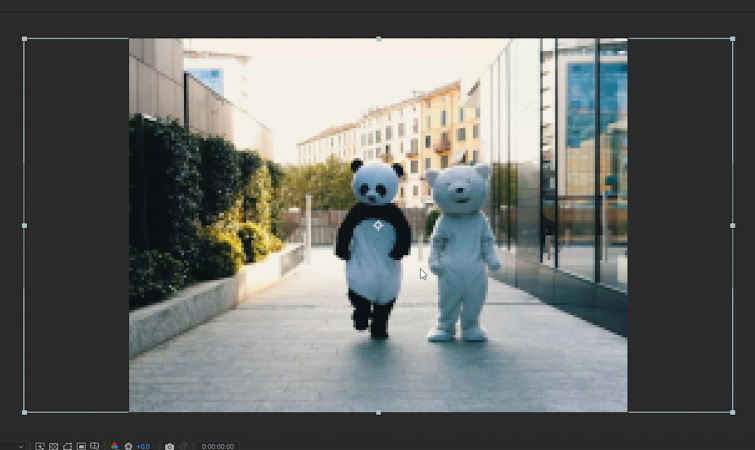
Once the footage is placed into this small composition, it must be scaled to fit. By navigating to Layer > Transform > Fit to Comp Height, the footage is compressed into a tiny window. At this stage, the image will appear extremely pixelated—a necessary precursor for the "stair-stepping" effect known as aliasing that defined early digital sensors.
Phase II: The Upscaling and Aliasing Process
The second phase involves creating a "Main Comp" at a standard resolution, such as 1920 px by 1080 px. The "Mini DV Comp" is then nested into this main composition and scaled back up to fit the height of the frame. This "down-and-up" scaling method is crucial. It ensures that the pixels are not just blurred, but "aliased."
Aliasing is the visual artifact that appears as jagged, stair-stepped edges on diagonal lines. In the era of Mini DV, processors were not powerful enough to perform complex anti-aliasing, leading to the flickering edges and "crunchy" textures that modern creators are now seeking to replicate.
Phase III: Color Grading and Contrast Manipulation
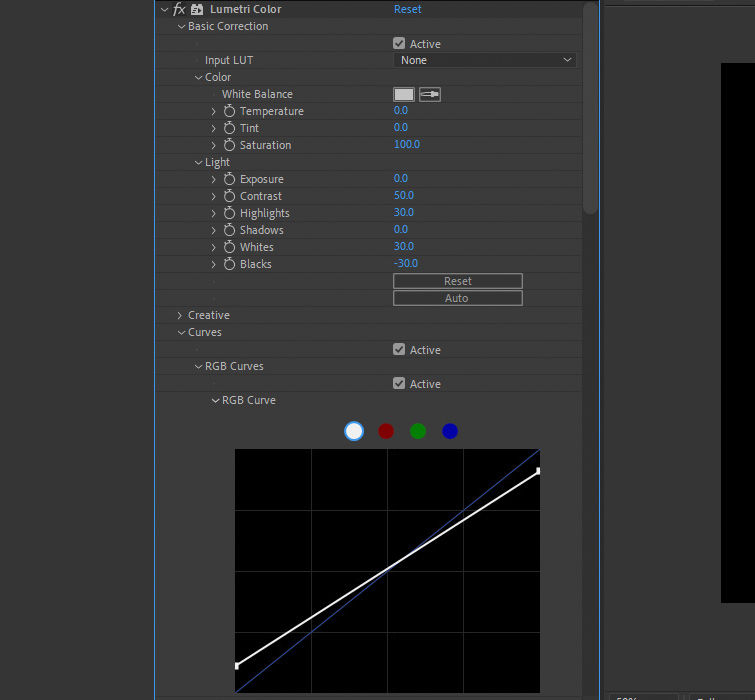
Mini DV cameras were notorious for their limited dynamic range. To mimic this, the Lumetri Color effect is applied to the footage. The goal is to create a "harsh" look that lacks the subtle gradations of modern cinema cameras.

Technical specifications for this look typically involve:
- Contrast: Increased to 50 or higher to crush the mid-tones.
- Highlights and Whites: Boosted by approximately 30 points to simulate the "clipping" effect where bright areas lose all detail.
- Blacks: Lowered to -30 to ensure the shadows are deep and devoid of modern "log" shadow detail.
- RGB Curves: Adjusting the black and white points on the curve can further restrict the tonal range, giving the footage a flatter, more "consumer-grade" electronic feel.
Phase IV: Chromatic Aberration and Edge Haloing
A defining characteristic of early digital video is color fringing, specifically in the blue and red channels. This occurred due to the way light was split onto the three CCD sensors (in high-end models) or handled by a single CMOS sensor in budget models.
By applying the Channel Blur effect and specifically increasing the "Blue Blurriness" to a value of 3 or 4, creators can simulate this vintage color bleed. This adds a layer of "optical imperfection" that makes the digital degradation feel more like it originated from a physical lens and tape system.
Finally, the Unsharp Mask effect is used to "punch up" the edges. While it sounds counter-intuitive to sharpen degraded footage, Mini DV cameras often used aggressive internal sharpening to compensate for low resolution. Setting the Amount to 150 and the Radius to 2 creates a slight "halo" around subjects, a tell-tale sign of early 2000s digital processing.
Comparative Analysis: Mini DV vs. VHS
While both are "retro," it is vital for professionals to distinguish between the two for the sake of historical and stylistic accuracy. VHS is an analog format; its imperfections are characterized by horizontal "tracking" lines, color shifts toward the red spectrum, and a soft, "mushy" texture caused by magnetic tape decay.
Mini DV, conversely, is "Digital LoFi." Its artifacts are geometric. It features blocky noise, sharp but jagged edges, and a specific type of motion blur that results from the interlaced scanning used by NTSC and PAL television standards of the time. Understanding these technical nuances allows editors to choose the right "flavor" of nostalgia for their specific project.
Industry Implications and the Future of Retro Tech
The move toward recreating Mini DV footage has broader implications for the software and hardware industries. Companies like Maxon and Red Giant have seen sustained success with "Universe" plugins that automate these processes, but the manual method in After Effects remains the gold standard for those who want granular control over the "decay" of their image.
Furthermore, this trend has sparked a secondary market for original hardware. Prices for used Sony, Panasonic, and Canon Mini DV camcorders have surged on secondary markets like eBay and Reverb. Filmmakers are increasingly opting to shoot on the original hardware and then ingest the footage through FireWire adapters—a cumbersome process that highlights the dedication to this specific aesthetic.

Conclusion: The Staying Power of Imperfection
The popularity of the Mini DV look in After Effects is a testament to the cyclical nature of design. As we move further into an era of AI-generated imagery and flawless digital reproduction, the desire for "textured" media will likely only increase. By mastering the techniques of downscaling, aliasing, and intentional color clipping, editors can bridge the gap between the high-tech capabilities of today and the evocative, nostalgic textures of the recent past.
This workflow does more than just apply a filter; it reconstructs the technical limitations of a bygone era, allowing modern stories to be told through a lens of digital memory. Whether used for a high-fashion commercial or a lo-fi music video, the Mini DV aesthetic proves that in the world of visual storytelling, sometimes the best way to move forward is to look back.