Apple Photos Gets Major AI Upgrades, Custom Slideshows, and New Utilities in iOS 27

Apple has officially detailed the sweeping suite of updates coming to the native Photos application with the upcoming release of iOS 27. While headline-grabbing advancements in artificial intelligence centered around Siri have dominated initial discussions regarding the new mobile operating system, Apple’s engineering teams have simultaneously directed substantial resources toward refining the ecosystem’s multimedia and image management hubs. Building upon the foundational overhaul introduced in iOS 18, the iOS 27 update focuses on expanding generative AI capabilities, introducing smarter organization tools, upgrading shared utilities, and giving users granular control over memory playback.
The latest iteration of Apple Photos maintains the overarching layout introduced in previous cycles, indicating that the company is firmly committed to its unified gallery design philosophy. However, beneath the familiar interface lies a robust collection of enhancements powered by Apple Intelligence, designed to streamline how users edit, categorize, and share their visual memories. These changes arrive at a strategic moment in Apple’s product lifecycle, aligning closely with the introduction of new hardware ecosystems and spatial computing integration.
Advanced Apple Intelligence Editing Suite: Extend, Reframe, and Clean Up
At the core of the iOS 27 Photos experience is a significantly expanded suite of AI-driven editing tools. Building on the capabilities initially rolled out in prior software generations, Apple Intelligence now powers three distinct features designed to give users professional-grade manipulation options directly on their mobile devices: Extend, Spatial Reframing, and an upgraded Clean Up tool.
The new Extend feature is engineered to provide subjects within photographs with additional breathing room without requiring traditional, destructive cropping methods. For instance, photographers often face the challenge of dealing with a slightly crooked horizon that, when straightened using legacy tools, results in the loss of critical peripheral details. With Extend, the underlying image models analyze the context of the photo, automatically generating consistent background elements to fill in the missing pieces seamlessly. This allows users to adjust aspect ratios or correct composition errors effortlessly while preserving the integrity of the primary subject.
Complementing this is Spatial Reframing, a tool that draws heavily upon Apple’s deep understanding of spatial computing models developed for the Apple Vision Pro. Spatial Reframing allows users to interact with a finished photograph by touching and dragging the frame to preview real-time perspective shifts. The software simulates the effect of physically repositioning a camera within the original scene long after the shutter has closed. Utilizing advanced neural networks, Spatial Reframing generates only the necessary new content required by the shifted perspective, ensuring that the final output remains entirely consistent with the lighting, shadows, and textures of the original environment.
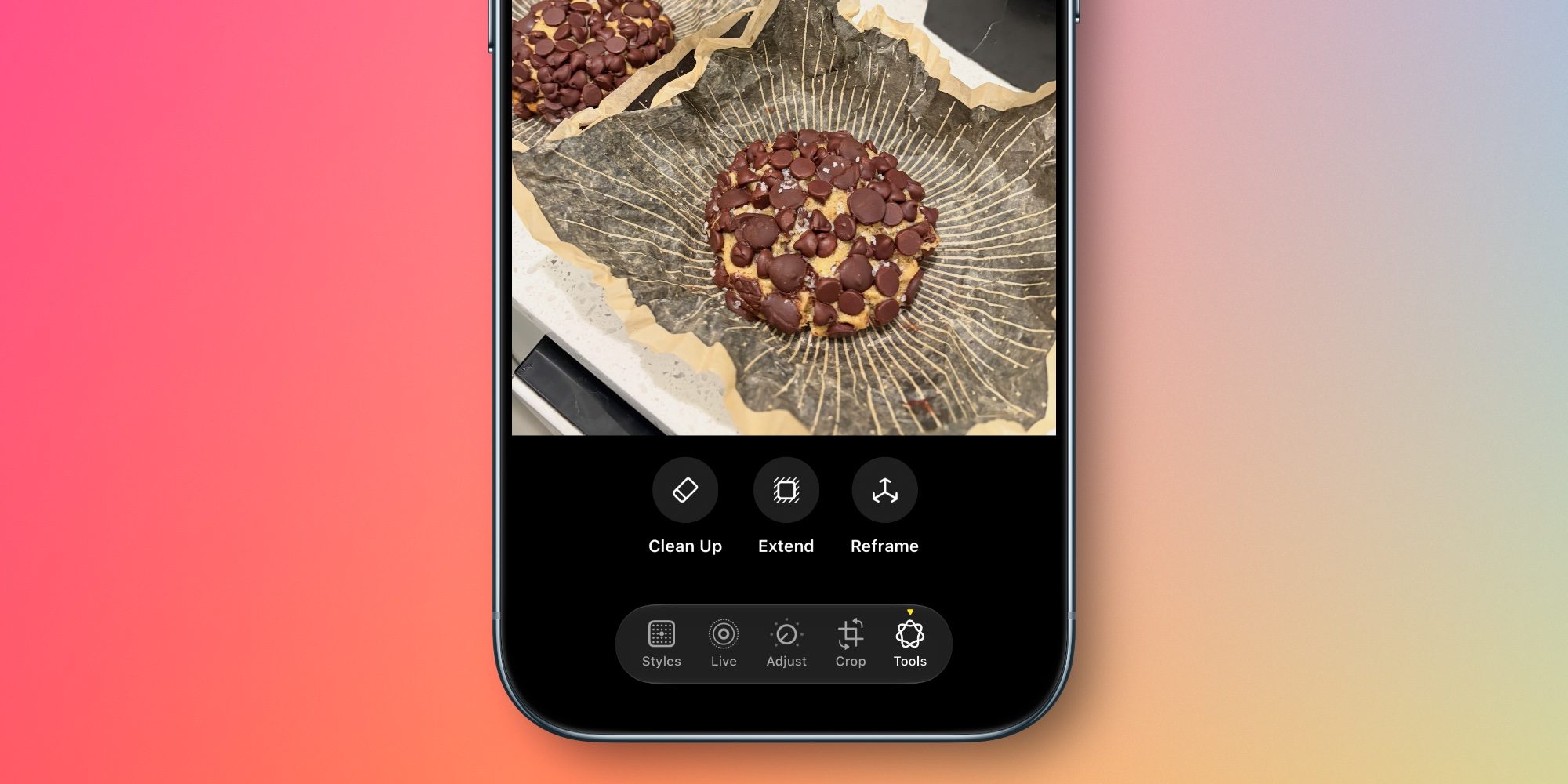
Meanwhile, the popular Clean Up feature—first introduced in iOS 18 to remove unwanted background objects from images—receives a substantial under-the-hood upgrade. Apple has refined the underlying machine learning models to handle increasingly complex scenes with greater precision. Users can now eliminate complex distractions, transient passersby, or visual clutter with significantly improved artifact suppression and more realistic infill textures, minimizing the need to resort to third-party desktop editing applications.
Smarter Organization with New Utilities and Keywords
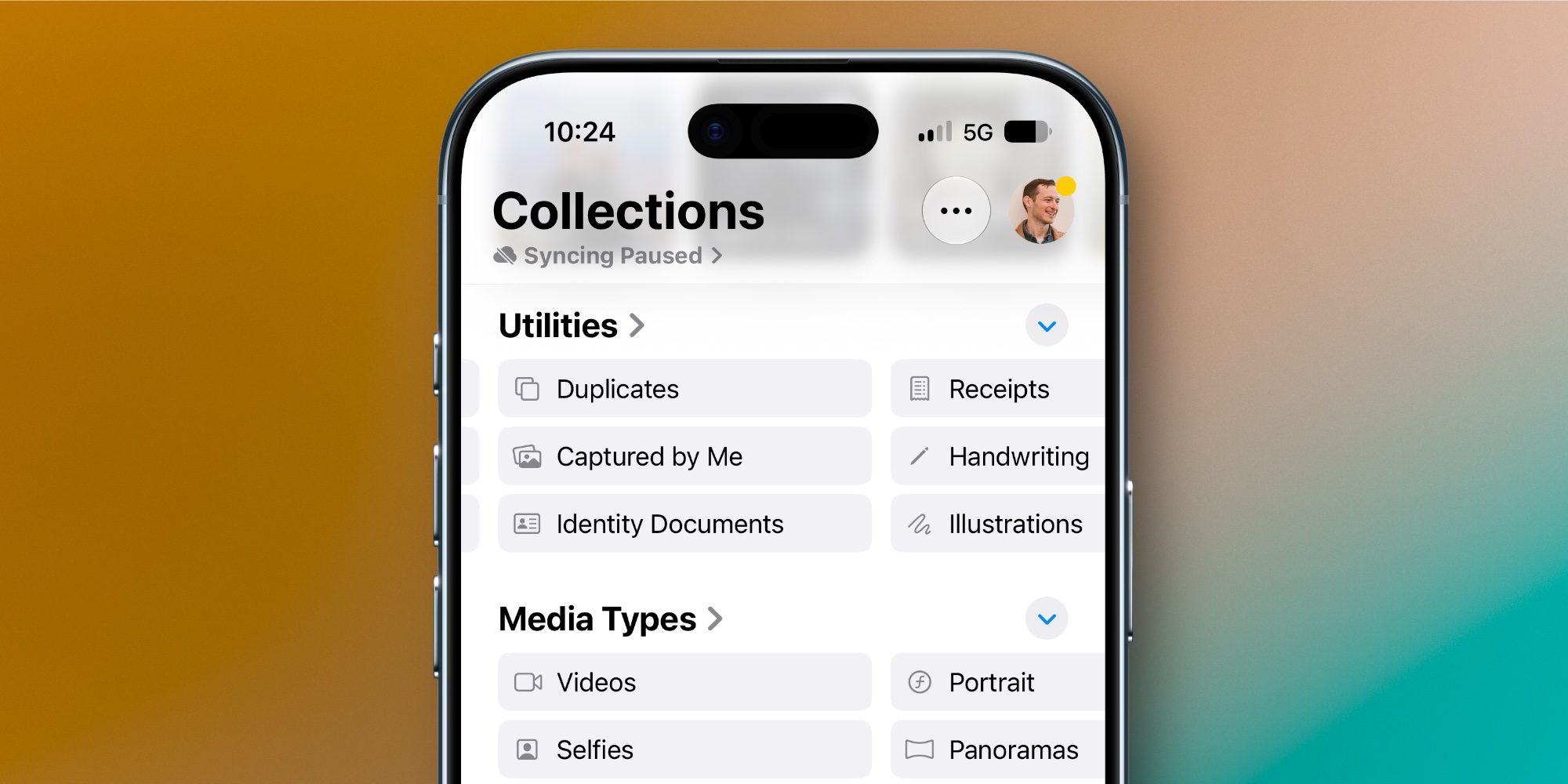
Beyond image generation and editing, iOS 27 addresses long-standing user requests for better library management through intelligent automated collections and flexible tagging options. Located within the Utilities section of the Photos app, two new smart collections aim to reduce the time spent searching through vast personal archives.
The first is "Captured by Me," a dedicated view that exclusively filters out screenshots, downloaded internet images, memes, and media received through messaging apps or shared links. By isolating only the authentic photographs captured natively through the device’s camera hardware, the feature provides a cleaner, more personal retrospective of the user’s actual experiences.

The second addition is Identity Documents, a privacy-conscious utility that scans the local on-device photo library to surface images containing vital reference materials, such as passports, driver’s licenses, and identification cards. By leveraging localized machine learning models that do not require cloud transmission, the system indexes these documents securely, allowing users to access critical administrative paperwork rapidly when needed.
In addition to automated categorization, iOS 27 introduces manual keyword tagging. While users have been able to attach descriptive text captions to images for several years, the new software introduces a dedicated "Add Keywords" field accessible by scrolling up from the bottom of any photo’s metadata panel. This enables power users to establish custom taxonomies, making large-scale library filtering and organization significantly more efficient. Apple has also promised broader, unspecified "Album organization improvements," signaling a concerted effort to streamline large library maintenance across the board.
Overhauled iCloud Shared Albums and Hardware Integration
The release of iOS 27 also brings the first major architectural and functional upgrades to iCloud Shared Albums in several years. These enhancements arrive in tandem with Apple’s broader push into ambient home technology, most notably supporting the company’s recently announced HomeView product lineup.
The timing of these updates suggests a strategic synergy between mobile media management and ambient display hardware. By optimizing how shared libraries sync, display, and update across multiple household accounts, Apple is positioning the Photos app as the central media server for modern domestic ecosystems. Families can now curate, update, and view expansive shared collections with reduced friction, ensuring that dynamic photo frames and living room displays always reflect the most recent captures.
Comprehensive Slideshow Customization and Export Tools
Slideshows have been a staple of the Apple Photos experience for well over a decade, but historically suffered from rigid automation that left little room for user personalization. Historically, if the system-generated pacing, transitions, or background music did not match a user’s vision, workarounds were limited.
iOS 27 fundamentally alters this dynamic by introducing a robust suite of customization controls for slideshow creation. Users are no longer locked into preset formats; the new interface allows creators to manually adjust transition styles, define custom playback durations for the entire presentation, and even fine-tune the display time for individual photographs within the sequence.
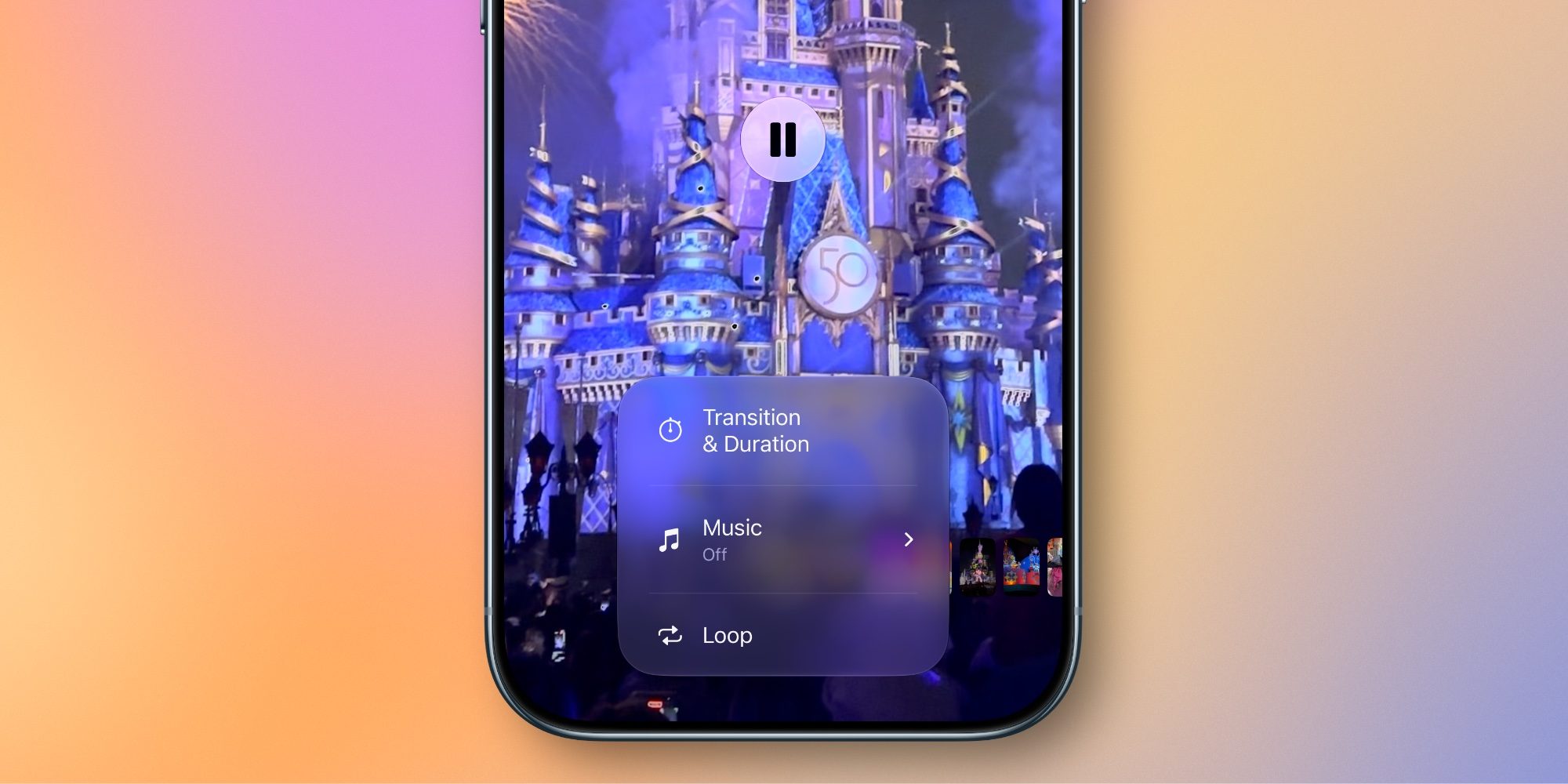
Furthermore, Apple has eliminated a persistent workflow bottleneck by introducing a one-tap export option. Users can now take any customized slideshow and instantly save it as a standalone video file directly to their camera roll. This makes sharing memory compilations across social media platforms, messaging apps, or email as simple as sharing a standard video clip.
Industry Implications and Future Outlook
The introduction of iOS 27’s Photos features underscores Apple’s ongoing transition from traditional hardware-driven device iteration to software- and intelligence-led differentiation. By embedding sophisticated computational photography tools natively into the operating system, Apple continues to lower the barrier to entry for creative media manipulation while simultaneously raising consumer expectations regarding smartphone capability.
As artificial intelligence integration deepens across iOS, iPadOS, and macOS, the ability of local hardware to process complex tasks—such as spatial reframing and realistic background infill—highlights the increasing importance of dedicated neural processing units (NPUs). With developers and consumers alike evaluating the practical utility of mobile AI, Apple’s focus on productivity, organization, and creative control in everyday applications like Photos suggests a mature, highly practical approach to artificial intelligence implementation.

Public beta builds of iOS 27 are currently rolling out to registered developers and public testers, with the official public release scheduled for the autumn. As the software matures through its testing cycle, further refinements to album organization and AI processing speeds are anticipated ahead of its widespread deployment.
Related posts: