MacOS 27.3 Beta Introduces Native Markdown Rendering to Quick Look, Streamlining Workflow for Developers and Writers

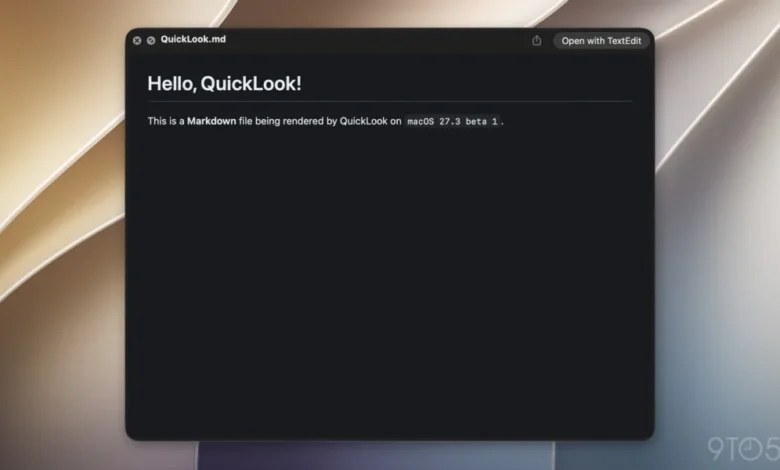
Apple has officially rolled out macOS 27.3 beta 1, bringing a suite of meaningful upgrades to the Mac operating system. Alongside prominent additions such as Safari’s new Vertical Tabs and Adaptive Dark Mode, expanded Siri artificial intelligence capabilities, and advanced developer toolkits, the update introduces a long-awaited convenience feature for writers, developers, and power users alike: native Markdown support within Quick Look.
Beginning with this software version, users can select any file ending in the .md extension and press the Spacebar to preview its contents rendered with proper formatting. This eliminates the previous behavior, which forced users to view raw, unformatted syntax or open a dedicated text editor or Markdown viewer just to check the layout of a document. While seemingly a minor quality-of-life update compared to headline-grabbing AI integrations, the inclusion of native Quick Look rendering reflects a broader industry shift toward lightweight, plain-text documentation standards in the modern computing landscape.
The Evolution of Markdown in the Apple Ecosystem
The integration of native Quick Look rendering for Markdown files is the latest in a series of steps Apple has taken to embrace the format across its hardware and software platforms. Over recent years, the Cupertino-based company has steadily woven Markdown compatibility into its native applications. Notably, the Notes app in iOS 26 and corresponding macOS iterations gained robust support for importing and exporting Markdown files, allowing users to move text effortlessly between Apple’s proprietary ecosystem and third-party writing environments like Obsidian, Ulysses, and Typora.
Markdown’s growing prominence within the Apple ecosystem is not merely a concession to traditional writers and bloggers. The format has experienced a significant renaissance due to the rapid advancement of artificial intelligence agents and large language models. Developers and AI engineers increasingly rely on .md files to store instructions, system prompts, contextual data, and configuration parameters because of the format’s lightweight and human-readable nature.
This utility was underscored with the rollout of Apple’s new Siri AI app skills feature, which debuted alongside the macOS 27.3 developer beta. As noted by prominent technology commentators, the system utilizes Markdown-based SKILL.md files. These files enable third-party developers to supply structured instructions that dictate how Siri interacts with and executes complex, multi-step tasks within their applications. By standardizing on Markdown for agentic workflows, Apple has cemented the format as a core pillar of its next-generation software architecture.
A Brief History of Markdown

To understand the significance of Apple’s recent software updates, it is helpful to examine the origins of the format. Markdown was created in 2004 by John Gruber, in collaboration with Aaron Swartz, as a response to the friction inherent in writing content for the web. At the time, publishing text meant manually typing out HTML tags—such as paragraphs, bold styling, and hyperlinks—which often cluttered the source material and made plain-text drafts difficult to read.
Gruber famously described Markdown as a text-to-HTML conversion tool for web writers. The primary design goal was readability: allowing a document to be published as-is, as plain text, without looking like it had been marked up with tags or formatting instructions. By using simple typographic cues—such as asterisks for emphasis, hash symbols for headings, and brackets for links—writers could generate structurally valid HTML quickly and intuitively.
Over the past two decades, Markdown has expanded far beyond its original web-publishing roots. It has become the de facto standard for technical documentation, academic note-taking, README files in software repositories like GitHub, and, increasingly, as the primary input medium for human-AI interaction.
Technical Implementation and User Experience in macOS 27.3
Prior to the release of macOS 27.3 beta 1, invoking Quick Look on a Markdown document resulted in a preview of the raw text file. While functional, this required users to parse the underlying syntax mentally—interpreting headers denoted by hashes or bold text wrapped in double asterisks—rather than viewing the final typeset layout.
With the new update, the Quick Look daemon parses the .md file in real-time, rendering headings, bulleted lists, blockquotes, code blocks, and hyperlinks in a clean, formatted presentation window. This brings Markdown files to the same tier of native previewability long enjoyed by PDFs, images, Microsoft Office documents, and rich text files.
For developers managing repositories locally, content creators drafting articles, and students organizing research notes, the change reduces friction. Quick scanning of documentation no longer necessitates launching a heavy Integrated Development Environment (IDE) or a specialized Markdown editor. A simple keystroke provides an immediate, polished visual confirmation of the document’s structure.
Broader Implications for Developers and the Mac Platform

The inclusion of native Markdown Quick Look rendering highlights Apple’s ongoing commitment to refining developer workflows and power-user ergonomics on macOS. As the boundary between traditional software development and AI-driven prompt engineering continues to blur, the tools required by everyday computer users are evolving.
In professional software environments, documentation is almost universally written in Markdown. By optimizing macOS to handle these files natively at the operating system level—ranging from basic file management and Notes app integration to Quick Look visualization and Siri skill configuration—Apple is reducing the administrative overhead associated with text-based workflows.
Industry analysts note that while operating system updates are frequently dominated by consumer-facing features like graphical customizations and artificial intelligence assistants, foundational updates like native Markdown support are crucial for retaining the loyalty of technical professionals, engineers, and creative workers who form the backbone of the Mac user base.
Outlook and Availability
macOS 27.3 beta 1 is currently available to registered developers and public beta testers enrolled in Apple’s Software Update program. As the beta testing cycle progresses over the coming weeks, additional refinements and bug fixes are expected before the final software package is released to the general public, anticipated in the late winter or early spring.
As the digital workspace continues to demand greater efficiency and seamless cross-platform compatibility, Apple’s integration of Markdown into the core macOS architecture ensures that the Mac remains a premier platform for writing, coding, and modern artificial intelligence development.