Adobe Premiere Pro 26.2 Release Enhances Professional Workflows with New Sequence Index and Advanced Media Management Tools

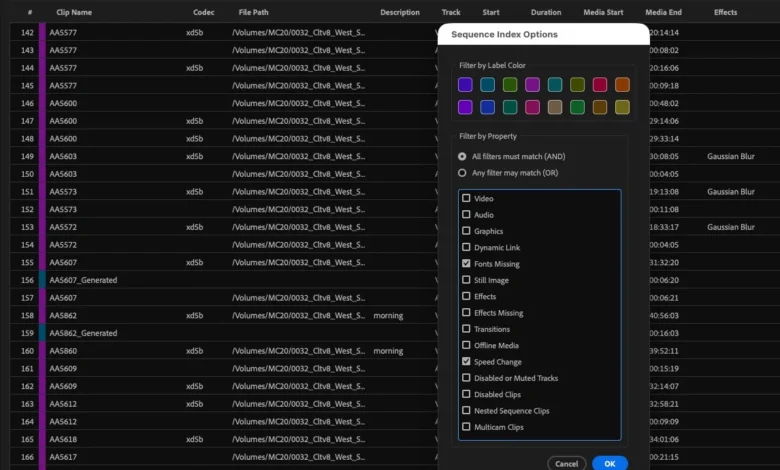
The release of Adobe Premiere Pro version 26.2 marks a significant milestone in the evolution of the industry-standard non-linear editing system, delivering a suite of features designed to streamline high-end post-production workflows. While much of the industry’s attention has recently been captured by the experimental "Color Mode" currently in beta testing, the 26.2 update represents a stable, production-ready leap forward for editors requiring precision, speed, and reliability. This update focuses on the fundamental aspects of video editing: timeline organization, media management, and collaborative infrastructure. By addressing long-standing user requests and integrating advanced metadata handling, Adobe continues to bridge the gap between creative flexibility and technical efficiency.
Context and Chronology of the 26.2 Update
Adobe’s development cycle for Premiere Pro has transitioned in recent years toward a model of continuous delivery, where incremental version updates often contain features that previously would have been reserved for annual major releases. Following the stability improvements seen in the 25.x series, the 26.x branch has focused on modernizing the underlying architecture of the software. The introduction of version 26.2 follows several months of user feedback sessions and professional testing, aiming to resolve bottlenecks in complex project environments.

Historically, Premiere Pro has faced criticism regarding its handling of large-scale projects and media relinking—areas where competitors like Avid Media Composer have traditionally held a perceived advantage. The 26.2 update directly addresses these concerns, signaling Adobe’s commitment to the "Hollywood" level of production, where projects often involve thousands of clips and multi-editor collaborations via the Productions framework.
The Sequence Index: A Paradigm Shift in Timeline Navigation
At the forefront of the 26.2 update is the introduction of the Sequence Index. This new panel provides a comprehensive, list-based view of every element within an active timeline, offering a level of transparency and control previously unavailable within the application. For editors working on feature-length projects or complex commercial spots with hundreds of layers, the Sequence Index serves as a centralized command center.
The Sequence Index allows users to view detailed metadata for every clip in the sequence without returning to the Project Bin. Editors can customize the view by right-clicking on column headers to display specific metadata points, such as frame rate, resolution, tape name, or custom comments. This level of granularity is particularly beneficial for assistant editors tasked with quality control and delivery prep.

Furthermore, the Sequence Index is not merely a viewing tool; it is fully interactive. By enabling the "Select in Timeline" toggle, clicking any item in the Index automatically highlights and navigates to that clip in the sequence. This eliminates the need for manual searching through stacked video tracks. The filtering capabilities are equally robust, allowing editors to isolate clips based on specific criteria, such as offline status, specific effects applied, or label colors. For final delivery, the ability to export the Sequence Index data as a spreadsheet report provides a streamlined method for creating edit decision lists (EDLs) or music cue sheets.
Enhancing Media Management and Relinking Precision
Media management remains one of the most critical aspects of professional video editing. Version 26.2 introduces "smarter search" capabilities for relinking offline media, an under-the-hood improvement that significantly reduces the friction of moving projects between different storage environments.
In professional environments, file paths often change when moving from on-set storage to a post-production house or when transitioning from local SSDs to a Storage Area Network (SAN). Premiere Pro’s updated relinking engine utilizes improved algorithms to identify files based on multiple identifiers beyond just the filename. By analyzing metadata and file structures more effectively, the software can now reconnect media that has been moved or renamed with a higher degree of accuracy.

Industry analysts suggest that these improvements are essential as workflows become increasingly decentralized. With more editors working remotely, the ability to quickly and accurately relink proxy and high-resolution media is a prerequisite for maintaining project schedules. Adobe has also updated its documentation to provide deeper insights into the "Clip ID" system, helping technicians troubleshoot complex database issues in enterprise-level environments.
Productivity Enhancements: Range Markers and Global Audio Control
Efficiency in the edit suite is often found in the smallest details. Version 26.2 introduces two highly requested features that simplify repetitive tasks: enhanced Range Markers and a Global Audio Mute.
Range Markers, previously referred to by many editors as "extended markers," have been overhauled for better accessibility. Editors can now create a range marker instantly using keyboard shortcuts, including the ability to automatically span a marker across established In and Out points. Prior to this update, creating a range marker required manual mouse dragging or entering duration values in a pop-up window. This change is particularly useful for marking segments for review, identifying areas that require visual effects, or tagging sound bites during a long-form interview edit.

The addition of Global Audio Mute addresses a common ergonomic challenge. Editors often need to review visual pacing or perform technical checks without the distraction of audio, yet muting individual tracks or adjusting hardware volume can be disruptive to the workflow. The new Global Audio Mute button, located in the upper-right corner of the interface and also available as a mappable keyboard shortcut, allows for an instantaneous silence across the entire application while maintaining playback. This feature is integrated into both the Source and Program monitors, providing flexibility for different stages of the editing process.
Infrastructure and Performance: Faster Production Upgrades
For collaborative teams utilizing the "Productions" workflow, version 26.2 offers substantial improvements in project migration. Upgrading a Production to a newer version of Premiere Pro has historically been a time-consuming process that required significant downtime while the software re-indexed project files and updated database structures.
The 26.2 update optimizes this "under-the-hood" process, allowing for faster transitions between software versions. This is a critical update for studios that must balance the need for new features with the necessity of keeping projects active. Additionally, Adobe has implemented multithreaded audio generation, which speeds up the caching process for audio waveforms. This improvement ensures that editors can begin working on newly imported footage almost immediately, without waiting for the system to process audio data sequentially.

The Future of Cloud Collaboration: Frame.io Drive Integration
While not a core feature of the 26.2 executable itself, Adobe has used this release cycle to announce the upcoming "Frame.io Drive." This feature, developed in partnership with Suite Studios, represents a major shift in how cloud storage interacts with local editing environments.
Frame.io Drive will allow users to mount their Frame.io cloud storage directly onto their desktop as if it were a physical hard drive. This utilizes streaming technology to provide "instant" access to media stored in the cloud, including camera originals and proxies. By building on technology from Suite Studios, Adobe is positioning Frame.io not just as a review-and-approval tool, but as a foundational storage solution for the modern edit suite. This move directly competes with other cloud-streaming storage providers like LucidLink, offering a more integrated experience for Creative Cloud subscribers.
Broader Industry Implications and Analysis
The updates found in Premiere Pro 26.2 reflect a broader trend in the software industry toward "workflow maturity." Rather than focusing solely on flashy AI-driven effects, Adobe is prioritizing the stability and organizational tools required by professional users. The Sequence Index, in particular, brings Premiere Pro into closer alignment with the organizational standards expected in high-end television and film post-production.

From a technical standpoint, the focus on metadata and faster indexing suggests that Adobe is preparing its architecture for even larger data sets and more complex AI integrations in the future. By ensuring that the "engine" of the software can handle massive amounts of information efficiently, they are laying the groundwork for the next generation of editing tools.
The response from the professional community has been largely positive, with many noting that the Sequence Index and relinking improvements solve daily pain points that have existed for years. As the industry continues to move toward hybrid and cloud-based workflows, the combination of Premiere Pro’s local performance and Frame.io’s cloud integration provides a compelling ecosystem for content creators at all levels.
In conclusion, Adobe Premiere Pro 26.2 is a substantial update that reinforces the application’s position as a leader in the professional market. By focusing on the Sequence Index, media management, and collaborative infrastructure, Adobe has delivered a version of the software that prioritizes the editor’s time and technical accuracy, ensuring that the creative process remains as uninterrupted as possible.