The Cultural Resurgence of the Mini DV Aesthetic
The return to the Mini DV look is part of a broader "Y2K" nostalgia cycle that has influenced fashion, graphic design, and cinematography. While the previous decade was dominated by the pursuit of the "film look"—emulating the grain and dynamic range of 35mm celluloid—the current trend focuses on the early digital era. Mini DV (Digital Video), launched in 1995, represented a bridge between the analog world of VHS and the high-definition tapeless workflows of today.
Industry analysts suggest that the appeal of the Lo-Fi look stems from a desire for perceived authenticity. In an era of AI-generated imagery and hyper-real computational photography, the "stair-stepping" artifacts and harsh highlights of Mini DV footage provide a sense of tangible history and raw energy. This aesthetic is particularly prevalent in "skate culture" and indie music scenes, where the original Sony DCR-VX1000 camcorder remains a legendary tool for its specific color science and wide-angle capabilities.

Technical Chronology: Establishing the Base Resolution
To recreate the Mini DV look accurately, one must first understand the technical constraints of the original format. Standard Mini DV footage typically utilized a resolution of 720×480 pixels (NTSC) or 720×576 pixels (PAL), with a 4:3 aspect ratio. Modern 16:9 high-definition footage must be manipulated to fit these parameters to induce the correct pixel-level degradation.
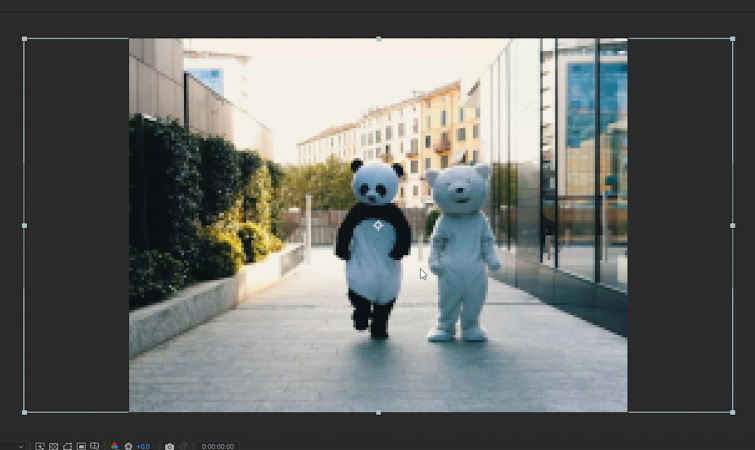
The process begins by creating a specialized composition within Adobe After Effects. This composition, designated as the "Mini DV Comp," should be set to an ultra-low resolution of 200 px x 150 px. This specific size maintains a 4:3 aspect ratio while forcing the software to discard a significant amount of image data. Once the high-definition source footage is imported into this composition, the editor must navigate to Layer > Transform > Fit to Comp Height. This action scales the footage down, resulting in a heavily pixelated image. This initial degradation is essential, as it mimics the low-resolution sensors found in early consumer cameras.
The second phase involves creating a "Main Comp" at a standard modern resolution, such as 1920 px x 1080 px. The "Mini DV Comp" is then nested inside this Main Comp and scaled back up using the Fit to Comp Height command. This "down-and-up" scaling method is the primary driver of digital aliasing—the "stair-stepping" effect visible on diagonal lines and edges—which is a hallmark of early digital video processing.
Enhancing Visual Authenticity Through Color and Contrast
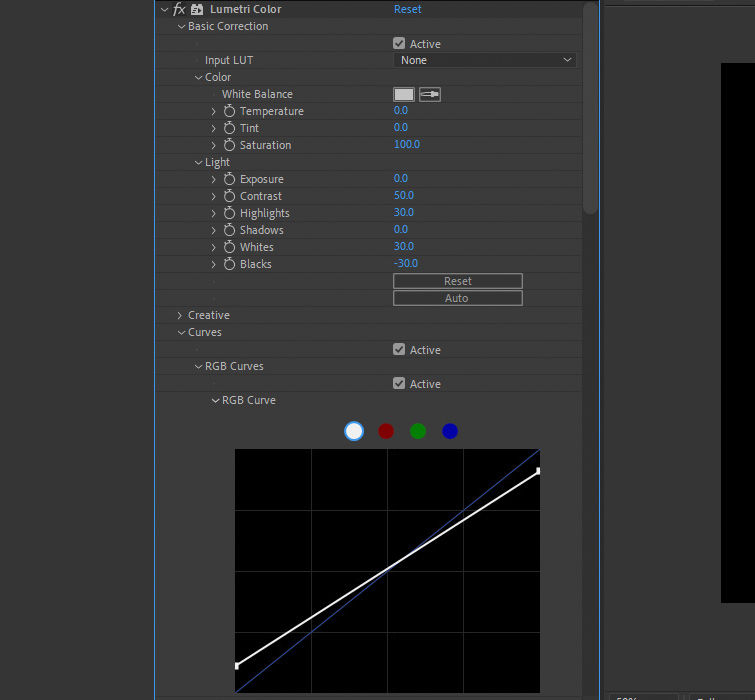
Achieving a convincing Lo-Fi look requires more than just resolution manipulation; it requires the emulation of early digital signal processing. Mini DV cameras often struggled with dynamic range, resulting in harsh highlights and deep, often crushed, blacks. To replicate this, editors apply the Lumetri Color effect to the nested composition.
Technical specifications for this look generally involve increasing the Contrast to 50, while pushing Highlights and Whites to approximately 30. To simulate the limited shadow detail of early CCD (Charge-Coupled Device) sensors, the Blacks should be reduced to -30. Further refinement can be achieved by adjusting the RGB Curves, specifically the White and Black points, to create a more "clipped" appearance. This creates the "harsh" digital look that distinguishes Mini DV from the softer, more organic degradation found in analog VHS tapes.
Simulating Signal Artifacts and Color Fringing
A critical component of the Mini DV aesthetic is the presence of color fringing and chroma subsampling artifacts. Early digital cameras often exhibited a slight misalignment of color channels, particularly in high-contrast areas. In After Effects, this can be simulated using the Channel Blur effect.

By applying the Channel Blur and specifically increasing the "Blue Blurriness" to a value of 3 or higher, editors can create a subtle blue-yellow fringe. This mimics the way early digital formats handled color data, where the blue channel often carried more noise or was compressed more aggressively. This step adds a layer of "digital warmth" that makes the footage feel dated rather than simply low-resolution.
To finalize the texture, the Unsharp Mask effect is applied. Unlike modern sharpening which aims for clarity, the goal here is to exaggerate the aliasing and create a "halo" effect around edges. Setting the Amount to 150 and the Radius to 2 forces the software to emphasize the pixels created during the scaling process, effectively "punching up" the digital artifacts to make them more prominent to the viewer.
Supporting Data: The Impact of Low-Fidelity Content on Modern Platforms
The move toward Lo-Fi aesthetics is supported by engagement data across major social media platforms. According to internal marketing studies from various digital agencies, "raw" or "retro" styled video content often sees a 20-30% higher engagement rate among Gen Z demographics compared to highly polished, corporate-style video. This trend has led major brands, including Nike and Gucci, to adopt Mini DV-inspired visuals in their digital campaigns.
Furthermore, the hardware market reflects this trend. The resale value of vintage camcorders, particularly the Sony VX series and the Panasonic AG-DVX100, has surged on secondary markets like eBay and Reverb. In 2023, a well-maintained Sony VX1000 could command prices higher than its original mid-90s retail value when adjusted for inflation, driven largely by professional directors seeking "in-camera" authenticity.
Comparative Analysis: Mini DV vs. VHS Aesthetics
While the terms "Retro" and "Lo-Fi" are often used interchangeably, there are distinct technical differences between the Mini DV look and the VHS look. VHS is an analog format, characterized by horizontal "tracking" errors, magnetic noise, and color bleeding. Its degradation is fluid and organic. In contrast, Mini DV is digital. Its degradation is mathematical and geometric, manifesting as square-shaped blocks (macroblocking) and aliasing.
The tutorial provided focuses on the digital "stair-stepping" of Mini DV. For creators, choosing between these looks depends on the specific nostalgic "anchor" they wish to hit. VHS evokes the 1980s and early 90s, whereas Mini DV is firmly rooted in the late 90s and the "skate video" era of the early 2000s. The After Effects method described provides a cleaner, more controlled version of digital decay that is often more compatible with modern graphic overlays.

Broader Implications for the Post-Production Industry
The democratization of these "boutique" visual styles through software like After Effects has significant implications for post-production workflows. Previously, achieving an authentic Mini DV look required the physical transfer of footage to tape and back again—a time-consuming process involving legacy hardware and specialized capture cards. The ability to recreate these looks digitally allows for greater flexibility, enabling editors to maintain the original high-resolution master while applying the Lo-Fi effect as a non-destructive layer.
Furthermore, this trend highlights a shift in the definition of "quality" in cinematography. The industry is moving away from a linear progression toward higher resolution and is instead embracing "stylized imperfection." As software tools become more adept at emulating the flaws of the past, the role of the editor evolves from a technician of clarity to a curator of texture.
The Mini DV aesthetic, once considered a limitation to be overcome, has transitioned into a powerful storytelling tool. By following the systematic approach of downsampling, color manipulation, and intentional artifacting, creators can tap into a specific visual language that resonates with contemporary audiences’ desire for nostalgia and authenticity in a digital-first world. This technical workflow ensures that while the medium remains modern, the message carries the distinct, evocative grit of the early digital age.