Website performance optimization often demands immediate answers, especially when a key product page experiences a sudden drop in search engine rankings, a competitor outperforms your content, or conversion rates decline unexpectedly. Traditionally, digital marketers and search engine optimization (SEO) professionals rely on comprehensive, site-wide crawls to diagnose performance bottlenecks. However, immediate site-wide analysis is frequently unnecessary when investigating isolated page-level discrepancies.

Semrush’s free SEOquake Chrome extension offers a streamlined alternative, allowing auditors to evaluate technical signals, on-page optimization, linking strategies, and core metrics without navigating away from the target URL. By following a structured three-minute workflow, professionals can quickly transition from initial triage to granular diagnosis, identifying critical flaws and determining whether issues require page-level corrections or broader architectural interventions.

Understanding SEOquake and Its Diagnostic Architecture

Developed by digital marketing software provider Semrush, SEOquake is a browser-based diagnostic utility engineered to evaluate webpage performance in real time. Upon installation, the extension integrates directly into the Google Chrome browser toolbar. When activated on any active webpage, the tool generates comprehensive reports encompassing technical compliance, on-page elements, internal and external link architectures, and integrated domain performance data.

The utility utilizes a dual-layered reporting mechanism: a Quick View pop-up designed for rapid sixty-second triage, and a Full Report interface that delivers granular insights across specialized panels. Throughout these reports, the extension employs a standardized color-coded system—green, orange, and red—to signal the severity of detected parameters. Green indicators denote optimal compliance with industry best practices, orange flags highlight potential warnings that require professional judgment, and red alerts designate critical errors or technical failures that can directly impair search engine indexing, parsing, or user experience.

Minute One: Triage Page-Level Anomalies Using the Quick View Interface

The initial sixty seconds of the audit focus exclusively on triage, answering a foundational question: Is there an obvious obstruction hindering the page’s search visibility or conversion potential? Accessing the Quick View pop-up reveals five distinct tabs, with the Page Info, Audit, and Content sections providing the most immediate value for a rapid assessment.

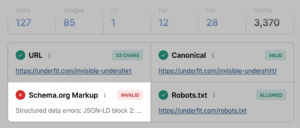
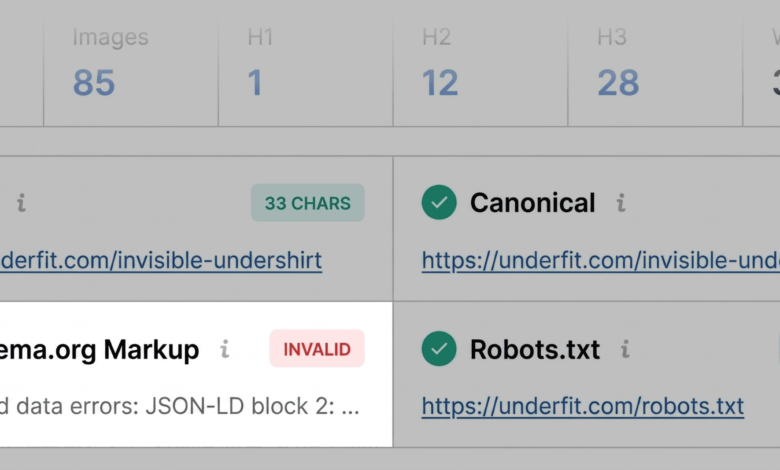
The Page Info tab serves as the primary gateway for reviewing core SEO elements, including the page title, meta description, HTTP status code, canonical configurations, and structured data implementation. During a standard evaluation of a commercial product page—such as an e-commerce apparel listing—auditors scan these elements against established on-page SEO frameworks. Critical red flags frequently surface within this view, particularly concerning Schema.org markup. For instance, invalid JSON-LD structured data can prevent search engines from parsing product attributes correctly, rendering the URL ineligible for rich search results that display live pricing, availability, and customer review aggregators.

Transitioning to the Audit tab within the Quick View pop-up exposes technical compliance metrics, covering indexability, mobile responsiveness, and mobile viewport configurations. While green and orange indicators dominate standard assessments, orange warnings necessitate contextual evaluation based on the specific commercial risk involved. For example, missing or incomplete hreflang annotations may not represent an immediate technical emergency for single-market websites, but they remain vital for international digital strategies.

The final phase of the initial triage involves reviewing the Content tab to evaluate structural hierarchy and keyword distribution. Heading tags (H1 through H6) must follow a logical, descending sequence to assist both human readers and automated parsing systems in understanding content architecture. Disjointed hierarchies—such as transitioning directly from an H1 header to an H4 tag deep within the page—can compromise accessibility and hinder algorithmic interpretation. Furthermore, image optimization metrics within this tab frequently highlight missing alternative (alt) text across dozens of embedded visual assets, negatively impacting both web accessibility compliance and image search visibility.

Minutes Two and Three: Deep-Dive Diagnosis Using the Full Report Panels

Once the initial triage highlights specific anomalies, auditors advance to the Full Report interface to determine the root causes and formulate corrective action plans. Activating the Full Report opens six specialized panels: Overview, Audit, Keyword Density, Internal Links, External Links, and Semrush Analytics.

The full Audit panel expands significantly upon the quick-view technical summary, offering detailed insights into crawlability, XML sitemap validation, and mobile usability. By utilizing the internal navigation menu, auditors can instantly isolate warnings regarding XML sitemaps—such as valid sitemap files that lack explicit internal linking or proper submission pathways. Executing secondary validations, such as passing structured data strings directly into Google’s Rich Results Test tool through direct integration prompts, confirms whether syntax errors block eligibility for enhanced search features.

Simultaneously, the Keyword Density panel evaluates topic coverage and term distribution across visible page content. By reviewing the generated keyword cloud and frequency tables, auditors verify whether primary commercial terms (such as specific product identifiers, materials, or category descriptions) align with targeted search intent. While interactive page elements or interface scripts can occasionally introduce extraneous terms into the density data, the core terminology must reflect the primary subject matter accurately.

Analyzing Link Health and Architectural Scope

Link integrity represents another vital diagnostic checkpoint. Broken internal or external links degrade user experience and disrupt crawler budget allocation. The Links panel inventories all directional connections on the page, categorizing them by response codes, anchor text, and rel-attribute configurations (dofollow versus nofollow). Identifying broken external references or malfunctioning JavaScript-driven hyperlinks enables webmasters to purge dead endpoints before they negatively impact user retention or search engine trust signals.

The final decision-making phase relies heavily on the Semrush panel, which synthesizes domain-level authority metrics, organic traffic estimates, and backlink profiles. Contextualizing page-level performance against domain-wide health is essential for resource allocation. When a structurally deficient page exists within a domain characterized by robust organic traffic and authoritative backlink acquisition, corrective measures can typically be restricted to page-level content optimization and template adjustments.

Conversely, systemic technical failures—such as site-wide XML sitemap omissions, recurring structured data template errors, or widespread internal redirection loops—demand comprehensive architectural interventions. In such scenarios, transitioning from localized page audits to a full-scale site crawl using dedicated auditing software becomes imperative. By mastering this rapid three-minute diagnostic workflow, digital marketing professionals can efficiently isolate performance barriers, prioritize technical fixes, and maintain optimal search engine visibility across competitive digital ecosystems.