Get Into the Halloween Spirit with Pumpkin Lights, a New Interactive Menu Bar App for macOS

As the autumn season settles in and users begin looking for festive digital decorations to match the changing environment, independent app developers continue to find innovative ways to bring personality to computer interfaces. The latest addition to the macOS indie ecosystem is Pumpkin Lights, a free utility designed by developer Boyu Cheng that transforms a standard system setting into a tactile, physics-based experience. Released just ahead of the Halloween holiday, the application merges practical utility with whimsical design, offering Mac users a novel way to interact with their operating systems while paying homage to classic holiday novelties.
Main Facts and Core Functionality
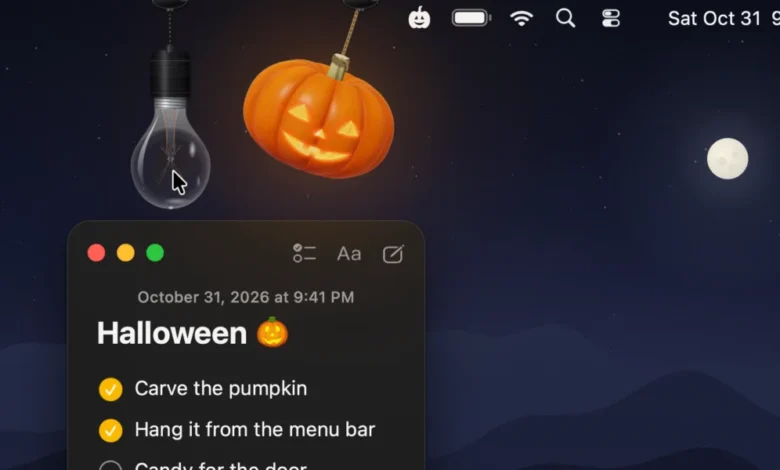
At its core, Pumpkin Lights is a menu bar utility for macOS that allows users to toggle between light and dark system modes. However, unlike traditional settings located deep within the macOS System Settings or the Control Center, this function is executed by interacting with a ray-traced, three-dimensional jack-o-lantern that drops down dynamically from the top of the computer screen.
The application is built with real-time physics engines, allowing the hanging pumpkin to swing, spin, and respond to cursor movements naturally. Users can grab the cord, toss the pumpkin around, and customize its appearance by growing different jack-o-lantern designs and selecting from four distinct color variants.
Beyond its primary function of switching system appearance modes, Pumpkin Lights offers expansive customizability for user workflows. Clicking or pulling the interactive decoration can be programmed to perform several secondary actions. Users can configure the trigger to open a specific website or application, activate a custom Apple Shortcut, execute a terminal command, mute system audio, or toggle a feature to keep the Mac awake. For those who prefer a more minimalist or year-round aesthetic, the application also includes an alternative option featuring a hanging light bulb with similar interactive properties.

Background Context and Chronology of the Indie App Spotlight
The launch of Pumpkin Lights follows a growing trend within the macOS independent developer community of creating seasonal, highly polished menu bar utilities that evoke nostalgia and seasonal joy. Last year, the developer ecosystem saw the release of Festivitas, a similar holiday-themed menu bar application that brought festive lighting to Mac displays during the winter season. These micro-utilities have carved out a distinct niche on macOS, where users increasingly value personalization, craftsmanship, and micro-interactions that make modern computing feel more tangible.
The conceptual timeline for Pumpkin Lights began as an observation of routine digital habits. According to the developer, the inspiration stemmed from the repetitive, mundane action of switching between Light and Dark Mode—a task typically requiring multiple clicks through nested menus. Seeking to replace a sterile system toggle with a delightful physical metaphor, the developer spent months refining the underlying math and graphics pipeline. The focus centered heavily on micro-details, such as the tension and movement of the hanging cords and the way real-time ray-traced candlelight flickers through the carved face of the pumpkin, ensuring the interaction remains engaging over prolonged use.
Supporting Data and Technical Specifications
Pumpkin Lights is engineered specifically for modern Apple hardware and software standards. The application requires macOS 14 Sonoma or a later operating system, leveraging advanced graphic rendering capabilities built into Apple Silicon and modern Intel-based Macs. Because the application utilizes real-time ray tracing and complex physics calculations, it is optimized to run efficiently in the background without placing a heavy burden on system resources or depleting laptop battery life prematurely.
Distributed independently through the developer’s official website, the software is made available entirely free of charge, continuing a tradition of community-driven software distribution within the independent macOS development space. The app has quickly gained traction across social media platforms such as X (formerly Twitter) and Bluesky, where tech enthusiasts and design-focused users frequently highlight creative indie utilities.

Official Statements and Developer Philosophy
In discussions regarding the creation of the application, Boyu Cheng elaborated on the design philosophy driving the project. The primary objective was to bridge the gap between flat digital interfaces and the physical world through thoughtful software design.
"The idea came from something most of us do every day without thinking: switching between Light and Dark Mode," the developer explained. "It’s always a toggle buried in Control Center or System Settings, and it never feels like anything. I wanted it to feel like touching a real object. So instead of a flat icon, the pumpkin and the bulb are real 3D models, ray-traced in real time, hanging on cords you can swing and spin. When the candle lights, its glow comes through the carved face. I spent most of my time on small details like how the cords move and how light falls on the pumpkin, because I wanted it to still feel delightful the hundredth time you use it, not just the first."
Broader Impact and Implications for macOS Customization
The reception of Pumpkin Lights highlights a broader consumer preference for software that injects personality and tactile feedback into operating systems that have otherwise trended toward minimalism and uniformity. While major operating system developers like Apple focus heavily on productivity, seamless integration, and standardized design languages, independent developers continue to find commercial and community success by offering playful customization options.
Menu bar utilities have long been a staple of the macOS ecosystem, allowing developers to extend system functionality in ways native interfaces do not accommodate. By turning a simple preferences toggle into an interactive physics sandbox, Pumpkin Lights demonstrates how micro-interactions can elevate everyday utility software into an engaging digital experience. As the independent app landscape continues to evolve, tools that prioritize aesthetic delight alongside practical functionality are expected to remain popular among users seeking to tailor their computing environments to their personal tastes and seasonal moods.
Related posts: