In the competitive landscape of digital commerce and content publishing, identifying underperforming web pages quickly is critical for maintaining search visibility and driving conversions. Whether dealing with a product page that has slipped in search engine rankings, a competitor’s post outperforming proprietary content, or a client landing page failing to generate leads, digital marketers and site administrators frequently require rapid diagnostic tools. Historically, such investigations necessitated exhaustive site-wide crawls that consumed valuable time. However, modern browser-based utilities offer a streamlined approach to technical triage and on-page evaluation.
SEOquake, a complimentary Chrome extension developed by visibility management platform Semrush, provides a comprehensive framework for auditing individual web pages directly within the browser interface. By eliminating the need for complex software configuration, the tool allows professionals to evaluate technical signals, on-page optimization, linking structures, and core domain metrics in a matter of minutes. This report details a systematic, three-minute workflow designed to transition digital marketers from initial triage to actionable diagnosis.
Understanding the SEOquake Architecture and Color-Coded Metrics

To effectively utilize the SEOquake extension, users must first understand its core interface and reporting mechanisms. The tool operates primarily through two distinct features: a Quick View pop-up window designed for rapid assessment, and a Full Report panel that offers granular technical data. Throughout both interfaces, the extension employs a standardized color-coded system to categorize the severity of identified elements and technical signals.
Green indicators generally represent optimal implementation, signifying that specific on-page or technical factors align with established search engine optimization best practices. Orange indicators serve as warnings, highlighting areas that do not constitute immediate critical failures but require professional judgment and contextual evaluation. Red indicators denote severe errors or missing elements—such as invalid structured data or broken markup—that directly hinder search engine parsing and indexing, demanding priority remediation.

Recognizing these visual cues allows auditors to maintain focus and prioritize technical fixes efficiently. The standard evaluation workflow is intentionally structured to be executed within 180 seconds, dividing the process into rapid triage followed by deep-label diagnosis.
Minute One: Triage Using the Quick View Pop-Up

The initial 60 seconds of the audit are dedicated to triage, answering a fundamental question: Is there an obvious, high-impact issue preventing the page from performing? To determine this, the auditor opens the Quick View pop-up, which is organized into five distinct tabs: Page Info, Diagnosis, Internal Links, External Links, and Compare URLs.
For an effective rapid assessment, professionals focus on three primary tabs, dedicating approximately 20 seconds to each: Page Info, Audit, and Content.

Evaluating Core Elements via the Page Info Tab
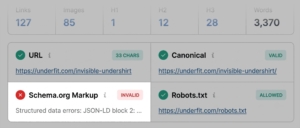
The Page Info tab provides a high-level overview of foundational SEO elements. During a rapid scan, auditors prioritize five core data points: the page title tag, the meta description, the canonical URL designation, the robots meta directives, and the presence of structured data markup (Schema.org).

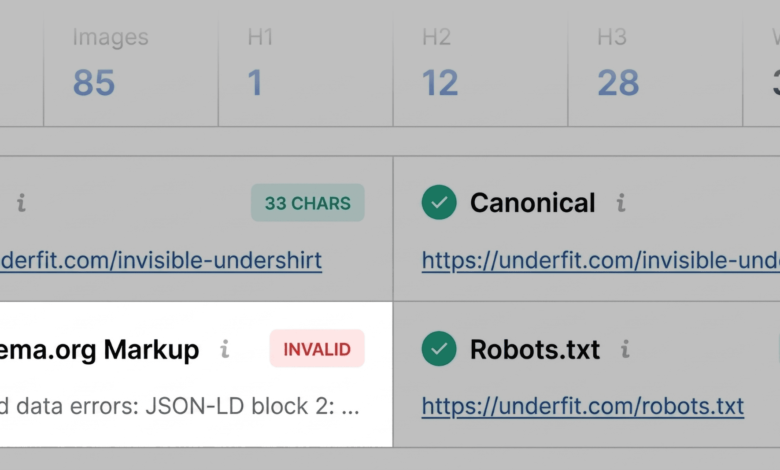
During an evaluation of a standard e-commerce product page—such as an apparel listing on UnderFit—the extension flags invalid JSON-LD Schema markup in red. For a product-oriented webpage, structural data errors carry significant implications. Invalid schema often disqualifies the page from earning rich results in search engine results pages (SERPs), preventing critical details such as pricing, stock availability, and customer review ratings from displaying directly in search listings. Consequently, structured data validation is immediately designated as a primary priority for subsequent investigation.
Aside from critical schema errors, standard title tags and meta descriptions are reviewed against modern length and relevance parameters. While minor deviations in character length may not act as absolute ranking deterrents, they provide valuable context regarding potential click-through rate optimization opportunities.

Inspecting Technical Compliance in the Audit Tab
Moving to the Audit tab within the next 20 seconds, the auditor examines foundational technical parameters, including mobile responsiveness, HTTPS security implementation, canonicalization consistency, and hreflang configuration for international targeting.

While a green or orange status across these metrics typically indicates the absence of an immediate emergency, orange warnings necessitate careful contextual review. For instance, an orange flag regarding XML sitemap discoverability or localized language targeting requires the auditor to determine whether the issue is isolated to the specific URL or indicative of a broader template-level error across the entire domain.
Analyzing Content Structure and Keyword Integration

The final 20 seconds of the triage phase are spent within the Content tab. Content structure—specifically the logical hierarchy of HTML heading tags (H1, H2, H3)—plays a vital role in helping both human readers and automated search algorithms comprehend the thematic focus of a document. Furthermore, modern optimization practices require clear semantic structuring to assist artificial intelligence search systems in parsing information accurately.
During the evaluation of the sample product page, structural irregularities often emerge, such as an H1 heading positioned deep within the body copy or inconsistent heading step-downs (e.g., jumping directly from an H1 to an H4). Additionally, the content summary frequently identifies missing alternative (alt) text across dozens of embedded images. Because product imagery heavily influences user engagement and conversion rates in e-commerce, unoptimized images reduce accessibility for visually impaired shoppers and deprive search engines of valuable contextual signals.

Minutes Two and Three: Deep-Dive Diagnosis Using the Full Report
Having identified potential anomalies during the initial one-minute triage, the auditor utilizes the remaining two minutes to access the Full Report by clicking "View Full Report" within the interface. This action launches a comprehensive six-panel analytical suite covering the Audit, Keyword Density, Internal Links, External Links, Microformats, and Semrush domain metrics.

Investigating Technical and Markup Errors
The full Audit panel expands upon the initial triage by categorizing technical checkpoints into clear, navigable sections: crawlability, indexation, mobile compliance, and structured data. By utilizing the built-in diagnostic links—such as testing structured data directly within Google’s Rich Results Test tool—auditors can verify automated tool findings against official search engine validation standards. Confirming multiple invalid items within the markup solidifies the necessity of developer-level code remediation.

Analyzing Topic Coverage via Keyword Density
When a page underperforms despite possessing adequate technical foundations, analyzing keyword density provides insight into topical relevance and potential optimization gaps. The SEOquake Keyword Density report generates a visual keyword cloud alongside detailed tables for single-word and multi-word phrases.

The primary objective during this phase is to confirm that core product or subject terms appear prominently within critical HTML elements—such as title tags, meta descriptions, and primary headings—while verifying that secondary semantic phrases reinforce the intended topic. Auditors should note that certain high-frequency terms appearing in data tables may originate from interactive UI elements, JavaScript navigation menus, or site-wide footers rather than primary editorial copy. This technical nuance is a standard artifact of DOM-based text extraction and must be accounted for during qualitative review.
Assessing Link Health and HTTP Response Codes

Broken or improperly configured hyperlinks degrade user experience and disrupt the efficient crawling of a website by search engine bots. The Links panel inventories all internal and external references on the target URL, reporting HTTP response codes (such as 404 errors or redirection chains), anchor text variations, and link attributes (dofollow versus nofollow).
In many technical audits, a high volume of flagged external links stems from modern JavaScript frameworks or dynamic DOM rendering. Auditors must isolate these instances to determine whether the broken links represent genuine navigational failures or standard programmatic elements that require no further action.

Contextualizing Performance with Domain-Level Semrush Metrics
The final analytical step involves reviewing the Semrush panel within the Full Report. This module integrates domain-wide authority indicators, organic search traffic estimates, and backlink profile strength alongside page-level statistics. By authenticating the extension with a registered Semrush account, users unlock advanced engagement metrics, including estimated bounce rates, average visit durations, and channel-specific traffic distributions.

This macro-level data provides essential context for decision-making. If an individual page underperforms while residing on a domain with robust overall authority, strong backlink profiles, and consistent organic traffic, the diagnosis typically points to page-level deficiencies—such as poor user intent alignment, inadequate content depth, or technical markup errors. Conversely, structural warnings—such as missing XML sitemap declarations or widespread template-level schema failures—often indicate systemic site-wide issues.
Implications and Strategic Next Steps

Conducting a rapid three-minute audit via SEOquake bridges the gap between high-level performance observation and granular technical troubleshooting. By systematically moving from initial triage to targeted diagnosis, digital marketing professionals can isolate critical impediments—ranging from broken structured data and missing image alt text to heading hierarchy flaws and link anomalies—without committing to an exhaustive, time-consuming site crawl.
For issues confirmed to be isolated at the page level, direct editorial and code-level updates can be executed immediately. However, when diagnostics reveal systemic vulnerabilities—such as site-wide sitemap errors or widespread template misconfigurations—site administrators are advised to escalate the investigation by initiating a comprehensive domain crawl using specialized enterprise auditing suites, such as the Semrush Site Audit tool. This disciplined, tiered methodology ensures that technical resources are allocated efficiently, maximizing both search visibility and long-term digital performance.