Apple Vision Pro Sizing

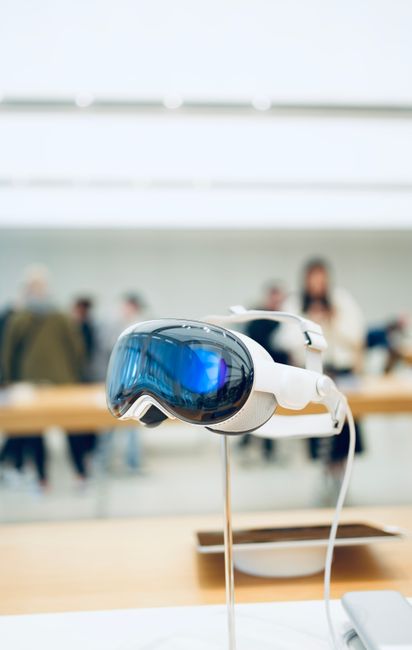
Apple Vision Pro Sizing: Achieving the Perfect Fit for Immersive Spatial Computing
The Apple Vision Pro, a groundbreaking spatial computing device, hinges significantly on achieving an optimal fit for its intended immersive experience. Unlike traditional head-worn devices, the Vision Pro’s advanced optics, sensor arrays, and comfort features necessitate precise sizing to ensure both visual clarity and prolonged wearability. This article delves into the intricacies of Apple Vision Pro sizing, covering everything from the initial assessment to understanding the impact of different components on the overall fit. Achieving the right size is not merely about comfort; it’s paramount for the device’s functionality, preventing motion sickness, and maximizing the visual fidelity of the spatial environment.
Understanding the Core Sizing Components
The Apple Vision Pro’s sizing solution is multi-faceted, revolving around two primary components: the Light Seal and the Head Band. The Light Seal is designed to block external light and create a snug, personalized fit around the user’s eyes and face. The Head Band, on the other hand, distributes the weight of the device and secures it comfortably on the head. Each of these components plays a distinct yet interconnected role in achieving the perfect fit.
The Light Seal: A Foundation for Visual Fidelity and Comfort
The Light Seal is arguably the most critical element for accurate Vision Pro sizing. It’s not a one-size-fits-all component; instead, it comes in various sizes and shapes to accommodate different facial structures. The primary function of the Light Seal is to create an opaque barrier that prevents ambient light from leaking into the user’s field of view. This is crucial for several reasons. Firstly, light leakage can disrupt the illusion of immersion in the spatial computing environment, pulling the user out of the digital world. Secondly, inconsistencies in light entering the eyes can cause visual strain and fatigue.
The Light Seal is made of a soft, flexible material that contours to the user’s face. It attaches magnetically to the front of the Vision Pro. Apple provides a guided process to help users select the correct Light Seal size. This process typically involves using the iPhone app and its TrueDepth camera to create a 3D scan of the user’s face. This scan analyzes facial contours, including the bridge of the nose and cheekbone structure, to recommend the most suitable Light Seal. The goal is to achieve a gap-free seal that doesn’t exert undue pressure on any single point of the face. Users might be offered a few different sizes to try, as subtle variations in facial geometry can mean one size fits better than another. A good Light Seal should feel secure without feeling tight or constricting. It should also allow for natural facial movements without shifting significantly.
The Head Band: Weight Distribution and Stability
The Head Band is the second pillar of Vision Pro sizing. It’s an adjustable strap system designed to comfortably and securely hold the Vision Pro in place. The Head Band is crucial for distributing the device’s weight evenly across the head, preventing excessive pressure on the face, neck, or scalp. For prolonged use, this weight distribution is essential for preventing discomfort and fatigue. The Head Band typically consists of a main strap that goes over the top of the head and a rear strap that secures around the back of the head.
The adjustability of the Head Band is key. Users can tighten or loosen the straps to find a snug but not overly tight fit. The goal is for the Vision Pro to feel stable and secure during head movements, whether turning to look at a virtual object or tilting the head. A well-adjusted Head Band will prevent the device from sliding down the face or feeling like it’s pulling forward. While the Light Seal focuses on the facial interface, the Head Band ensures the overall stability and comfort of the device on the user’s head.
The Importance of a Precise Fit for Visual Acuity
Beyond basic comfort, a precise fit is directly linked to the visual performance of the Apple Vision Pro. The device employs advanced optics that project digital content directly into the user’s eyes. The position of the lenses relative to the user’s pupils is critical for image clarity and focus.
Interpupillary Distance (IPD) Adjustment: While not a direct sizing component in the traditional sense, IPD is a critical factor that works in conjunction with the Light Seal and Head Band. The Vision Pro automatically measures and adjusts for IPD, but the overall fit influences how accurately this adjustment can be made. If the Light Seal isn’t fitting correctly, or the Head Band is too loose, the device might sit at an angle that compromises the accurate alignment of the lenses with the user’s pupils. This can lead to blurry images, eye strain, and even double vision. A proper seal and secure fit ensure the Vision Pro remains in the optimal position for the automatic IPD adjustment to function correctly.
Field of View (FOV) Optimization: The Light Seal also plays a role in maximizing the user’s field of view. By creating a snug fit, it ensures that the user is looking through the intended area of the lenses, preventing vignetting or a reduced FOV due to light leakage or an improperly positioned device. A correctly sized Light Seal allows the user to experience the full intended visual expanse of the spatial environment.
Preventing Motion Sickness and Discomfort
Spatial computing can, for some users, induce motion sickness if the visual experience doesn’t align with the user’s sense of balance and movement. A proper fit for the Apple Vision Pro is a significant factor in mitigating this.
Discrepancies between visual input and physical motion are often the root cause of simulator sickness. If the Vision Pro is loose and shifts during head movements, the visual output might not accurately reflect the user’s intended motion, creating a disconnect. A secure and well-fitting device ensures that the virtual world moves in concert with the user’s physical movements, reducing this perceptual mismatch.
Furthermore, pressure points created by an ill-fitting Light Seal or an overly tight Head Band can contribute to general discomfort and headaches, which can exacerbate feelings of disorientation or nausea. The goal of Vision Pro sizing is to create a seamless integration of the device with the user’s anatomy, minimizing any physical distractions or discomfort that could detract from the immersive experience or induce negative physiological responses.
The Sizing Process: A Step-by-Step Approach
Apple has designed a relatively straightforward process for users to determine their Apple Vision Pro size.
-
iPhone Scan: The process begins with using the Vision Pro app on an iPhone. The app will guide the user through a facial scanning process using the iPhone’s TrueDepth camera. This camera captures detailed facial geometry, including the contours of the user’s face, the shape of their nose, and the distance between their eyes.
-
Recommendation: Based on the scan data, the app will recommend a specific Light Seal size. This recommendation is an intelligent suggestion, not a rigid mandate.
-
Trial and Refinement: Apple typically provides a few Light Seal sizes with the Vision Pro to allow for user verification and potential refinement. Users should try on the recommended size and any accompanying alternatives. They should assess the fit around their eyes, nose, and cheeks. Is there any light leakage? Does it feel too tight or too loose?
-
Head Band Adjustment: Once a comfortable Light Seal is established, the user will adjust the Head Band. This involves tightening or loosening the straps until the device feels stable and the weight is distributed evenly. The goal is a secure fit that doesn’t cause any pressure points.
-
Visual Check: After securing the device, users should perform a visual check. Look around the edges for any visible light. Move your head gently to ensure the device remains in place. The on-screen display should appear clear and focused across the entire field of view.
Troubleshooting Common Sizing Issues
Despite Apple’s streamlined process, users might encounter some common sizing issues.
-
Light Leakage: If light is leaking in, it indicates that the Light Seal is not forming a complete barrier. This could be due to an incorrect size or shape, or it might require slight adjustments to the Head Band to ensure the Light Seal is pressed evenly against the face. Trying a different size Light Seal is often the solution.
-
Pressure Points: If the device feels uncomfortable, with specific areas of pressure on the face or head, it usually points to an issue with either the Light Seal or the Head Band adjustment. The Light Seal might be too small, forcing it to press too hard on certain facial features. Conversely, the Head Band might be too tight, creating excessive pressure. Loosening the Head Band or trying a larger Light Seal are common remedies.
-
Device Slipping: If the Vision Pro slides down the face or feels unstable during head movements, the Head Band is likely too loose. The straps need to be adjusted to provide a more secure grip. Ensure the rear strap is properly positioned around the occipital bone at the back of the head for optimal support.
-
Visual Distortion or Blurriness: While often related to IPD, an improper fit can contribute. If the device is not sitting squarely on the face, the lenses might not be aligned correctly with the pupils. This can result in distorted or blurry visuals. Re-adjusting the Light Seal and Head Band to ensure the device is centered and stable is crucial.
Factors Influencing the Ideal Fit
Several factors can influence the ideal fit for an individual’s Apple Vision Pro.
-
Facial Anatomy: The most significant factor is individual facial structure. Prominent cheekbones, a wide or narrow nose bridge, and the overall shape of the face will all influence which Light Seal size and shape provides the best seal.
-
Hair: While the Light Seal is designed to accommodate hair, thick or voluminous hair can sometimes interfere with achieving a complete seal. Users might need to adjust their hair to ensure it doesn’t create gaps.
-
Glasses: For users who wear glasses, the Vision Pro offers the option of prescription lens inserts. These inserts are custom-made and will not affect the external sizing of the Light Seal or Head Band. However, the presence of glasses frames underneath the Light Seal could potentially create minor inconsistencies in the seal if not accounted for during the fitting process. The Light Seal is designed to accommodate most eyeglass sizes within its cavity.
-
Comfort Tolerance: Ultimately, "perfect fit" also involves personal comfort tolerance. Some users may prefer a slightly snugger feel, while others prefer a looser fit. The key is to find a balance where the device is secure, comfortable, and visually optimized.
The Future of Vision Pro Sizing and Customization
As spatial computing technology evolves, so too will the approaches to device sizing and customization. While the current Light Seal and Head Band system is effective, future iterations might incorporate more advanced materials, adaptive fit technologies, or even fully custom-molded components for unparalleled personalization. The goal will always be to make the transition between the physical and digital worlds as seamless and comfortable as possible, and precise sizing is the bedrock of that endeavor. Ensuring the Apple Vision Pro fits correctly is not an optional step; it’s an integral part of unlocking its full potential for immersive spatial computing.


