Gmail introduces a convenient Copy Code feature to streamline two-factor authentication on Android and iOS devices

Gmail has officially begun rolling out a highly requested quality-of-life update that significantly simplifies the two-factor authentication (2FA) process for mobile users. Following the recent implementation of Live search and enhanced chat functionalities, Google’s latest update introduces a dedicated “Copy code” button directly within the Gmail interface for Android and iOS. This feature is designed to eliminate the friction associated with verifying identities by allowing users to extract security codes from their inbox without the need to open individual emails.
The Evolution of Mobile Authentication
The reliance on two-factor authentication has become a cornerstone of modern digital security. As cyber threats such as credential stuffing and phishing attacks have grown in sophistication, major platforms—including banking institutions, social media giants, and e-commerce retailers—have made 2FA mandatory for account protection. However, the process of checking an email, copying a six-digit code, switching back to the authentication app or browser, and pasting the code has long been a source of user frustration.
Historically, users have had to navigate several steps to complete a single login: receiving an email notification, tapping to open the app, waiting for the email to load, manually selecting the numerical sequence, copying it, and finally returning to the login portal. This cumbersome workflow often leads to session timeouts or user fatigue, potentially discouraging the adoption of high-security practices. With the introduction of the “Copy code” button, Google is addressing these pain points by surfacing the vital information directly in the user’s inbox view.
How the New Feature Operates
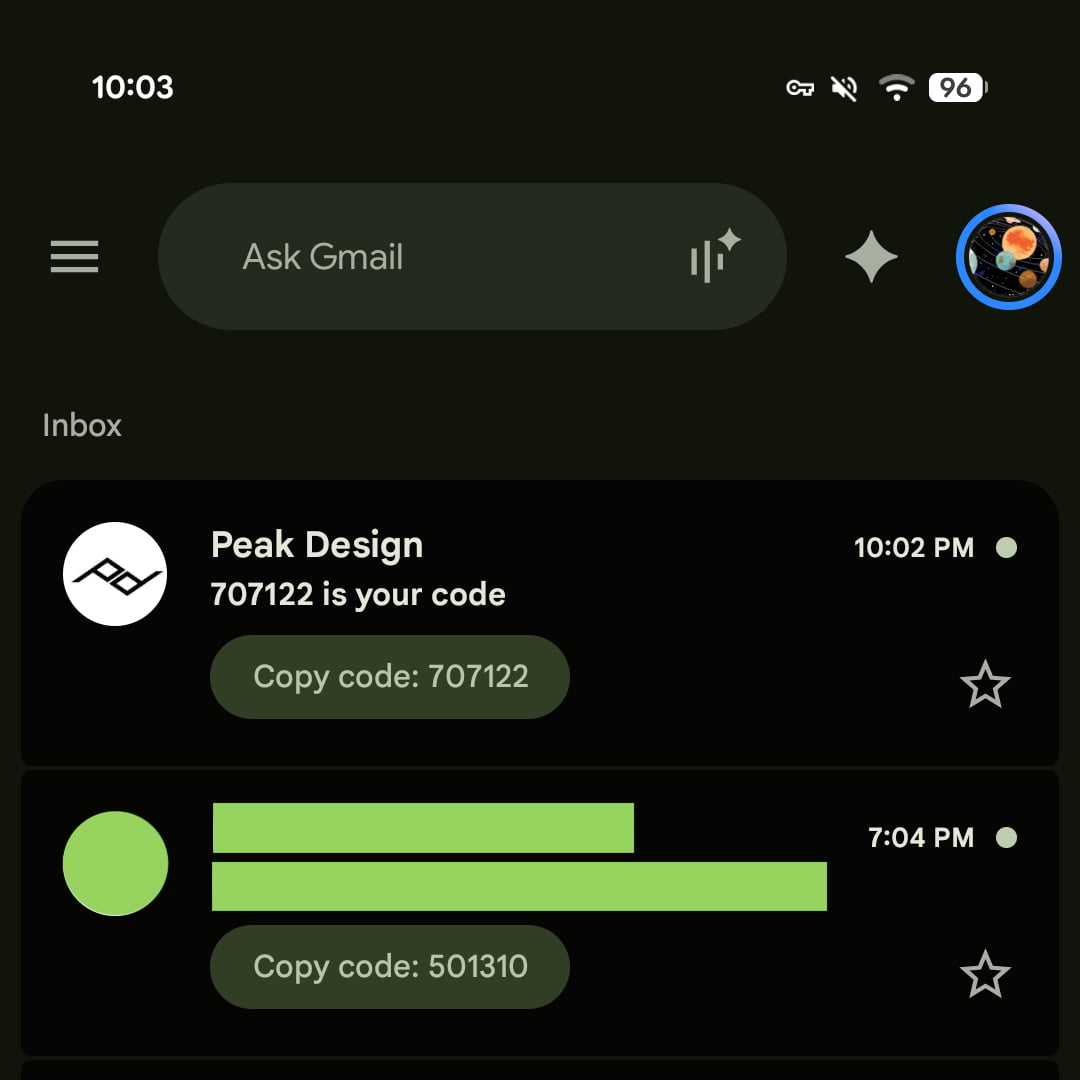
The implementation of this feature is visually intuitive. When a supported service sends a 2FA code to a user’s Gmail account, the system identifies the numerical string and generates a pill-shaped button directly beneath the email’s subject line. This button, labeled “Copy code” followed by the specific numerical digits, functions similarly to existing attachment previews for documents or images.
Upon tapping this button, the code is automatically copied to the device’s clipboard. The user can then immediately navigate to their authentication screen and paste the code. During initial testing across various Android and iOS devices, the feature has proven effective for a wide range of automated service emails, including those from financial institutions, retail platforms, and professional software suites.
This update is currently available in Gmail for Android (version 2026.09.07.x) and iOS (version 6.0.260907). Notably, the feature has not yet been extended to the web-based desktop version of Gmail, nor has it been integrated into the system-level push notifications that appear on Android lock screens, though industry analysts suggest that such integrations could be logical next steps for the development team.
Chronology of Recent Gmail Enhancements
Google’s recent product roadmap has emphasized rapid, iterative improvements to the Gmail user experience. The introduction of the “Copy code” button follows a period of significant updates aimed at keeping Gmail competitive against specialized email clients and workspace management tools.
- Early September 2026: Google begins the rollout of enhanced Live search and chat functionalities, improving the speed and relevance of in-app search queries.
- Mid-September 2026: Reports emerge of the “Copy code” feature appearing for select users, confirming that the update is being deployed via a server-side switch alongside app version updates.
- Ongoing: Google continues to refine its machine learning models to better identify 2FA strings across diverse email templates from various third-party services.
The consistency with which Google has pushed these updates indicates a broader strategy to centralize digital utility within the Gmail ecosystem. By reducing the time spent inside the app for common tasks, Google aims to maintain high engagement levels while providing tangible value to users who rely on the platform for their digital security needs.
Supporting Data and Security Context
The necessity for such a feature is underscored by the current state of cybersecurity. According to data from the Identity Theft Resource Center and various cybersecurity firms, the use of multi-factor authentication (MFA) is estimated to block over 99% of automated account takeover attacks. Despite this, the "usability gap"—the difference between how secure a system is and how easy it is to use—remains a major barrier.
Studies on user behavior indicate that nearly 40% of users abandon a login attempt if they find the MFA process too slow or complicated. By streamlining the retrieval of 2FA codes, Google is not merely adding a convenience; it is theoretically improving the overall security posture of its user base by making the "correct" security path the path of least resistance.
Furthermore, the integration of this feature relies on sophisticated Natural Language Processing (NLP) to correctly parse various email formats. Since companies use different templates for their 2FA emails, Google’s system must reliably distinguish a 2FA code from other numerical data, such as order numbers, shipping tracking IDs, or timestamps. The fact that the feature is functioning across diverse sectors, including banking and retail, suggests that the underlying parsing logic is highly robust.
Broader Implications and Future Outlook
The introduction of the “Copy code” button is part of a larger trend in mobile operating systems to provide "intelligent" interactions. Both Apple (with iOS) and Google (with Android) have been working to make notifications and app content more actionable. For example, iOS already features a "from clipboard" suggestion that allows users to quickly fill in 2FA codes received via SMS. By bringing this level of automation to email-based 2FA, Gmail is effectively closing the gap between SMS-based authentication and email-based authentication.
The implications for developers are also significant. Organizations that send 2FA codes via email may now find that their users have a smoother experience, potentially reducing customer support inquiries related to login difficulties. Conversely, this update forces companies to ensure their automated emails follow standard, readable formats so that the Gmail parser can reliably extract the code.
However, security researchers note that while this feature is highly convenient, it does not change the underlying risk profile of email-based 2FA. Because email accounts are themselves targets for hackers, security experts often recommend the use of hardware keys (like FIDO2/WebAuthn) or dedicated authenticator apps over email-based codes. Nevertheless, for the millions of users who rely on email for secondary authentication, this update represents a meaningful improvement.

Official Stance and User Reception
While Google has not released an extensive press release regarding the technical architecture of the feature, the company has consistently positioned its Gmail updates under the banner of "AI-powered productivity." Through its Gemini-integrated features and smart-reply capabilities, Google has signaled that its goal is to make the inbox an active workspace rather than a passive repository for messages.
Early user reception on professional forums and social media has been largely positive. Power users and enterprise employees who handle multiple logins daily have praised the efficiency gains. There is, however, an expressed desire from the community to see this feature extended to the web interface. Given that many professionals manage their workflows across dual-monitor setups with a browser-based email client, the lack of this feature on the web is viewed by some as a missed opportunity for full parity.
Conclusion
As the digital landscape becomes increasingly fragmented, the ability to manage security credentials efficiently is paramount. Google’s decision to integrate a one-tap “Copy code” button into Gmail is a pragmatic response to the realities of modern cybersecurity workflows. By reducing the friction involved in 2FA, the company is demonstrating a commitment to user experience that balances security requirements with the need for speed and convenience.
Looking ahead, the success of this rollout may prompt further innovations in how Gmail handles actionable content. As the platform continues to evolve, users can expect to see more context-aware buttons and shortcuts designed to minimize the number of taps required to complete routine digital tasks. For now, the “Copy code” button stands as a testament to the ongoing refinement of the world’s most popular email service, proving that even small, focused updates can have a substantial impact on daily digital productivity.