Apple Introduces System-Managed App Migration and Data Transfer in iOS 27.2 to Simplify Software Transitions

The landscape of mobile software management is undergoing a significant evolution with the upcoming release of iOS 27.2, introducing a native, system-managed framework designed to streamline how users transition from legacy applications to their designated successors. Historically, the lifecycle of software retirement and replacement has presented persistent friction for both developers and consumers. When a developer decides to sunset an existing application in favor of a newly engineered counterpart, the burden of data migration frequently falls heavily upon the end-user. This friction is particularly pronounced when dealing with local application data that resides outside the security and convenience of cloud-based synchronization architectures.
With the rollout of iOS 27.2, Apple is addressing this architectural limitation by introducing a centralized, operating-system-level mechanism. This new capability allows application developers to designate a direct replacement for an outgoing title, prompting the iOS operating system to securely transfer user data, preferences, and supported configurations automatically before uninstalling the legacy application. By automating what was previously a manual, error-prone process, Apple aims to eliminate data loss, reduce user abandonment rates during app transitions, and establish a more cohesive ecosystem standard for software lifecycles.
Background Context and the Evolution of App Transitions
The challenge of app migration has plagued the mobile app economy since its inception. In the early days of smartphone ecosystems, developers rarely replaced their own applications wholesale; instead, they preferred to update existing binaries indefinitely. However, as applications have matured into complex, multi-tiered software suites incorporating advanced frameworks, machine learning models, and modern user interfaces, codebase bloat has become a critical concern. Maintaining legacy architectures often becomes economically and technically untenable for development teams.
Consequently, developers are occasionally forced to deprecate an older app and launch a completely redesigned successor from a fresh binary package. While this practice allows development teams to shed technical debt and embrace cutting-edge operating system capabilities, it creates a disruptive user experience. Historically, users switching to a new app were greeted with a blank slate. Critical locally stored files, custom user configurations, offline caches, and personalized settings were frequently trapped within the sandbox of the deprecated application. Users were forced to manually export data, re-authenticate accounts, and reconstruct their personalized environments from scratch.
Recognizing these pain points, platform engineers and developer communities have long advocated for a standardized transfer protocol. While third-party migration tools and custom cloud synchronization endpoints have mitigated the issue for major enterprise and consumer tech giants, smaller independent developers lacked the resources to build robust, secure local transfer pipelines between disparate app sandboxes due to iOS’s strict sandboxing security boundaries. iOS 27.2 effectively democratizes this capability, providing a secure, system-vetted bridge that respects Apple’s rigorous privacy and sandboxing paradigms while enabling seamless data continuity.
Anatomy of the iOS 27.2 Migration Workflow
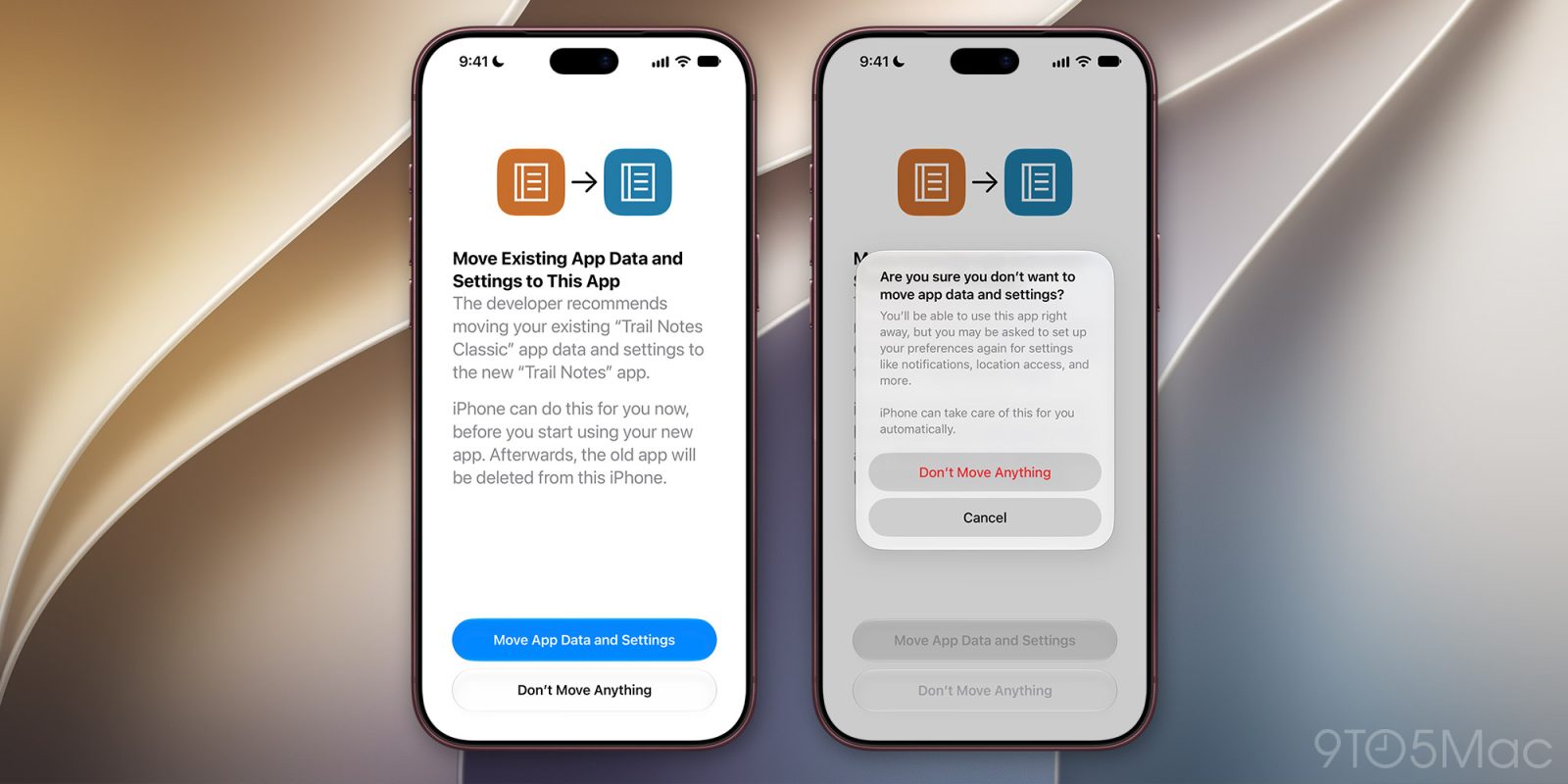
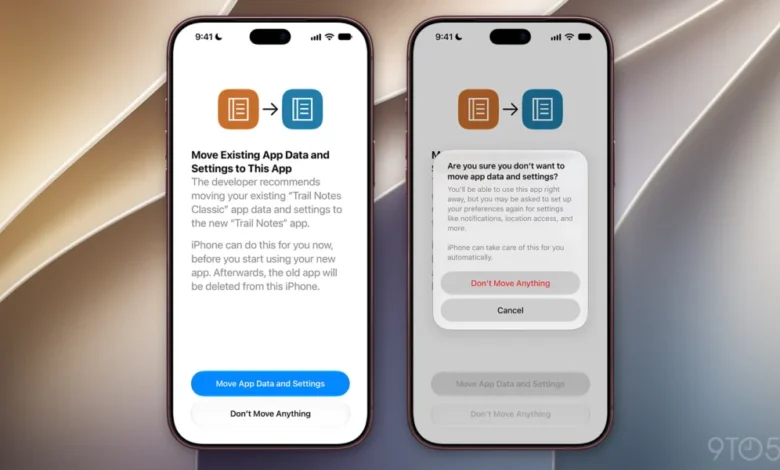
Based on preliminary developer documentation and code strings uncovered within the inaugural beta builds of iOS 27.2, the migration framework operates through an integrated, user-centric dialogue system managed directly by the operating system. When a user who has installed a designated legacy application attempts to interact with it, or when the system detects the presence of a newly installed successor application, a standardized prompt is generated.
The native alert explicitly informs the user of the recommended transition path, presenting the following system-generated notification:
The developer recommends moving your existing “%1$@” app data and settings to the new “%2$@” app. iPhone can do this for you now, before you start using your new app. Afterwards, the old app will be deleted from this iPhone.
This prompt provides two distinct pathways for the user: "Move App Data and Settings" or "Don’t Move Anything." Choosing the affirmative option initiates a secure, system-orchestrated background transfer of eligible files and preferences from the legacy application’s container to the target application’s directory structure. Once the data verification and transfer are successfully completed, iOS automatically purges the legacy application, reclaiming device storage and preventing user confusion caused by the presence of duplicate or outdated software titles on the home screen.
In instances where a user declines the initial migration offer by selecting "Don’t Move Anything," iOS deploys a secondary confirmation safeguard. This secondary prompt reminds the user that rejecting the migration may result in the loss of local data and explicitly notes that critical system-level preferences—such as location permissions and notification configurations—may need to be manually re-established within the new application environment. This dual-prompt methodology ensures that users make informed decisions regarding their local data while maintaining absolute autonomy over their device storage.
Scope of Transferrable Data and System-Level Configurations
The technical architecture of the iOS 27.2 migration framework is deeply integrated into the operating system’s container management system. While the exact boundaries of what can be transferred will depend on developer implementation and the specific data types utilized by individual applications, the framework is engineered to handle a comprehensive array of standard system-level preferences and sandbox contents.
At launch, the framework is designed to facilitate the migration of various persistent user states. Beyond raw file data stored in the application’s local document directories, the system can preserve critical user choices and permissions. Re-establishing permissions is traditionally one of the most frustrating aspects of adopting a new app; users frequently find themselves repeatedly granting access to device hardware features such as the camera, microphone, Bluetooth peripherals, and precise location services. By allowing the migration framework to carry over eligible permission states and authorization tokens where applicable, iOS 27.2 significantly reduces onboarding friction.

Furthermore, notification authorization states are factored into the migration pipeline. Ensuring that notification preferences persist across app replacements prevents notification fatigue and preserves the user’s customized alert cadence, ensuring continuity in how users interact with time-sensitive information delivered by the software suite.
Chronology of Implementation and Beta Testing Phase
The development and deployment of the app migration framework follow Apple’s rigorous software validation lifecycle, moving from internal prototyping to public developer and consumer beta channels.
- Early Development Phase (Q1–Q3 2026): Apple engineering teams conceptualize the framework in response to escalating developer feedback regarding software deprecation friction and the technical limitations of cross-sandbox data sharing under strict iOS security guidelines.
- iOS 27.2 Beta 1 Deployment (September 2026): The framework makes its first public appearance within the initial developer beta build of iOS 27.2. Software analysts and developers uncover underlying strings, user interface mockups, and architectural API hooks pointing to the new system-managed migration flow.
- Ongoing Beta Refinement (September–October 2026): Throughout the beta cycle, Apple continues to refine the API documentation, establishing clear guidelines for developers on how to properly tag legacy applications and declare designated successors within their app store metadata and project configuration files.
- Anticipated Public Release (Late 2026): The feature is scheduled for a wide commercial rollout alongside the general availability of iOS 27.2, bringing the capability to hundreds of millions of compatible iPhone devices worldwide.
Technical Limitations and Ecosystem Boundaries
To maintain Apple’s industry-leading standards for user privacy and data security, the iOS 27.2 migration framework operates under strict governance rules. Industry analysts and security researchers have emphasized that this feature is intentionally restricted in scope to prevent potential security vulnerabilities or unauthorized data harvesting between third-party vendors.
Specifically, the migration capability is strictly limited to scenarios where a single developer or corporate entity replaces one of its own proprietary applications with a designated, official successor. Cross-developer data migration—where data would be transferred from an application created by Developer A to an application managed by Developer B—is explicitly unsupported by this framework. This limitation is critical for maintaining consumer trust, as it prevents malicious actors from acquiring user bases and harvesting accumulated local data simply by launching a similarly named clone or acquiring a competing software title.
Additionally, developers are required to properly configure their application manifests and make use of Apple’s updated developer tooling to ensure compatibility with the framework. Legacy applications that are simply abandoned without a designated successor identifier will not trigger the automated migration prompt, reinforcing the requirement for proactive participation from the software engineering community.
Broader Industry Implications and Developer Impact

The introduction of native app migration in iOS 27.2 carries profound implications for the mobile software development ecosystem. For years, software houses have hesitated to execute major platform resets or launch modernized application variants due to the fear of user attrition. When users are forced to reconfigure accounts, re-download local assets, and rebuild personalized settings, conversion rates from legacy apps to new apps frequently plummet.
By shifting the burden of migration from the user interface to the operating system level, Apple effectively lowers the barrier to software modernization. Developers can now architect cleaner, faster, and more secure modern applications without worrying that structural code changes will strand their existing user base in legacy environments. This is expected to accelerate the retirement of outdated, insecure, or poorly performing application binaries across the App Store, ultimately fostering a healthier, more modern ecosystem of software titles.
For consumers, the feature represents a tangible quality-of-life improvement. The anxiety traditionally associated with app updates and replacements—particularly the fear of losing years of accumulated local preferences, offline media caches, or customized workflow parameters—is systematically neutralized by the operating system. As the digital economy increasingly prioritizes seamless user experiences, tools like the iOS 27.2 migration framework set a new benchmark for operating system intelligence and consumer advocacy in mobile computing.
Looking Ahead
As the iOS 27.2 beta cycle progresses toward its final commercial release, technology analysts, app developers, and enterprise stakeholders will closely monitor the adoption and performance of the migration framework. Further documentation detailing API integration specifics and edge-case handling is anticipated as Apple rolls out subsequent beta builds to registered developers. The successful deployment of this feature is poised to redefine best practices for software lifecycle management across mobile platforms, offering a blueprint for balancing uncompromising security with fluid, user-centric software evolution.
Related posts: