When a high-priority web page—such as a top-performing product listing, a crucial client landing page, or a piece of content recently outranked by a competitor—begins to underperform, digital marketers and search engine optimization specialists are often pressed for time. Traditionally, identifying the root cause of a drop in visibility required configuring comprehensive site crawls, exporting massive spreadsheets, and spending hours parsing raw data. However, modern lightweight triage workflows allow professionals to perform preliminary on-page and technical diagnostics without ever leaving the active browser tab.

Understanding the Architecture of Browser-Based SEO Auditing
The digital marketing landscape has increasingly shifted toward modular, on-demand analytical tools that provide immediate feedback loops. SEOquake, a free Chrome browser extension developed by Semrush, serves as a primary example of this shift. Designed to integrate directly into the user’s browsing experience, the extension evaluates technical signals, on-page optimization parameters, internal and external linking structures, and core proprietary metrics supplied by Semrush.

Rather than requiring a deep crawl of an entire domain—which can consume considerable time and computational resources—browser extensions evaluate the Document Object Model (DOM) and server response headers of the exact URL currently rendered in the browser. This approach is particularly valuable for rapid competitive analysis, allowing teams to inspect competitor landing pages, high-ranking blog posts, and e-commerce product pages instantly to benchmark structural elements against their own properties.

Minute One: Rapid Triage Using the Quick View Pop-Up
An effective three-minute audit relies on a structured triage phase during the first sixty seconds. The objective of this initial window is simple: determine whether there are glaring technical or structural failures preventing the page from realizing its ranking potential.

Upon clicking the extension icon, users are presented with a Quick View pop-up interface organized into distinct analytical tabs, notably Page Info, Audit, and Content.

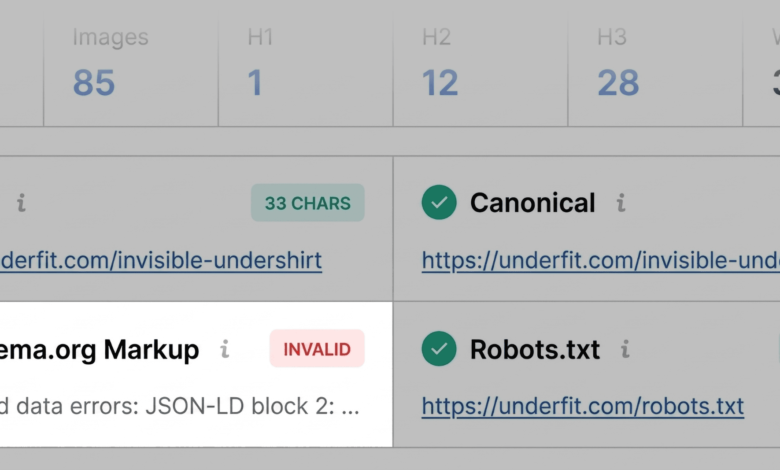
- Page Info Inspection: The auditor begins by assessing core on-page elements. Key priorities include validating the presence and character length of the title tag, reviewing the meta description for keyword alignment and persuasive intent, verifying the canonical URL to prevent duplicate content issues, checking the robots meta tags for accidental noindex directives, and inspecting the HTTP status code to ensure the page returns a healthy 200 OK response rather than a redirect chain or soft 404.
- Technical Compliance Scan: Moving to the Audit tab, the user evaluates fundamental technical health markers. Color-coded flags—green for optimal configurations, orange for warnings requiring human judgment, and red for critical errors—guide the reviewer. For instance, a red flag on Schema.org structured data, specifically involving invalid JSON-LD syntax, immediately alerts the auditor that search engines may fail to parse rich snippet information, potentially disqualifying the page from capturing valuable e-commerce features such as dynamic pricing, star ratings, and inventory availability in search engine result pages (SERPs).
- Content and Structural Evaluation: The final twenty seconds of the triage phase focus on the Content tab, where heading hierarchies (H1 through H6) and image optimization metrics are displayed. A disorganized heading structure—such as missing H1 tags, multiple H1 elements, or illogical jumps from an H1 directly to an H4—can obscure the primary topic of the page from both human readers and automated machine learning algorithms. Similarly, identifying a high volume of images lacking alternative (alt) text highlights immediate opportunities to improve accessibility compliance and image search visibility.
Minutes Two and Three: Deep-Dive Diagnosis via the Full Report
Once the initial triage yields a targeted list of anomalies, the auditor transitions into the diagnostic phase, utilizing the remaining two minutes to uncover the underlying causes of those flags and determine the appropriate scope of remediation.

By selecting the "View Full Report" option, users access an expanded interface divided into specialized panels: Audit, Keyword Density, Internal and External Links, and Semrush Domain Metrics.

Investigating Technical and Structured Data Anomalies
Within the comprehensive Audit panel, specialists can drill down into specific compliance categories, including mobile responsiveness, XML sitemap integration, and metadata configurations. When structured data errors are flagged during triage, auditors can trigger direct validations through external validation suites, such as Google’s Rich Results Test. Confirming syntax errors in product schema allows engineering teams to deploy precise code corrections, restoring eligibility for enhanced SERP features.

Furthermore, technical audits often uncover subtle infrastructural oversights, such as valid XML sitemaps that reside on the server but lack clear internal linking paths or proper references in robots.txt files. Identifying these gaps ensures that web crawlers can discover and index newly updated inventory or content pages efficiently.

Analyzing Topic Coverage and Keyword Density
While technical health ensures a page can be crawled and parsed, content relevance dictates whether it satisfies user intent. The Keyword Density panel breaks down the frequency and distribution of single-word and multi-word phrases across visible body copy, titles, and meta descriptions.

During this phase of the diagnosis, auditors evaluate the Keyword Cloud and phrase tables to verify topical depth. For an e-commerce product page, prominent terms should naturally center around product categories, materials, specific use cases, and brand identifiers. Conversely, the presence of anomalous high-frequency phrases derived from JavaScript-driven user interface elements, button labels, or hidden templates helps auditors filter out programmatic noise and focus strictly on substantive copy. Ensuring a balanced distribution of primary and secondary keywords prevents keyword stuffing while reinforcing semantic relevance for modern search engines.

Evaluating Link Health and Architecture
Internal and external link integrity directly influences PageRank distribution and user navigation. The Links panel provides a comprehensive inventory of all hyperlinks originating from the inspected page, categorized by response codes, anchor text, and follow/nofollow attributes.

A high concentration of broken external links—particularly those bound to legacy JavaScript frameworks or third-party widgets—can degrade user experience and signal poor page maintenance to search engine quality raters. Cataloging these broken pathways allows web administrators to either update destination URLs, implement proper redirects, or remove obsolete references entirely.

Determining the Scope of Remediation: Page-Level Fixes vs. Site-Wide Audits
A critical decision point at the conclusion of a three-minute audit involves determining whether observed issues are isolated to the specific URL under review or indicative of a systemic, site-wide architectural failure.

The Semrush domain metrics panel provides essential macro-level context by displaying organic traffic estimates, authority scores, and historical ranking trends for the root domain. When a page exhibits weak performance despite residing on a domain with robust authority, strong backlink profiles, and healthy overall traffic, the diagnosis typically points to localized, page-level optimizations—such as rewriting thin content, correcting heading tags, or adding missing image alt attributes.

Conversely, structural anomalies—such as widespread schema validation errors across entire product templates, broken XML sitemaps, or site-wide crawl blockages—require organizational intervention. When diagnostic tools reveal systemic vulnerabilities, search marketing professionals must escalate the findings beyond individual page edits and initiate comprehensive, domain-wide technical audits using enterprise-grade diagnostic suites.

Implications for Modern Digital Marketing Workflows
The adoption of rapid diagnostic frameworks reflects broader changes in how digital marketing professionals manage website health. As search engine algorithms increasingly prioritize user experience, core web vitals, structured data accuracy, and semantic content depth, the margin for technical error narrows.

By leveraging browser extensions for rapid initial triage, marketing teams can triage emergencies, prioritize development tickets, and maintain continuous oversight of key digital assets without stalling operational momentum. Whether diagnosing a sudden algorithmic traffic drop or preparing a pre-launch audit for a new product catalog, the ability to transition from surface-level observation to deep diagnostic clarity within minutes remains an invaluable asset in the modern SEO toolkit.