Apple Releases iOS 27 Beta 4, Introducing Refinements to Media, Photography, Siri, and Hinting at Future Hardware Innovations


Apple on Monday, July 20, 2026, at 2:50 pm PDT, continued its rigorous development cycle for iOS 27, making the fourth developer beta available to registered developers. As the eagerly anticipated September public launch approaches, this latest iteration signals a phase of focused refinement, introducing a selection of new features and adjustments rather than sweeping overhauls seen in earlier beta releases. The update, documented by Juli Clover for MacRumors, provides crucial insights into Apple’s ongoing commitment to optimizing user experience across its ecosystem, from media consumption and photography to intelligent assistance and connectivity. The incremental yet significant changes observed in Beta 4 underscore Apple’s meticulous attention to detail as it prepares its flagship mobile operating system for widespread adoption, integrating advanced functionalities while ensuring stability and user-friendliness.

Enhanced Media Consumption: The TV App’s Automatic Downloads
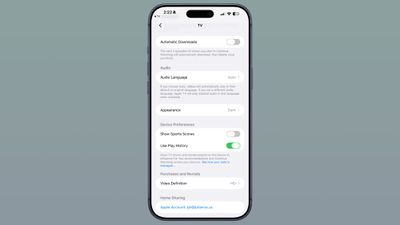
One of the notable additions in iOS 27 Beta 4 is a new "Automatic Downloads" toggle located within the Settings section of the Apple TV app. This feature is designed to significantly enhance the viewing experience for users who follow ongoing television series. When activated, the system will intelligently download the next two episodes of any show currently being watched in the "Continue Watching" section. A key aspect of this functionality is its self-managing nature: once these downloaded episodes are viewed, they are automatically deleted from the device, ensuring efficient storage management. This intelligent pre-caching mechanism prevents unnecessary data accumulation while providing a seamless viewing experience.
This enhancement directly addresses a common pain point for modern media consumers: ensuring uninterrupted access to content, especially in environments with limited or unreliable internet connectivity. Travelers, commuters, or individuals in areas with patchy Wi-Fi can now enjoy their favorite series without the frustration of buffering or manual pre-downloading. This strategic move aligns with Apple’s broader efforts to position its Apple TV platform, including Apple TV+, as a seamless and user-friendly entertainment hub. By proactively managing episode downloads, Apple aims to foster a more continuous and immersive viewing journey, reducing friction and encouraging deeper engagement with its content offerings. It reflects an understanding of contemporary consumption habits, where convenience and accessibility are paramount. This feature also subtly encourages sustained viewership, a critical metric for streaming services in a highly competitive market, by removing practical barriers to binge-watching or continuous enjoyment of serial content.

Visual Refinements: Photos App and Wallpaper Dynamics
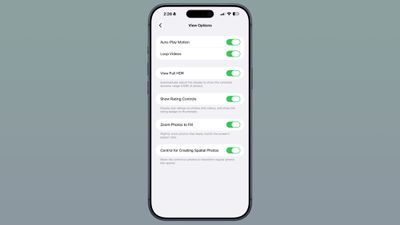
The Photos application receives a subtle yet impactful adjustment with the introduction of a "Zoom Photos to Fill" toggle, found within the Photos section of the Settings app. This feature, which is enabled by default, intelligently zooms photos that nearly match the screen’s aspect ratio. The primary goal is to eliminate minor black bars or empty spaces around images, providing a more immersive, full-screen viewing experience on modern iPhone displays. While a seemingly minor aesthetic tweak, it underscores Apple’s meticulous attention to visual presentation and optimizing every pixel of the user interface. By intelligently scaling images, Apple ensures that photographs are displayed with maximum impact, leveraging the edge-to-edge displays of contemporary iPhones. This default setting means that most users will experience a slightly more polished photo viewing experience without needing to adjust any settings, contributing to the overall sense of a refined and thoughtful operating system design. The decision to make this the default suggests Apple’s confidence in its algorithm to enhance rather than detract from the original composition of the photos.
Conversely, iOS 27 Beta 4 also marks the removal of a wallpaper feature that was introduced in Beta 3. This earlier feature allowed users, when swiping down the Notification Center, to see a dynamic cutout of the subject of their Home Screen wallpaper. The rationale behind its removal is not explicitly stated by Apple, but such changes during beta cycles often stem from various factors including performance considerations, user feedback regarding utility or visual clutter, or a reassessment of overall design consistency. It’s plausible that the computational overhead for dynamically generating these cutouts, especially across various device models and wallpaper types, proved to be more demanding than anticipated, impacting overall system fluidity. Alternatively, user feedback might have indicated that the feature was either distracting or did not significantly enhance the user experience, leading to its deprecation before the final release. This iterative process of adding and removing features is characteristic of extensive beta testing, allowing Apple to fine-tune the operating system based on real-world usage and internal evaluations, ensuring that only the most impactful and efficient features make it to the public version.
Siri’s Ongoing Evolution: Voice, Accessibility, and Search Enhancements
Apple’s commitment to advancing its intelligent assistant, Siri, continues with several updates in Beta 4, particularly focusing on voice personalization, accessibility, and user interaction. The Siri Voice selection interface has undergone a redesign, presenting a more streamlined and visually appealing layout. For devices that do not support the customizable voice feature, the interface now mirrors the aesthetic of the custom voice selection, offering a range of distinct voices and accents for users to choose from. This unification of the interface provides a consistent user experience regardless of device capabilities. More significantly, for devices capable of custom Siri selections, Apple has introduced "more voices options," albeit with a "coming soon" designation, indicating future expansion of personalized voice capabilities. This hints at an evolving AI voice engine that will offer greater diversity and potentially more natural-sounding or unique voice profiles, allowing users to select an assistant that truly resonates with them.
It is important to note the hardware exclusivity for the most advanced custom Siri voices. Currently, this highly personalized feature is limited to Apple’s latest flagship devices: the iPhone 17 Pro, iPhone 17 Pro Max, and the innovative iPhone Air. This suggests that the custom voice technology likely leverages advanced processing power or specialized neural engine capabilities unique to these premium models, such as enhanced on-device machine learning cores required for real-time voice synthesis and adaptation. This tiered approach to feature rollout is common for Apple, often introducing cutting-edge functionalities on its newest hardware before potentially expanding to a broader range of devices in subsequent generations, as the underlying technology becomes more efficient and widely available. This strategy also serves to highlight the premium capabilities of its top-tier devices, providing a compelling reason for early adopters to upgrade.
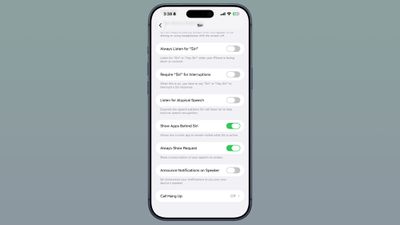
Beyond voice, Siri’s interaction and accessibility have also been refined. Within the Siri section of the Settings app, users now have a new option to adjust the length of Siri previews. This setting allows for greater control over how much information Siri displays on screen, with choices ranging from up to five lines of text to no preview at all. This granular control caters to different user preferences, allowing those who prefer a minimalist interface to reduce visual clutter, while others can opt for more comprehensive on-screen feedback, particularly useful for complex queries or detailed responses. This adaptability enhances the user experience, making Siri’s visual output less intrusive or more informative as desired.
Further enhancing accessibility, a new "Always Show Request" toggle has been added within the Accessibility settings, under the Siri section. When enabled, this feature provides a live transcription of what the user says to Siri directly on the screen. This is a significant boon for users with hearing impairments, those in noisy environments, or anyone who simply wishes for a visual confirmation of their commands. It adds an extra layer of clarity and reliability to Siri interactions, making the assistant more inclusive and user-friendly by ensuring that verbal commands are accurately captured and understood. This aligns with Apple’s long-standing commitment to making its products accessible to the widest possible audience, leveraging visual feedback to augment auditory interactions.
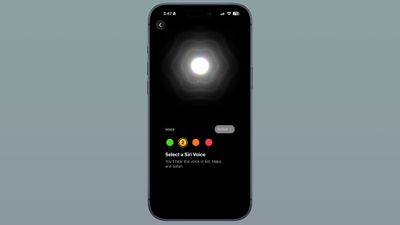
Finally, the "Siri Search or Ask" interface, accessed by swiping down on the Home Screen, now greets users with a splash screen. This introductory screen serves an educational purpose, explaining the functionalities and capabilities of the search and ask interface. As Apple increasingly integrates advanced generative AI capabilities into Siri – a major theme of iOS 27 as highlighted in earlier beta releases and company announcements – such onboarding mechanisms become crucial for guiding users through new and powerful features. This splash screen likely aims to demystify Siri’s evolving intelligence and encourage users to leverage its full potential for information retrieval, task automation, and contextual interactions, ensuring that users can effectively utilize the new, smarter Siri. The overall suite of Siri updates in Beta 4 underscores Apple’s strategic focus on making its AI assistant more powerful, personal, and accessible, a core tenet of the iOS 27 release and a key differentiator in the competitive smart assistant landscape.
Pro-Grade Camera Capabilities: ProRes Log Format
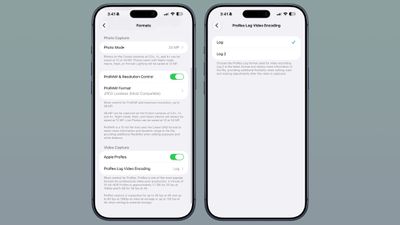
For professional videographers and advanced content creators, iOS 27 Beta 4 introduces a significant enhancement to the iPhone’s camera capabilities: the option to choose a ProRes log format. Found within the Camera section of the Settings app, this new functionality becomes available when the Apple ProRes toggle is enabled. Users can now tap on "ProRes Log Video Encoding" and select between "Log" or "Log 2." This addition further cements the iPhone’s status as a versatile tool for high-quality video production.
The addition of Log 2 is particularly noteworthy. Log formats, in general, are designed to capture video with a wider dynamic range, preserving more detail in both the highlights and shadows than standard video formats. This results in a flatter, desaturated image directly from the camera, which is intentionally designed for extensive post-production grading. Log 2, as the latest iteration, further refines this capability, retaining even more information within the video file. This expanded data retention offers unparalleled flexibility during the editing process, allowing colorists and editors to make more precise and dramatic adjustments to color, contrast, and exposure without introducing artifacts or losing detail. This is critical for achieving a cinematic look and for matching footage with professional cinema cameras that also shoot in various log profiles (e.g., Arri Log C, Sony S-Log).
This feature solidifies the iPhone’s position as a serious tool for professional filmmaking. With each generation, Apple has consistently pushed the boundaries of mobile photography and videography, culminating in advanced features like ProRes recording, which offers high-fidelity video with less compression than standard codecs. The introduction of Log 2 encoding demonstrates Apple’s understanding of professional workflows and its commitment to providing creators with the tools necessary to produce high-quality, cinema-grade content directly from their pocket devices. It directly appeals to independent filmmakers, social media creators, and journalists who require maximum flexibility in post-production to achieve specific aesthetic visions or to seamlessly integrate iPhone footage into larger, multi-camera productions. This continues the trend of pro-level features migrating to the iPhone, blurring the lines between consumer and professional-grade equipment and further justifying the "Pro" moniker for its flagship models.
Network Optimization: Granular Wi-Fi Assist Control
In a move to provide users with more granular control over their device’s network behavior, iOS 27 Beta 4 introduces an option to enable or disable Connectivity Assist for individual Wi-Fi networks. This new setting can be found within the details of each specific Wi-Fi network, overriding the global Connectivity Assist master toggle. This level of fine-tuning was previously unavailable, and its implementation reflects a response to diverse user needs and scenarios.
Connectivity Assist, a feature designed to seamlessly switch to cellular data when a Wi-Fi connection becomes poor or unreliable, has been a staple in iOS for some time. While generally beneficial for maintaining consistent internet access, some users might prefer to disable it for specific Wi-Fi networks where cellular data caps are a concern, or where a particular Wi-Fi network, despite its flakiness, is still preferred over cellular for cost or privacy reasons. For instance, a user might want to prevent their iPhone from switching to cellular data on a public Wi-Fi network that occasionally drops, even if it means a momentary interruption, rather than incurring unexpected data charges. Another scenario could involve a specific private network where the user has unlimited Wi-Fi data but a very limited cellular plan, making involuntary switches undesirable.
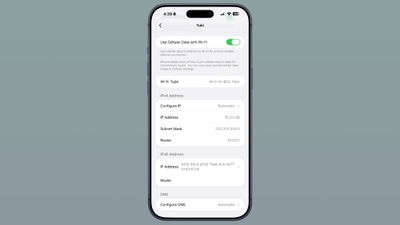
This per-network control empowers users with greater autonomy over their data usage and network preferences. It allows for a more tailored and efficient management of connectivity, adapting to diverse scenarios and individual needs. This refinement reflects Apple’s ongoing effort to provide users with sophisticated yet intuitive controls over their device’s core functionalities, acknowledging that a one-size-fits-all approach to network management may not always be optimal. It represents a practical improvement for users who navigate various network environments and need to manage their data consumption proactively.
Audio Experience: AirPods Enhancements
Apple’s popular AirPods ecosystem also sees a refinement in iOS 27 Beta 4, with changes to their options within Control Center. The update brings a refreshed visual interface for managing AirPods settings, making it